18
START-UP AND OPERATION, CONTINUED: LOAD LIMITS
18
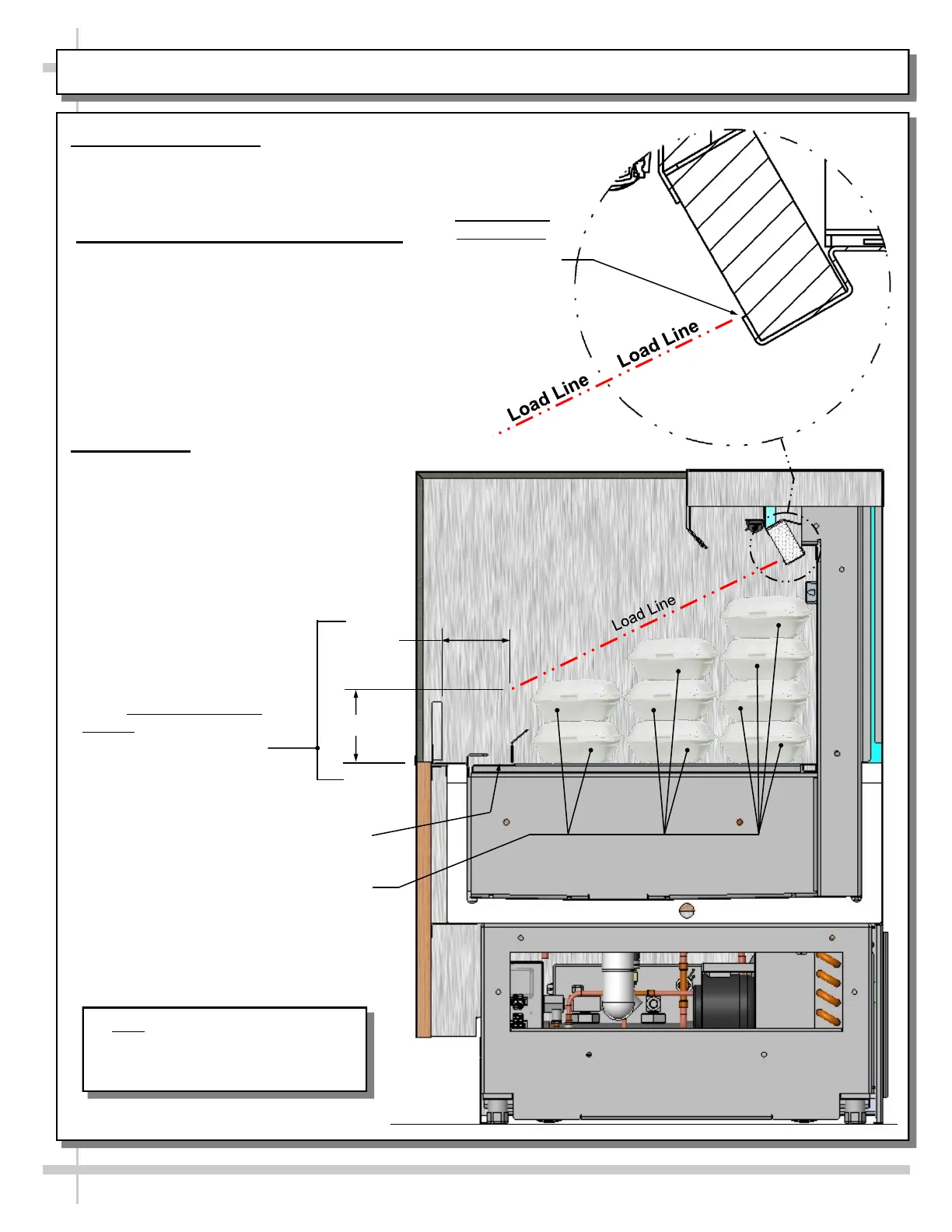
PRODUCT PLACEMENT / HONEYCOMB AIRFLOW CONSIDERATION / LOAD LINES
1. Product Placement
• Product can be placed on decking or steps
(risers) within self-service display area.
• A wide range of product may be displayed.
2. Honeycomb Airflow Consideration
• Airflow from honeycomb air diffuser is
designed to flow over (and around)
product to return air grille at case front.
• Caution! You must keep the honeycomb
air diffuser unblocked by product for
airflow to reach return air grille.
• Caution! You must ALSO keep product
OFF return air grill at case front.
• See illustration below.
3. Load Lines
• Load lines represent the maximum
height that product can be place and/
or stacked in case.
• Keep product at or under load lines to
assure that refrigerated airflow is
properly cycled from honeycomb air
diffuser through the return air grille.
• Proper product placement will
maintain acceptable
product temperature.
• See illustration below.
Return Air Grille Must Not
Be Blocked By Product!
Sample Product
Note: Perspective View of Model
CO5324R Is Shown At Right. It May
Not Exactly Reflect Every Feature or
Option of Your Particular Case.
4.00”
3.66”
UPPER LOAD
LINE ORIGIN:
LOWER
EDGE OF
HONEYCOMB
DISCHARGE
LOWER LOAD LINE
ORIGIN: FRONT ACRYLIC
AND DECK SURFACE
DIMENSIONAL
INTERSECTION.



 To Next Page