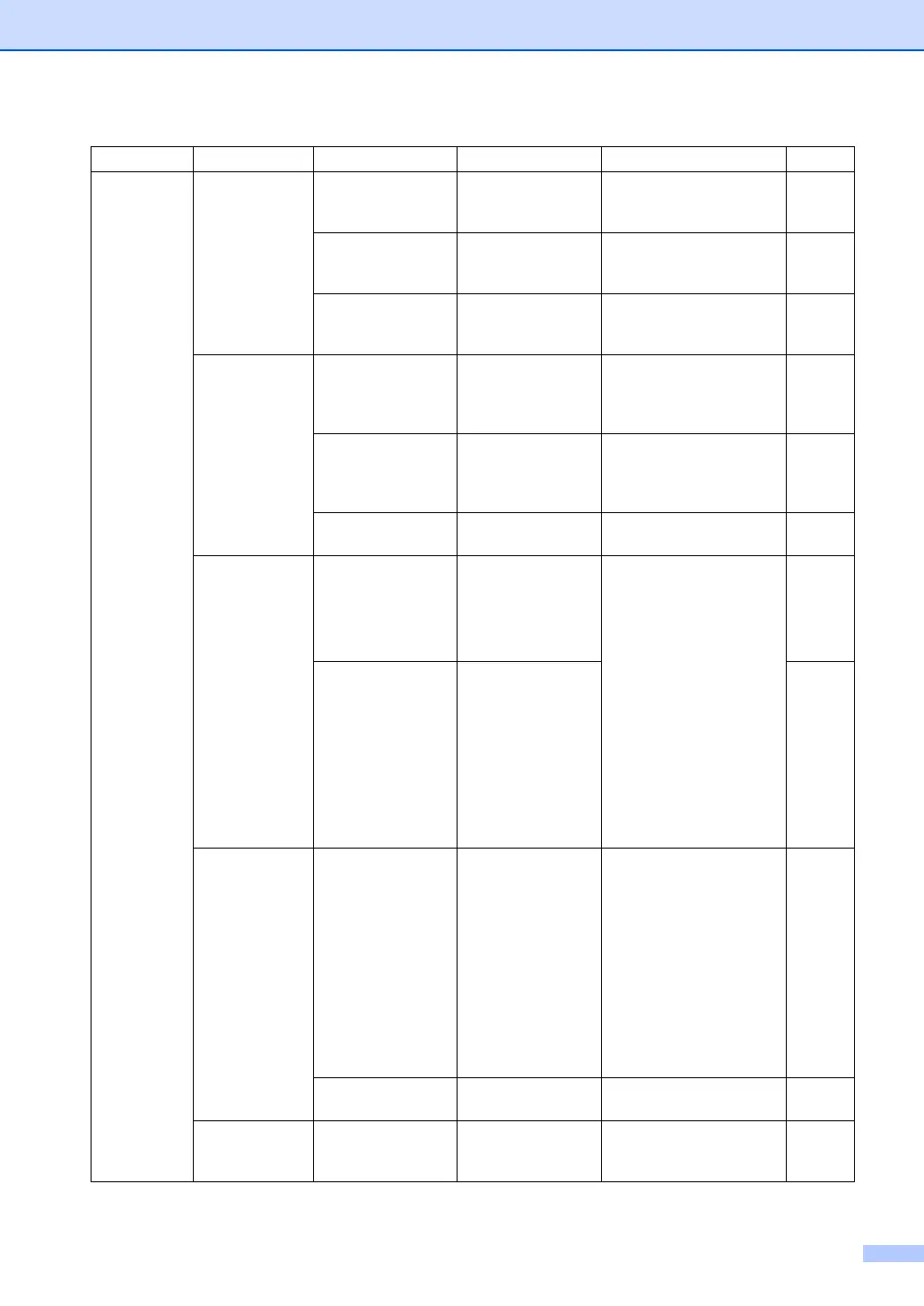
Menu and Features
143
3.Fax
(Continued)
2.TX
Settings
(In Fax mode only)
(Continued)
8.Cover Message — Sets up your own
comments for the fax cover
sheet.
33
9.Overseas Mode On
Off*
If you are having difficulty
sending faxes overseas,
set this to on.
37
0.Glass Fax
Size
A4/Letter*
Legal/Folio
Adjusts the scan area of
the scanner glass to the
size of the document.
31
3.Dialer
Setting
1.One-Touch — Stores up to 40 One-Touch
Dial numbers, so you can
dial by pressing one key
(and Start).
57
2.Speed Dial — Stores up to 300
Speed Dial numbers, so
you can dial by pressing
only a few keys (and Start).
58
3.Setup Groups — Sets up to 20 Group
numbers for Broadcasting.
60
4.Report
Setting
1.Job Status
Rpt
Incomplete*
Inc+Image
All
All+Image
Sets initial setup for Job
Status Report and Fax
Journal.
68
2.Journal Off
Every 50 Faxes*
Every 6 Hours
Every 12 Hours
Every 24 Hours
Every 2 Days
Every 7 Days
68
5.Remote
Fax Opt
1.RMT RTV/FX
FWD
(Local Print)
Off*
Fax Forward
Remote RTRV
PC Fax Receive
Sets the machine to
forward fax messages, to
store incoming faxes in the
memory (so you can
retrieve them while you are
away from your machine),
or to send faxes to your
PC.
If you choose Fax Forward
or PC Fax Receive, you
can turn on the safety
feature local print.
62
2.Print Fax — Prints incoming faxes
stored in the memory.
46
6.View/Del.
Jobs
— — You can check which jobs
are in the memory and lets
you cancel chosen jobs.
38
Main Menu Submenu Menu Selections Options Descriptions Page



 To Next Page