EasyManua.ls Logo

OEM TL 45 - Operator Panel; Start Screen

OEM TL 45
84 pages
Print Icon
To Next Page IconTo Next Page
To Previous Page IconTo Previous Page
Loading...
EC-compliant use and warning instructions
Page 52
CHAPTER 6 COMMANDS AND USE
6.3. Operator panel
The machine is controlled through an operator panel located at the side of the product entry area, through which
you can manage the functions to use the oven.
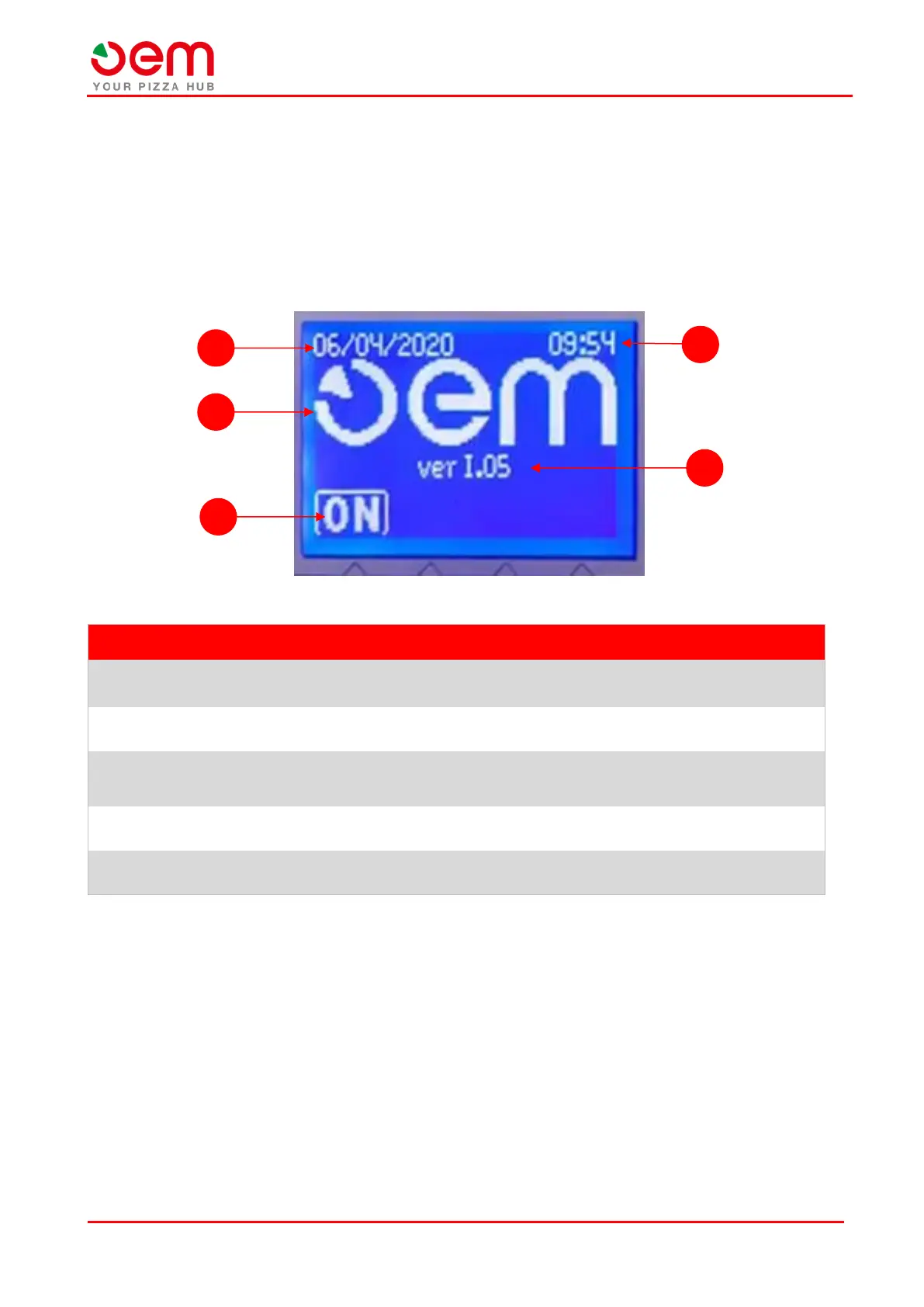
6.3.1. Start screen
This screen is presented to the operator when the machine is turned on.
POS.
FUNCTION
DESCRIPTION
1
Time
It indicates the current time.
2
Version
It indicates the software version currently in use.
3
Start
It starts the machine by pressing the relevant button below it, accessing
the "Main Screen".
4
Constructor Logo
It indicates the oven manufacturer's logo.
5
Date
It indicates the current date.
5
1
2
4
3

Table of Contents

Related product manuals