CHAPTER 6– COMMANDS AND USE
IMPORTANT!
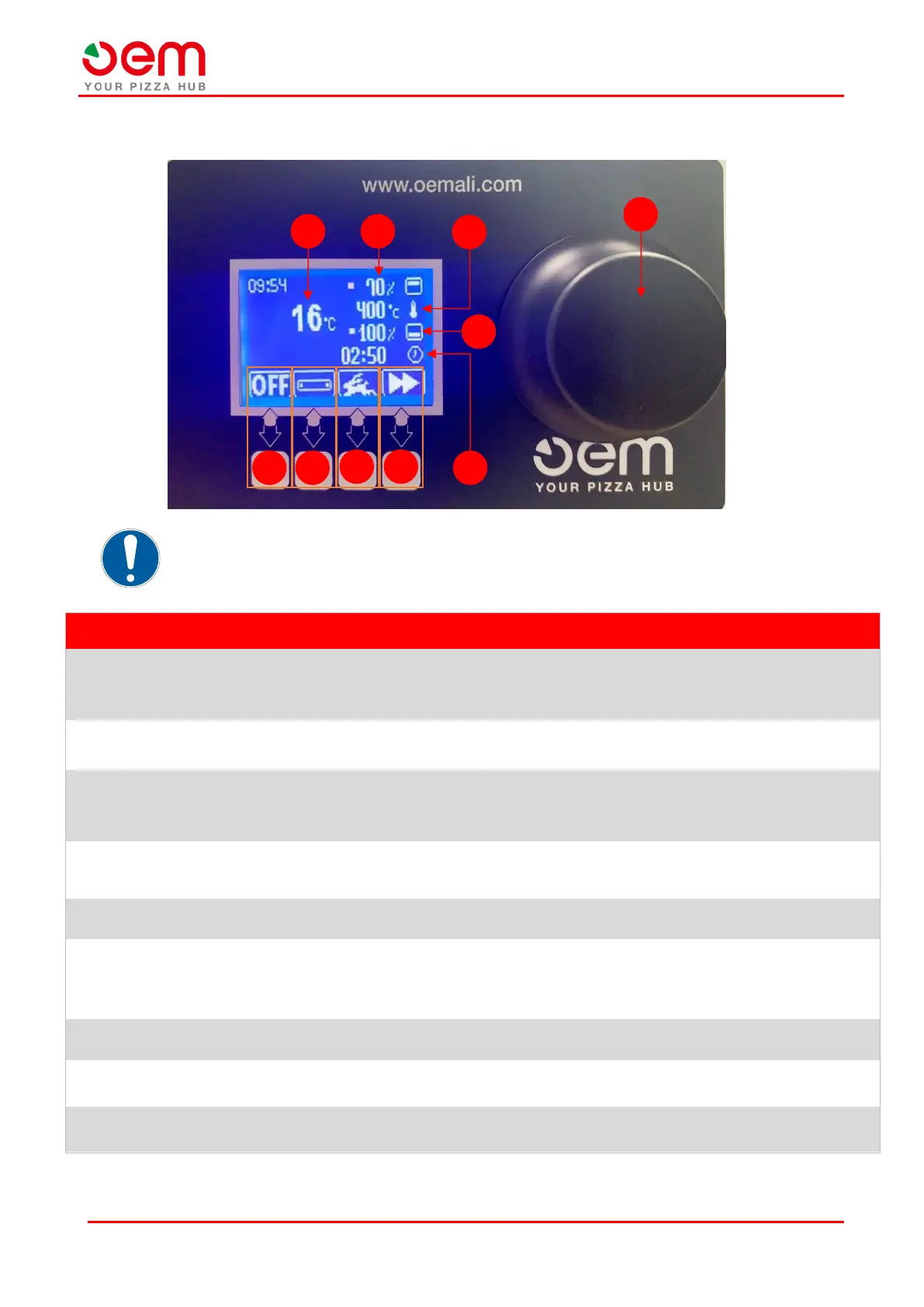
To move from one menu to another, you must use the wheel selector (A).
It allows you to set the working percentage of the upper resistance of the oven by
rotating the wheel selector(A).
Note: each rotation causes a 5% change in operating percentage.
It allows you to set the temperature you want to reach inside the baking chamber
by rotating the wheel selector (A).
It allows you to set the working percentage of the lower oven resistance by rotating
the wheel selector(A).
Note: each rotation causes a 5% change in operating percentage.
It allows you to set the transit time of the product inside the baking chamber,
rotating the wheel selector (A).
It allows you to access the screen “Menù”.
It allows you to choose from the following operating modes:
• Hare: Maximum performance.
• Turtle: limited performance.
It starts or stops the rotation of the transport belt.
It allows you to turn off the machine and return to the "Startup screen".
It indicates the current temperature inside the baking space.


 To Next Page