14
7 LEO connection ports
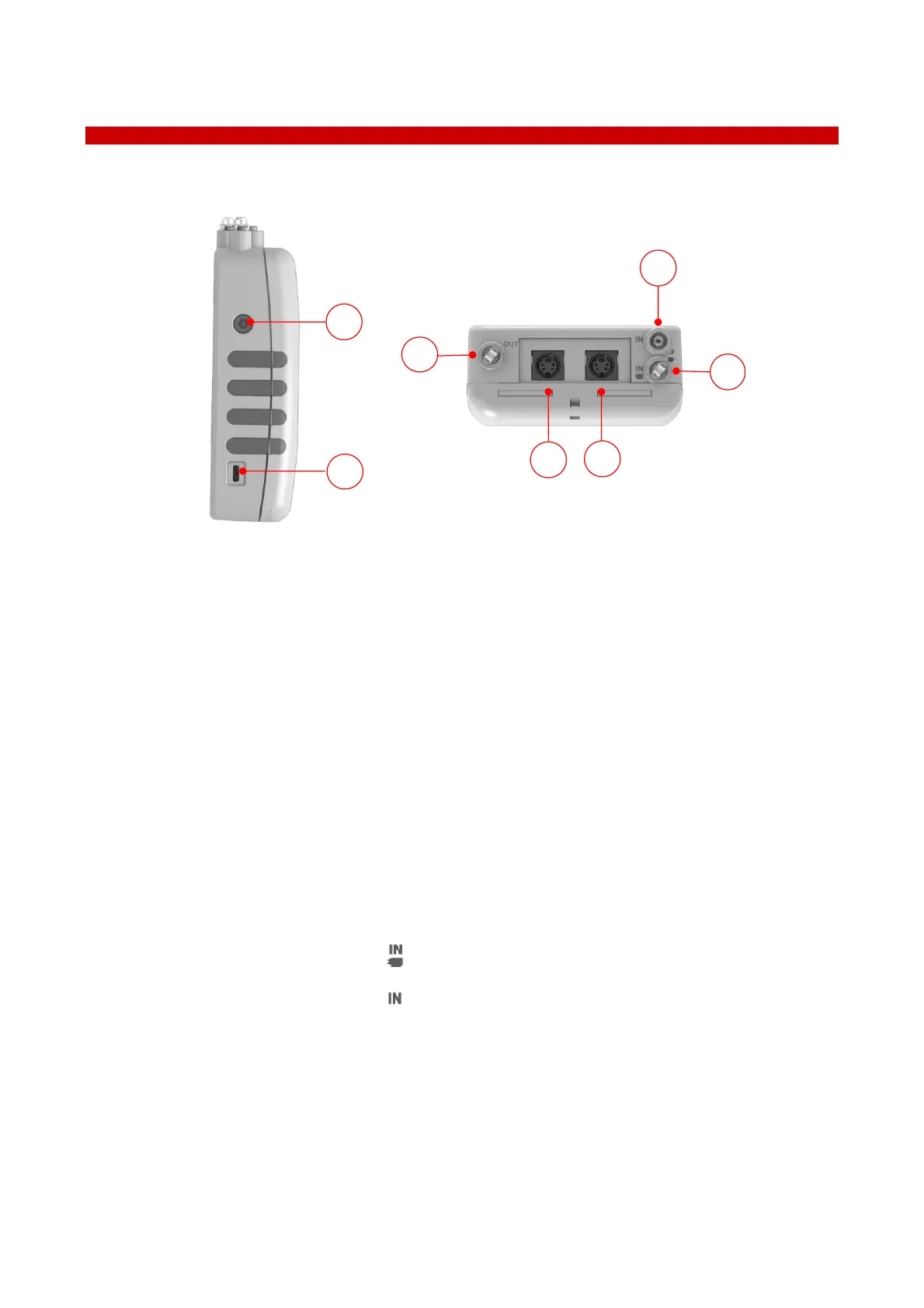
All connection ports of LEO are illustrated in Figure 16.
Figure 16. LEO connections
LEO features:
1. Power button
There are many different press modes:
- To turn LEO on: press and hold the power button for 2 seconds.
- To turn LEO off: press and hold for 2 seconds the power button, and tap OK to confirm.
- Press and hold for 5 seconds the power button to start the Touchscreen Calibration procedure (see
paragraph 15).
- Press and hold for 10 seconds the power button to restart LEO.
- Press the power button to lock and unlock LEO’s screen during the use.
- Press the power button to display the battery charging status (see paragraph 8.1).
2. MICRO-USB port. To charge the battery with the power adapter (see paragraph 5.1) and to download
software updates
3. Gas input port labeled with icon .
4. Gas input port labeled with icon
5. Probe connector 1. To connect additional external sensor modules
6. Probe connector 2. To connect additional external sensor modules
7. Gas outlet for gas release during the gas sampling measurement



 To Next Page