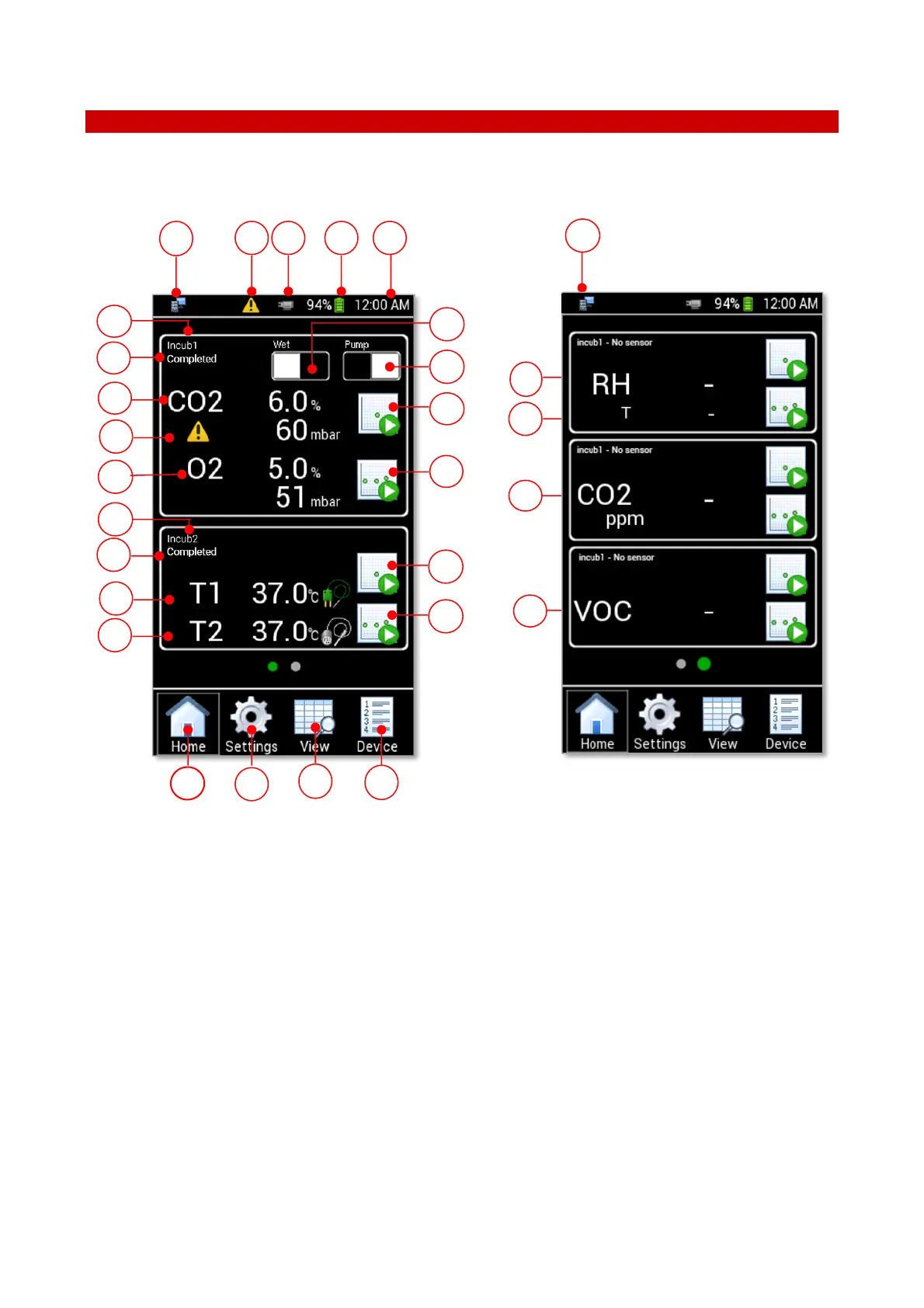
Figure 19. LEO Homepage
1. Wet/Dry button: to set the Dry or Wet Mode. See paragraph 10.1.5.
2. Pump/Diffusion button. Press Pump button to run the pump and draw the gas sampling into LEO
3. CO2-O2 Single Point Measurement: to start a Single Point measurement of CO2 -O2 gas
concentration. See paragraph 10.1.3.
4. CO2.O2 Logging: to start a Logging of CO2 -O2 gas concentration. See paragraph 10.1.4.
5. Temperature Single Point Measurement: to start a Single Point temperature measurement. See
paragraph 11.2. If no Temperature sensor is connected to LEO, this function does not work.
6. Temperature Logging: to start a temperature logging. See paragraph 11.3. If no Temperature sensor
is connected to LEO, this function does not work.
7. Device: to select (or add) a device. See paragraph 9.3.1.
8. View: to access to the stored data. See paragraph 12.1.



 To Next Page