47
12 Reading Data
LEO allows storing sensors’ measurements and then to view (see paragraph 12.1), download (see
paragraph 12.2) or delete (see paragraph 12.3) the stored data.
12.1 Viewing Data
To view the collected Data, please follow the instructions below.
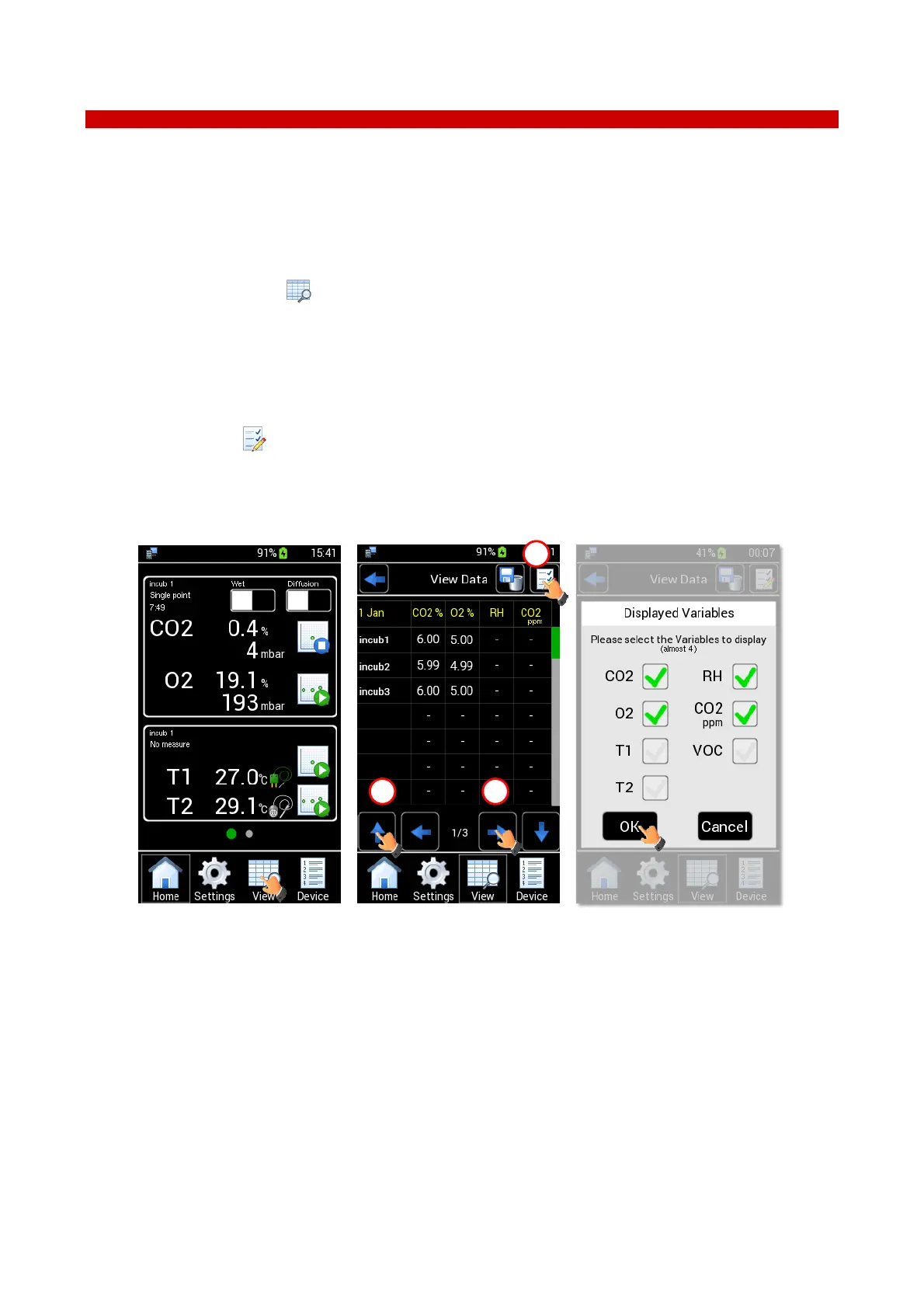
1. Click the View icon (see Figure 58 a) to see the View Data (see Figure 58 b). The values in this page
are the last measurement of each sensor module.
2. Use the UP and DOWN arrows to scroll the device list (1 in Figure 58 b).
3. Use the LEFT and RIGHT arrows to view the measurements by date (2 in Figure 58 b).
4. Press the icon (3 in Figure 58 b) to select the variables to see, download or delete. Flag the
variables and then press OK button to save, see Figure 58 c.
Note ► You can display up to 4 variables at any one time.
Figure 58. How to access to view data (a – b – c).
5. Press the device name (for example, the incub1) (see Figure 59 a). The page with all values stored in
that date for the selected device opens (see Figure 59 b).



 To Next Page