39
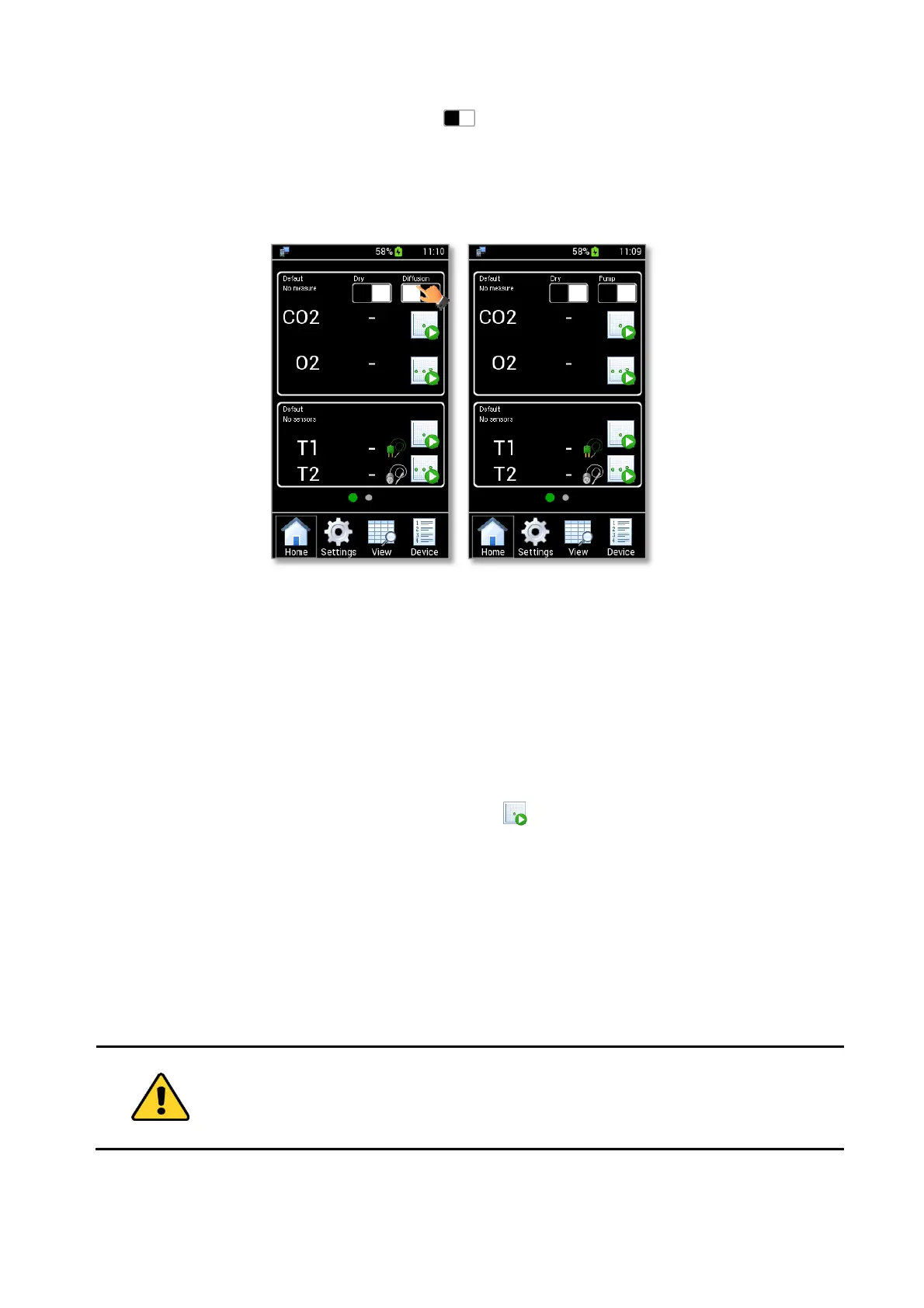
6. Press the Pump/Diffusion Mode button (see Figure 49 a) to select the Aspiration Mode (see
Figure 49 b).
Once you have followed the step above, LEO is ready to be used in Aspiration Mode. See paragraph 10.1.3
to start a Single Point Measurement or 10.1.4 to start a gas measurements logging.
Figure 49. How to select the Aspiration Mode (a – b).
10.1.3 CO2-O2 Single Point Measurement
To start a single point measurement, follow the instructions below:
1. Select the Device for which the data will be stored (see paragraph 9.3.1).
Note ► If no device is selected, the data will be stored on the current device shown on the Homepage (1 in
Figure 50 a).
2. Press the CO2-O2 Single Point Measurement icon (see Figure 50 a). A pop-up dialog box appears
(see Figure 50 b). Select Auto for an automatic or Manual for a manual measurement.
− Auto: the CO2-O2 Single Point measurement terminates automatically when the gas reading
value becomes stable.
− Manual: you have to click again on the CO2-O2 Single Point Measurement Icon to stop the
measurement.



 To Next Page