42
When CO2-O2 Logging is completed or if you stop it by clicking on the icon (see Figure 52 c), the last values
remain on the Homepage for 10 seconds, or until a new measurement occurs.
5. Press the View icon (see Figure 51 a) to view data stored. More details are reported in chapter
12.
10.1.5 Wet Mode
LEO measures the sampled gas composition at the environmental pressure, temperature and humidity
conditions. If the gas sample is very humid, you must use the moisture trap between the incubator and LEO (see
paragraph 5.2 and paragraph 10.1), the loss of water molecules changes the composition of the gas and has an
effect on the CO2 – O2 measurement. To address this issue and correct the CO2 and O2 measurement to account
for the incubator real condition, you can use the Wet Mode.
The Wet Mode is a LEO feature allowing you to set the incubator temperature and relative humidity values.
LEO will correct the CO2 and O2 values by accounting for the real water content of the gas drawn from the
incubator.
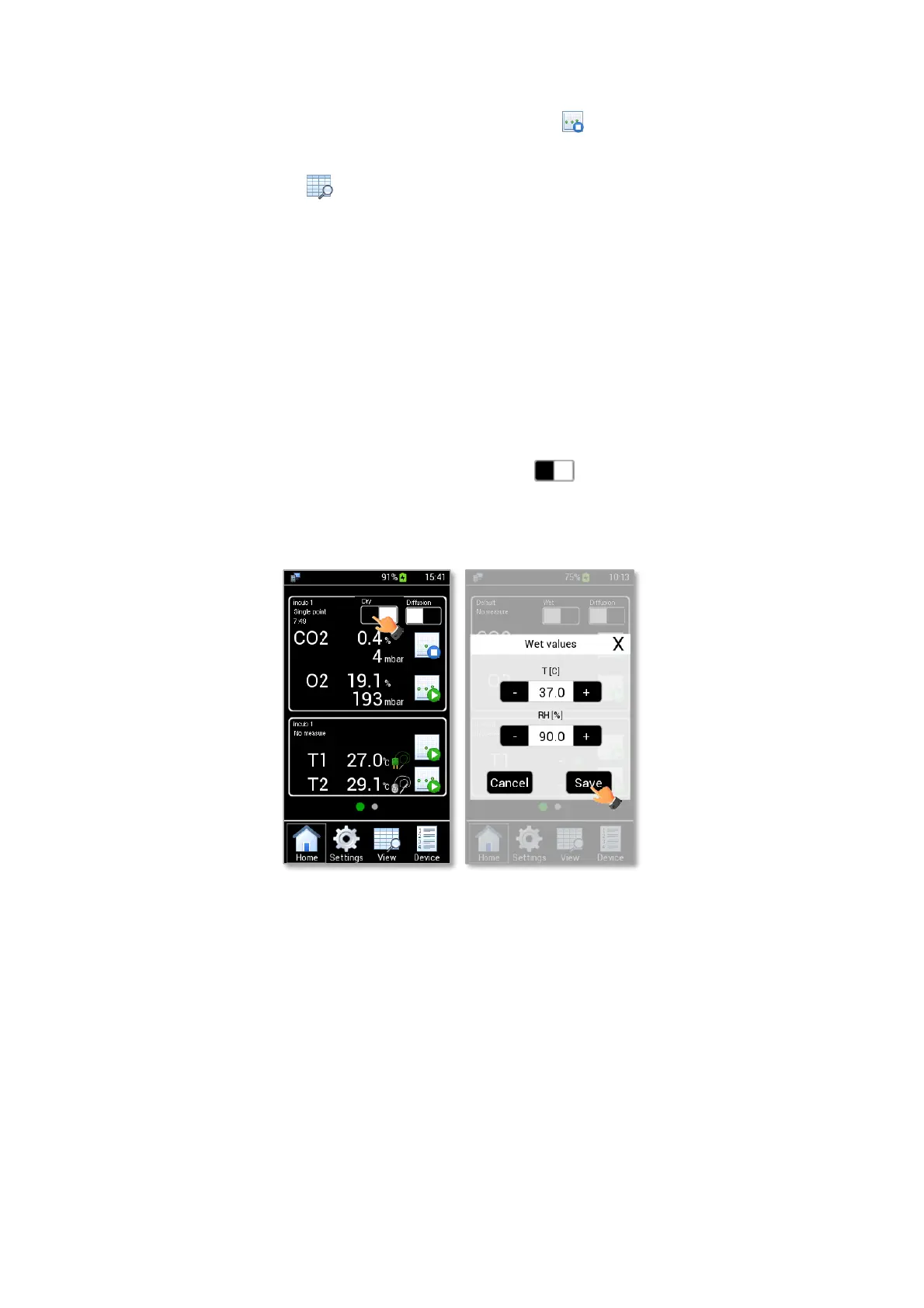
In order to set Wet Mode, press the Wet/Dry Mode button (see Figure 53 a). A pop-up dialog box
appears. Insert the temperature and relative humidity values of the Wet Incubator and then press Save, as shown
in Figure 53 b.
Figure 53. How to select Wet Mode (a – b).



 To Next Page