Application Programs
|
Setting Up the Card Reader
41
Setting Up the Card Reader
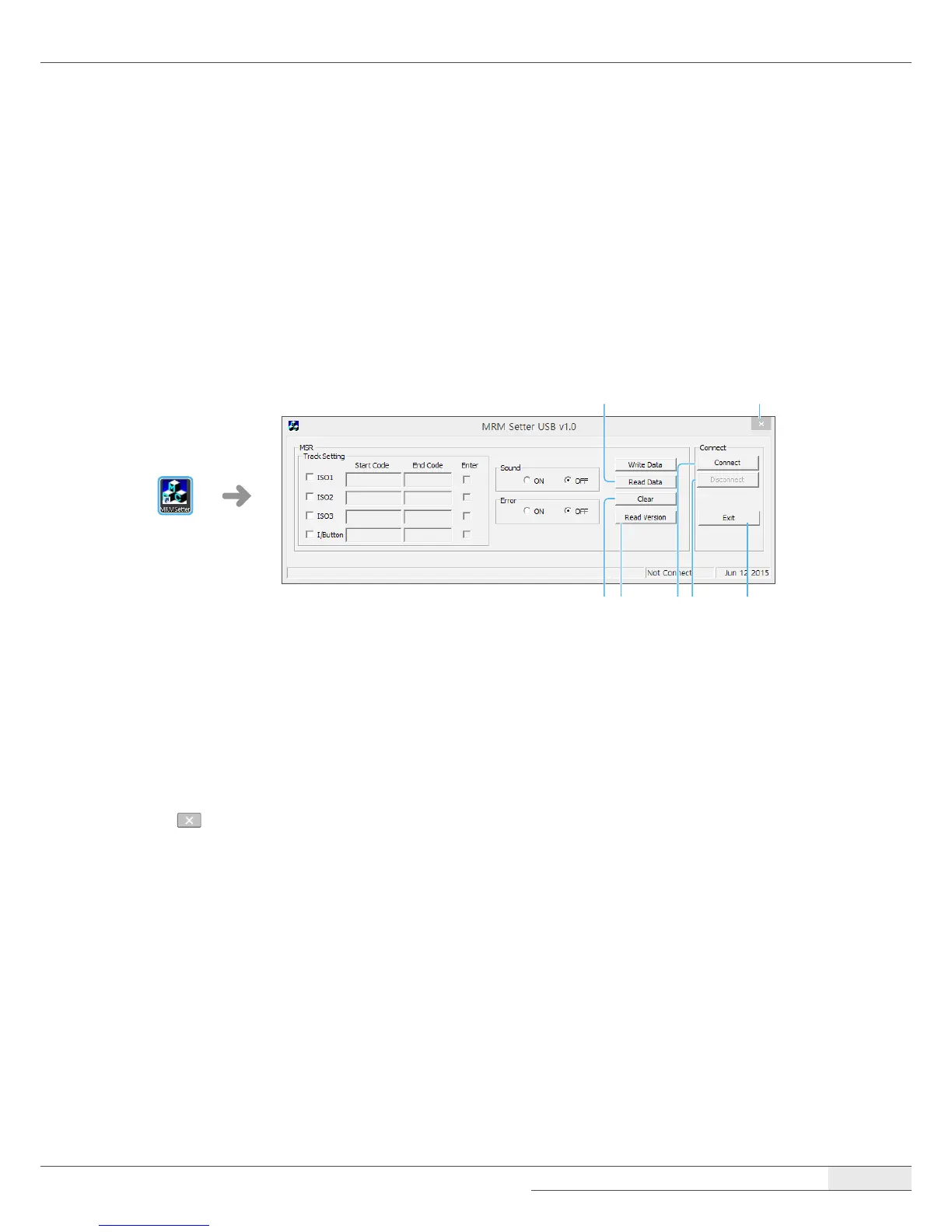
After connecting the card reader, run the MRMSetter program to setup the card reader.
Running the setup program
1.
Double-click the MRMSetter icon on the desktop.
➊
➋ ➍➌ ➏
➐
➎
➊
Read Data: Loads the previous setting values.
➋
Clear: Clears all settings and returns to the default settings.
➌
Read version: Displays the program version.
➍
Connect: Connects the card reader to the system.
➎
Disconnect: Disconnects the card reader from the system.
➏
Exit: Closes the MRM Setter program.
➐
: Closes the MRM Setter program.
2.
Click Connect.
3.
Select all settings for your card reader.
4.
Click Write Data and check the WRITE OK! message.
5.
Click Exit.



 To Next Page