Troubleshooting
6-10 BASIC OPERATION GUIDE
Paper Jams
If a paper jam occurs, a message
displays and copying or printing
stops.
A message indicating the jammed
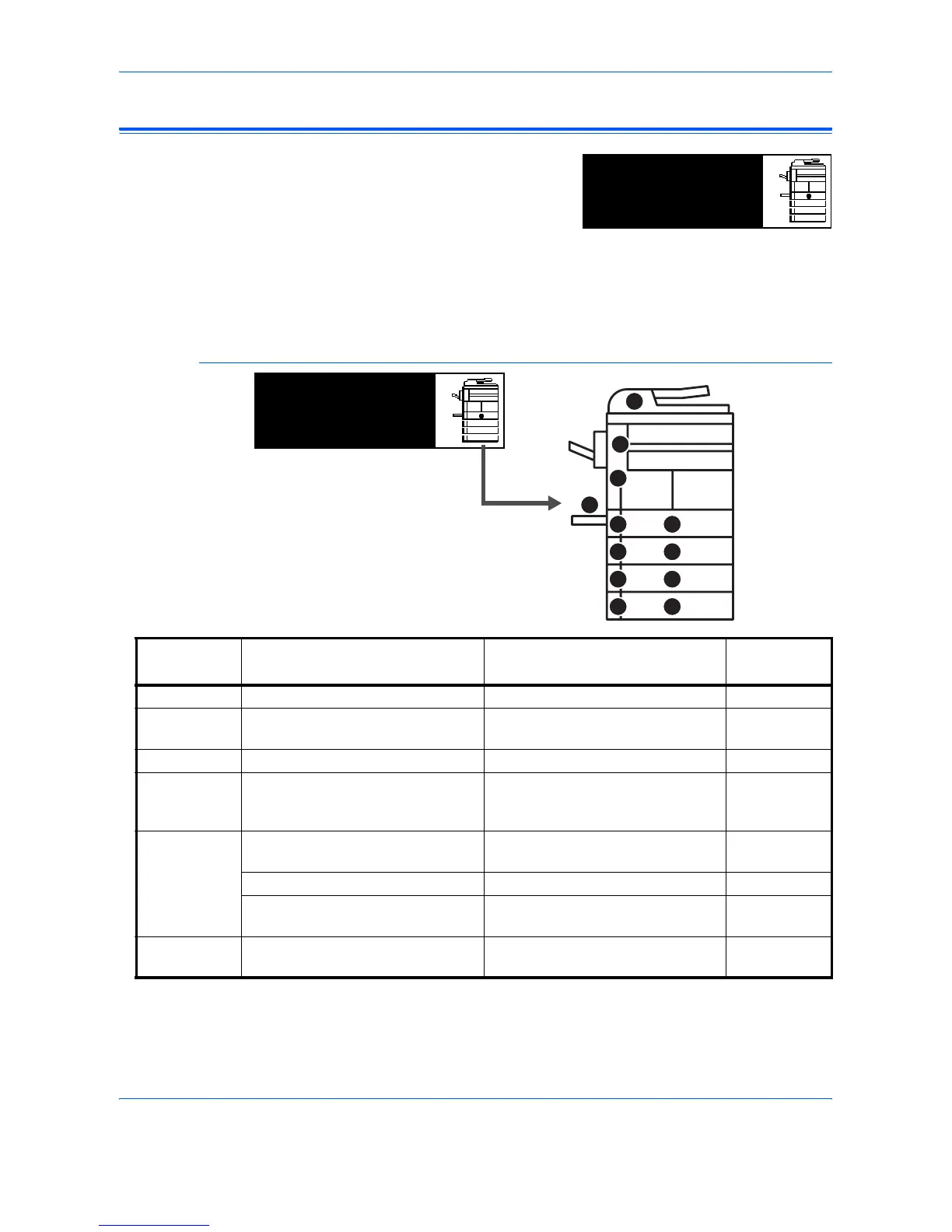
area and instructions for clearance displays. Jam location indicators also
display.
Leave the main power switch on ( | ) and refer to the appropriate
instructions to remove the jammed paper.
Jam Location Indicators
†For the 16 ppm model, cassettes 2 to 4 are included in the optional Paper
Feeder. For the 20 ppm model and the 25 ppm model, cassettes 3 and 4
are included in the optional Paper Feeder.
Paper misfeed in
cassette 1.
JAM11
Remove paper.
Indicator
Location
Paper Jam Location Paper Jam Number
Reference
Page
A Paper jam inside Cassette 1 JAM11, JAM21 page 6-11
B Paper jam inside Cassettes 2 to 4
†
JAM12, JAM13, JAM14, JAM15,
JAM16, JAM22, JAM23, JAM24
page 6-12
C Paper jam in the Multi-Bypass Tray JAM10, JAM20 page 6-14
D Paper jam in the Left Cover JAM30, JAM40, JAM41, JAM42,
JAM43, JAM44, JAM45, JAM60,
JAM61
page 6-14
E Paper jam in the Paper Output Slot JAM50, JAM52, JAM53, JAM54,
JAM55, JAM56
page 6-15
Paper jam in the optional Finisher JAM80, JAM81, JAM83, JAM84 page 6-18
Paper jam in the optional Job
Separator
JAM51 page 6-20
F Paper jam in the optional Document
Processor
JAM70, JAM71, JAM72, JAM73,
JAM74, JAM75
page 6-17
AA
C
D
E
F
BB
BB
BB
Paper misfeed in
cassette 1.
JAM11
Remove paper.



 To Next Page
 Loading...







