Troubleshooting
6-14 BASIC OPERATION GUIDE
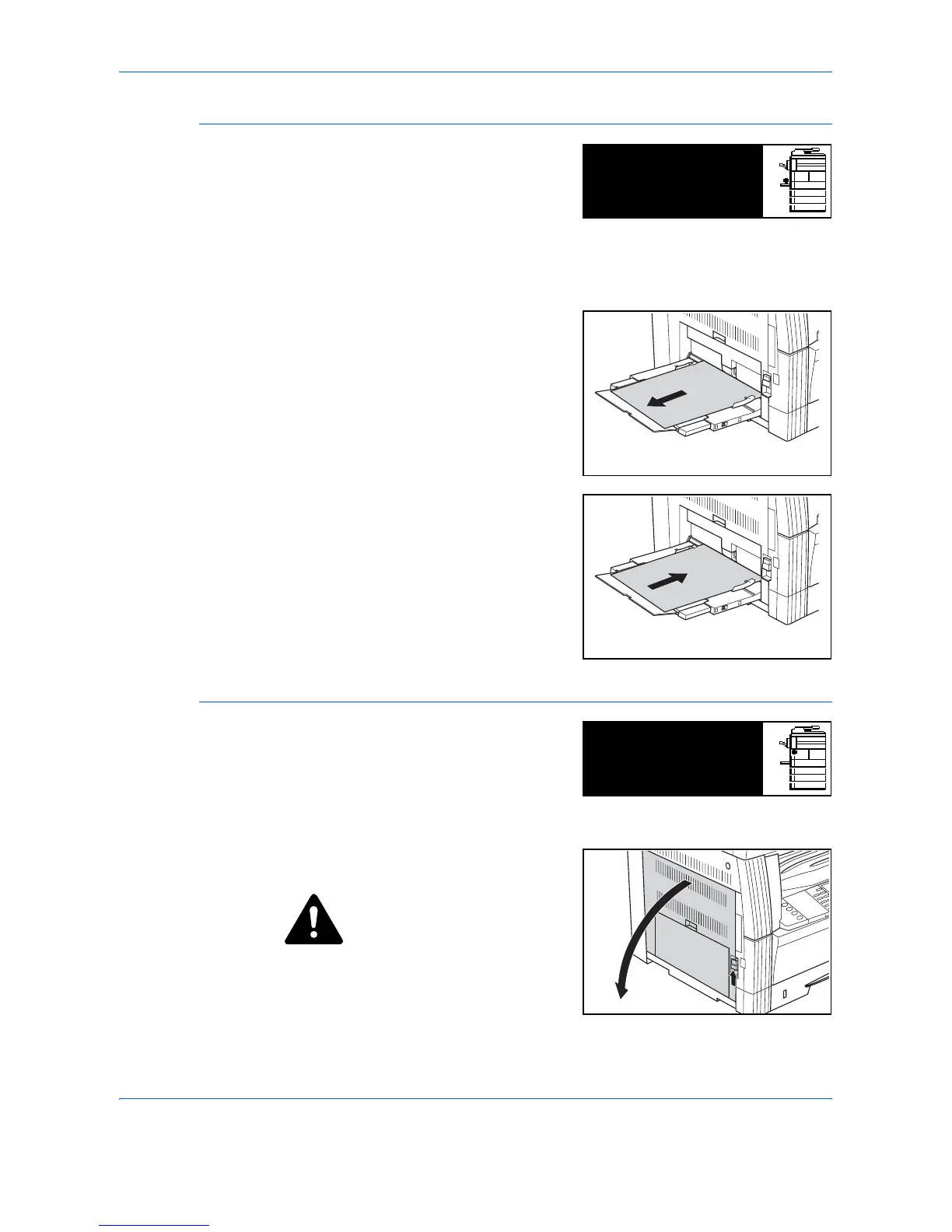
Multi-Bypass Tray
If a jam occurs in the Multi-Bypass
Tray and JAM10 displays,
perform the following procedure
to remove the jammed paper.
IMPORTANT: If JAM20 or JAM40 displays, refer to Left Cover, on page 6-
14.
When removing jammed paper, do not pull it out from the Multi-Bypass
Tray side.
1
Remove the paper from the Multi-
Bypass Tray.
2
Reload the paper in the Multi-
Bypass Tray.
The error message clears.
Left Cover
If a jam occurs in the left cover,
perform the following procedure
to remove the jammed paper.
IMPORTANT: The drum section
is sensitive to scratches and contaminants. When removing paper, be
careful not to touch or scratch it with your watch, jewelry, etc.
1
Pull up the Left Cover handle and
open the Left Cover.
CAUTION: The fixing unit is
extremely hot. Take sufficient care
when working in this area, as
there is a danger of getting
burned.
Paper misfeed in
stack bypass.
JAM10
Remove paper.
Paper misfeed.
Open left cover
JAM30
and remove paper.












 To Next Page