8
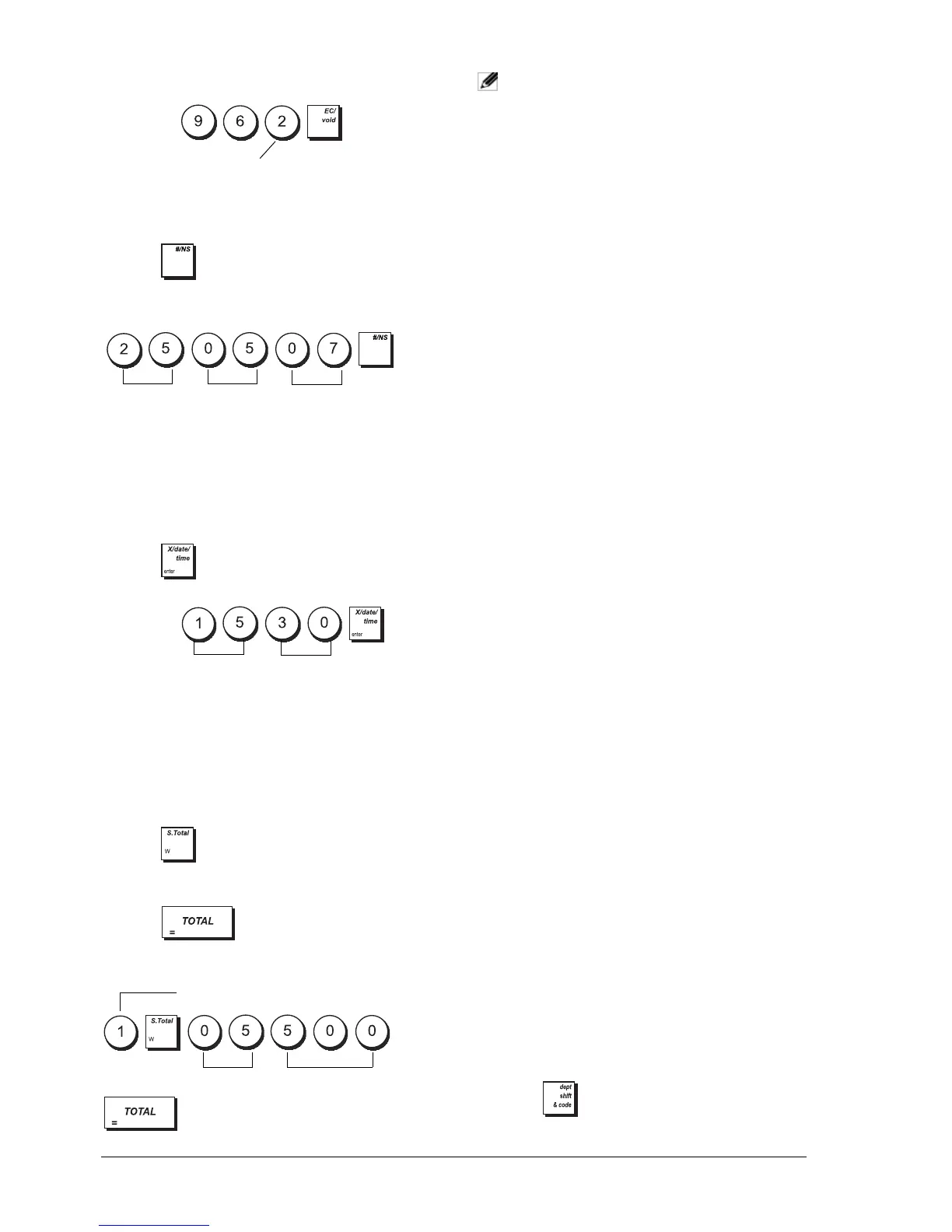
Example: Program the cash register to print in French.
Type/Press:
SETTING THE DATE
1. Control lock key position: PRG.
2. Type the current date in the DDMMYY format.
3. Press .
Example: Set a date of May 25, 2007.
Type/Press:
The date format can be changed by programming
system option 1.
SETTING THE TIME
1. Control lock key position: PRG.
2. Type the current time in the HH:MM, 24-hour
format.
3. Press .
Example: Set the time at 3:30 PM.
Type/Press:
The time format can be changed by programming
system option 2.
SETTING FIXED VAT RATES
1. Control lock key position: PRG.
2. Type the 1-digit Vat Rate identifier [1 to 4], 1 for
VAT1, 2 for VAT2, 3 for VAT3 and 4 for VAT4.
3. Press .
4. Type the VAT rate. Enter five digits, THREE digits
placed after the decimal point.
5. Press .
Example: Set a VAT1 rate of 5.50%.
Type/Press:
NOTE: Before changing a VAT rate, print a Z
Financial report. See "X1 and Z1 Financial
Reports".
See sections "Fraction Rounding for VAT Calculation"
and "Printing VAT Information on Receipts" for other
VAT-related features.
PROGRAMMING DEPARTMENTS
A total of 99 departments are available. Programming a
department means defining a department status and an
associated price. The department status consists of a 9-
digit code that characterizes the department as follows:
• Positive or negative sales.
• Single or multiple item sales.
• High Digit Lock Out (HDLO) status, whereby you
prohibit item amounts over a certain number of
digits.
• VAT rate (previously programmed).
• A VAT rate that can be applied to the department,
temporarily replacing the preset VAT rate.
• Link to one of up to 10 merchandise categories.
You can then assign a preset price to the department.
The 9-digit department status can be programmed
using the following options:
1. Control lock key position: PRG.
2. Press to enter the department status
programming mode.
Positive/Negative
Sales
Multiple/Single Item
Sales
0 = Positive
department
0 = Multiple item sales
1 = Negative
department
1 = Single item sales
HDLO Tax Status
0 = No HDLO
00 = Tax-exempt
1 = 0.01 - 0.09 01 = Taxable with VAT 1
2 = 0.01 - 0.99 02 = Taxable with VAT 2
3 = 0.01 - 9.99 03 = Taxable with VAT 3
4 = 0.01 - 99.99 04 = Taxable with VAT 4
5 = 0.01 - 999.99
6 = 0.01 - 9999.99
Take-out Tax Status Merchandise category
00 = Tax-exempt
00 - 10
(category number)
01 = Taxable with VAT 1
02 = Taxable with VAT 2
03 = Taxable with VAT 3
04 = Taxable with VAT 4
VAT number
5
50
Day
Month
Year
Language identifier
Hour
Minutes















 To Next Page