30
X1 and Z1 Financial Reports
NOTE: If you run out of paper during the printing
of a Z report, you can print only one
duplicate report by pressing
followed by .
1. Control lock key position: X or Z (bear in mind that
a Z1 printout resets all totals to zero).
2. If a PRG and Z mode, or X mode, manager
password was defined type the [4-digit password]
and press .
3. Press .
X2 and Z2 Financial Reports
1. Control lock key position: X or Z (bear in mind that
a Z2 printout resets all totals to zero).
2. If a PRG and Z mode, or X mode, manager
password was defined type the [4-digit password]
and press .
3. Type and press .
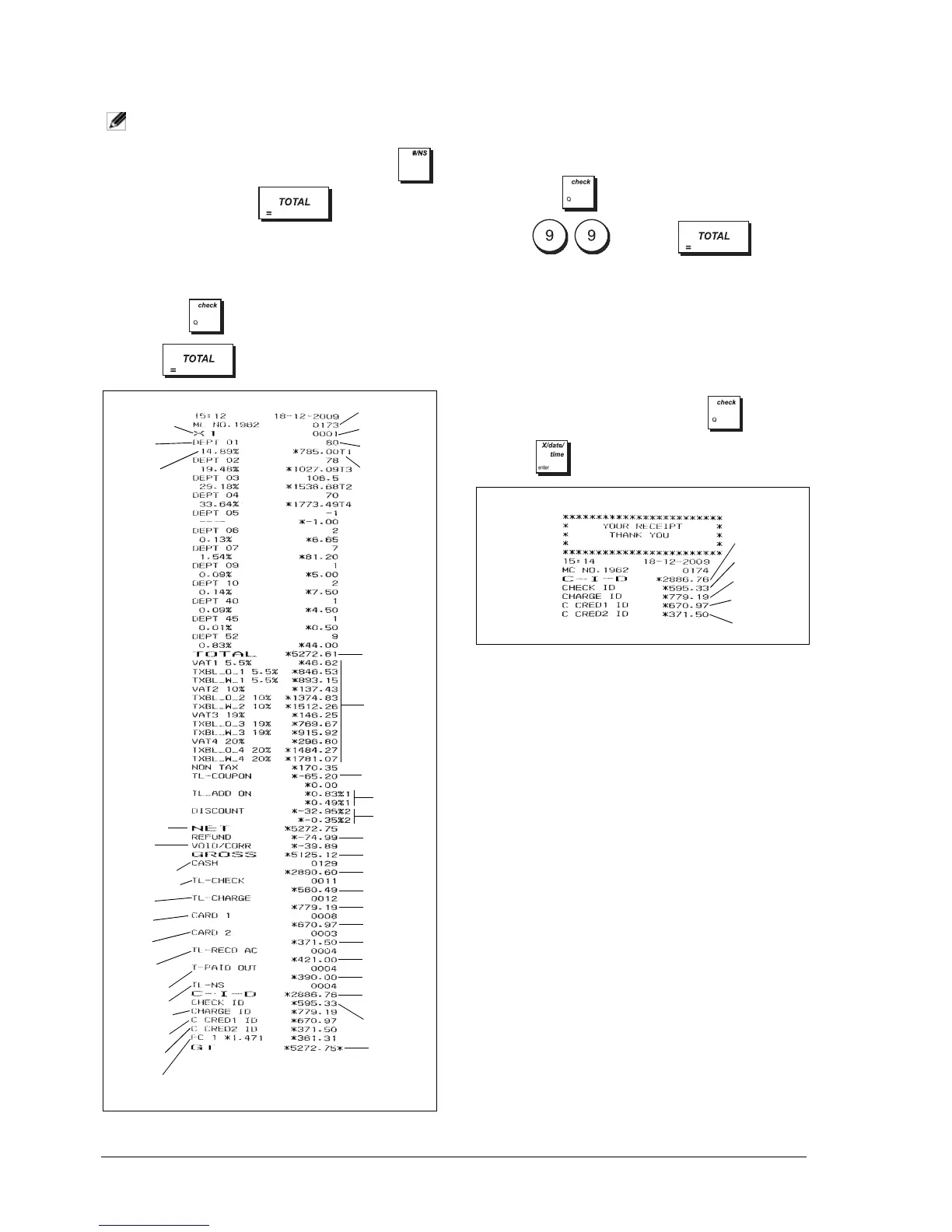
CASH IN DRAWER REPORT
This report tells you the financial status of your cash
drawer. It provides the totals for cash, check, charge,
credit 1 and credit 2 payments.
1. Control lock key position: X only.
2. If an X mode, manager password was defined type
the [4-digit password] and press .
3. Press .
Consecutive
receipt number
X counter
Department 1
activity counter
Department 1
sales total
Sales total for all
departments
Total amount
VAT 1, 2, 3 and 4
Coupon (-) total
Percent
add-on total
Percent
discount total
Refund total
Gross sales total
Cash sales total
Check sales total
Charge sales total
Card 1 sales total
Card 2 sales total
Received on
account total
Paid out total
Cash in drawer
total
Check in drawer
total
Grand total
X report identifier
Department
number or
assigned name
Department
1 ratio %
Net sales total in
local currency
Void total
Cash sales counter
Check sales counter
Charge sales
counter
Card 1 sales
counter
Card 2 sales
counter
Received on
account counter
Paid out counter
No sale counter
Charge in drawer
total
Card 1 in drawer
total
Card 2 in drawer
total
Foreign currency rate and sales total
Cash in drawer
total
Check in drawer
total
Charge in drawer
total
Credit 1 in
drawer total
Credit 2 in
drawer total















 To Next Page