38
DISCOUNTING INDIVIDUAL ITEMS USING
PROGRAMMED AND RANDOM DISCOUNT
R
ATES
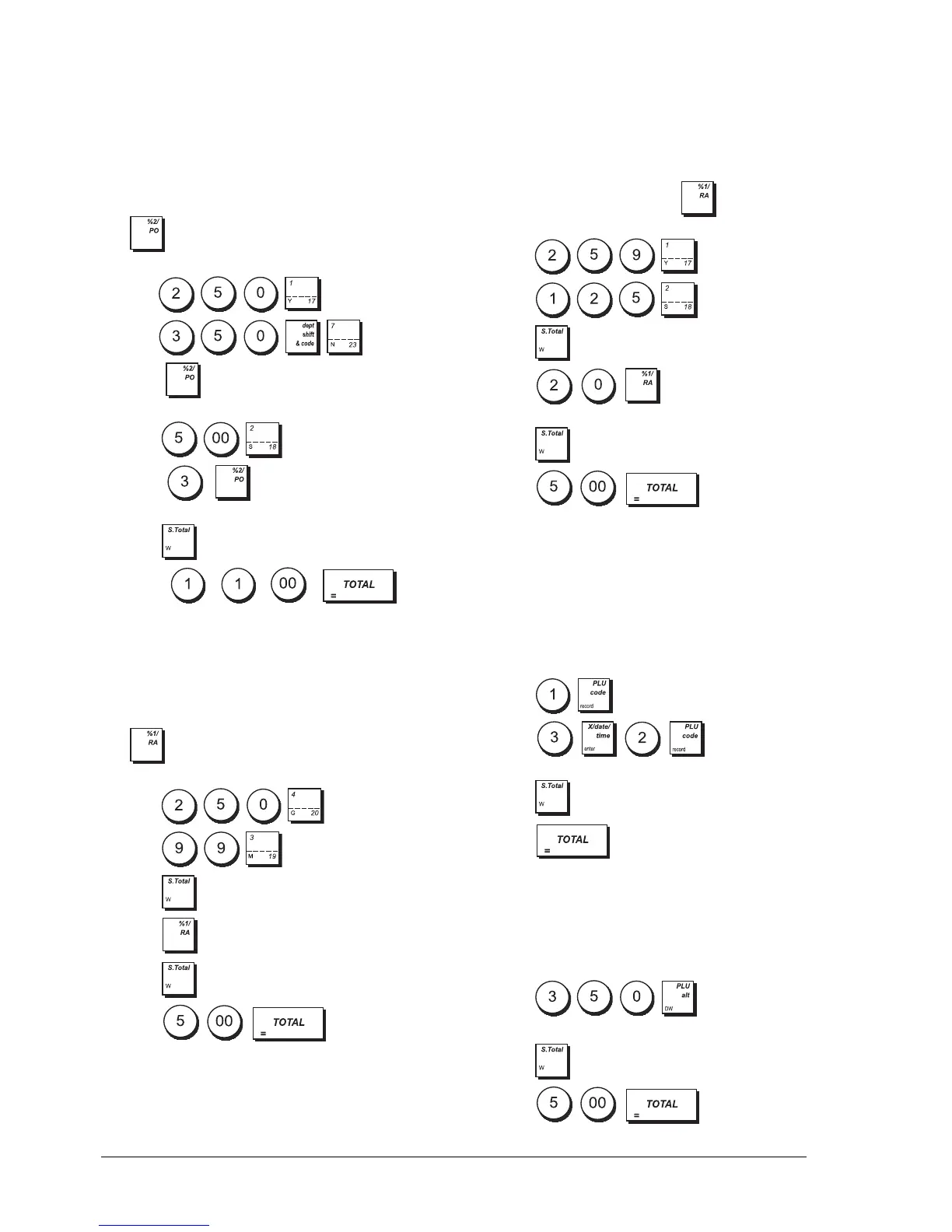
Example: Register a £2.50 item to Department 1, apply
the programmed discount to a £3.50 item to
Department 23 and apply a discount rate of 3% to a
£5.00 item to Department 2. Compute change tender.
The key must have been programmed to apply a
3% percent discounts.
1. Type .
2. Type .
3. Press to apply the programmed discount.
The amount discounted is displayed.
4. Press .
5. Press . The amount discounted is
displayed.
6. Press .
7. Press . The
change due to the customer is displayed.
APPLYING THE PROGRAMMED PERCENT
PLUS RATE TO A TOTAL SALE
Example: Register a programmed 10% add-on to an
entire sales transaction. Compute the change tender.
The key must have been programmed to apply a
10% add-on.
1. Press .
2. Press .
3. Press .
4. Press . The amount added-on is displayed.
5. Press .
6. Press . The change due
to the customer is displayed.
APPLYING A RANDOM PERCENT PLUS
RATE TO A TOTAL SALE
Up to 4 digits can be used for the percent add on rate
(from 0.01 to 99.99%).
Example: Register a 20% add-on to a sales transaction.
Compute the change tender. The key must have
been programmed to apply percent add-ons.
1. Press .
2. Press .
3. Press .
4. Press . The add on amount is
displayed.
5. Press .
6. Press . The change due
to the customer is displayed.
REGISTERING A SALES TRANSACTION
USING PRESET PLU ITEM PRICES
To use this feature, PLU item prices must have been
previously programmed.
Example: Use preset PLU item prices to register an
entire transaction: register PLU 1 and multiply 3 PLUs 2.
End the transaction with an exact cash tender.
1. Press .
2. Press . The amount of
the multiplication is displayed.
3. Press .
4. Press .
OVERWRITING A PRESET PLU PRICE
A
SSOCIATED WITH A BARCODE
Example: Overwrite the preset price associated with a
barcode with £3.50. Compute change for a £5.00
tender.
1. Press .
2. Scan the barcode to register the PLU code.
3. Press .
4. Press . The change due
to the customer is displayed.















 To Next Page