ENGLISH
9
3. Define the department to program by typing the
department number [1 to 99] and then press
.
4. Type the [Positive/Negative sales code], [Single/
multiple item sales code], [HDLO code], [Tax
Status code], [Take-out Tax Status] and
[Merchandise Category] by referring to the
previous table. A 9-digit status code must be
entered.
5. Press followed by to exit.
6. Press to enter the department price
definition mode.
7. Define the department to associate the price to by
typing the department number [1 to 99] and then
press .
8. Type a [unit price] to assign, press followed
by to exit.
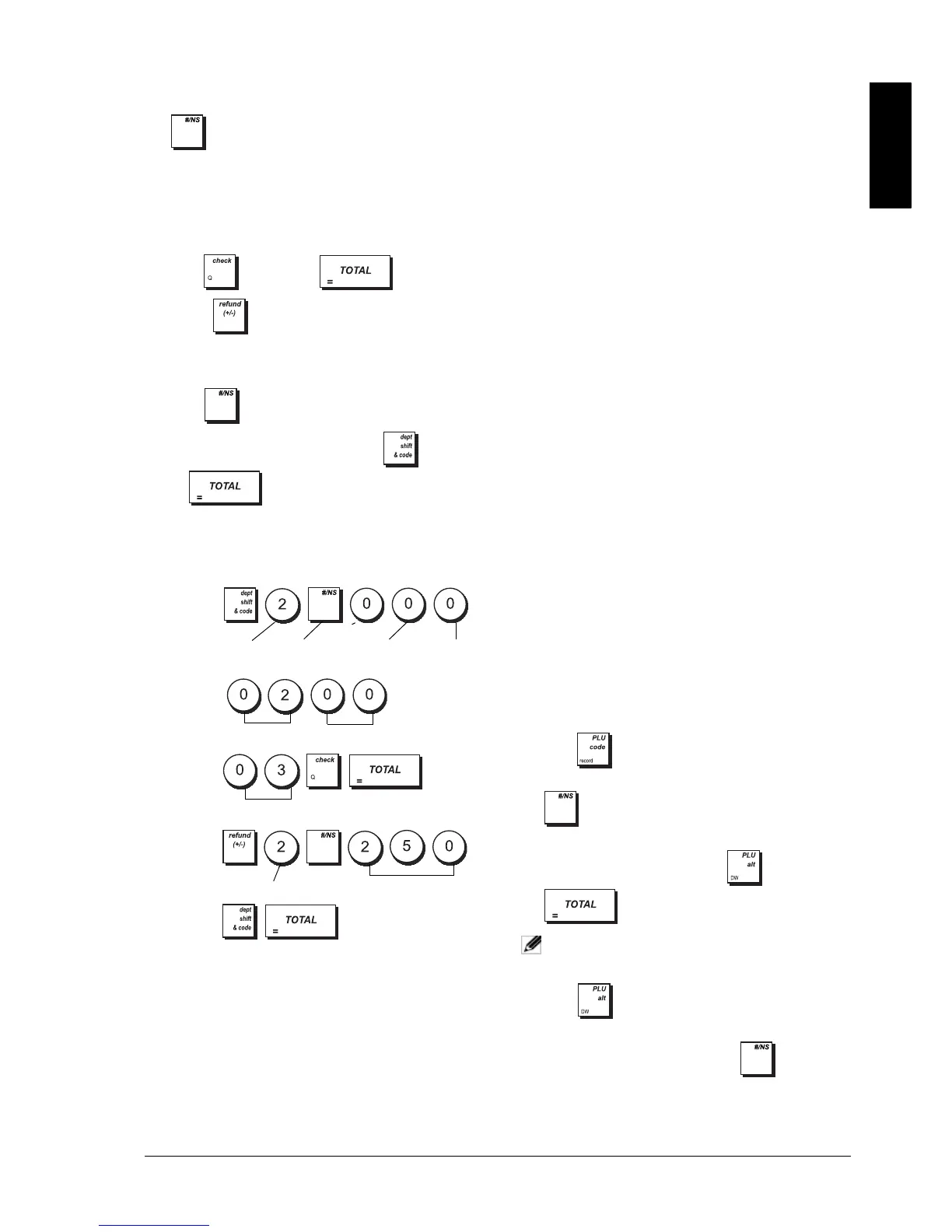
Example: Program Department 2 as follows: multiple
positive item sales, no HDLO, VAT 2, take-out VAT 0,
link to category 3 and an associated price of £2.50.
Type/Press:
After you have programmed your departments, you can
print a report that indicates the programming values.
See section "Department Programming Report" for
details.
PROGRAMMING FIXED PRICE LOOK-UPS
(PLUS)
Up to 1500 PLUs can be programmed. Programming a
PLU item means associating a fixed price, the stock
quantity and a status to it, and then linking it to a
department.
For each PLU you normally input a numeric code that
identifies it (its PLU code). If you have a barcode reader,
you can scan the barcode of an article to input the code
automatically rather than typing it in.
The 5-digit PLU status can be programmed using the
following options:
1. Control lock key position: PRG.
2. Press to enter PLU Price Definition mode.
3. Type the PLU number (max. 14 digits) and press
or scan the item's barcode.
4. Type the unit price [0 to 99999.99] you wish to
assign to the PLU, then press and exit with
.
NOTE: All prices entered must be specified to 2
decimal places.
5. Press to enter the initial quantity of items in
stock for the PLU.
6. Type the PLU number and press or scan the
item's barcode.
Price Status Tax Status
0 = PLU price open
with or without
preset price
00 = Tax-exempt
1 = PLU price open
without preset price
01 = Taxable with VAT 1
2 = Only preset price
allowed for PLU
02 = Taxable with VAT 2
03 = Taxable with VAT 3
04 = Taxable with VAT 4
Take-out Tax Status
00 = Tax-exempt
01 = Taxable with VAT 1
02 = Taxable with VAT 2
03 = Taxable with VAT 3
04 = Taxable with VAT 4
Department
Positive item
sales
Multiple item
sales
No HDLO
Tax status
Take-out Tax status
Merchandise category
Department
Unit price



 To Next Page