42
SALES TRANSACTIONS USING
ALTERNATIVE VAT RATES (TAKE-OUT
S
ALES)
The alternative VAT rate programmed can only be
temporarily applied to all the items registered, before
finalizing the sales transaction. The transaction subtotal
and total displayed and printed includes the
programmed take-out VAT rate.
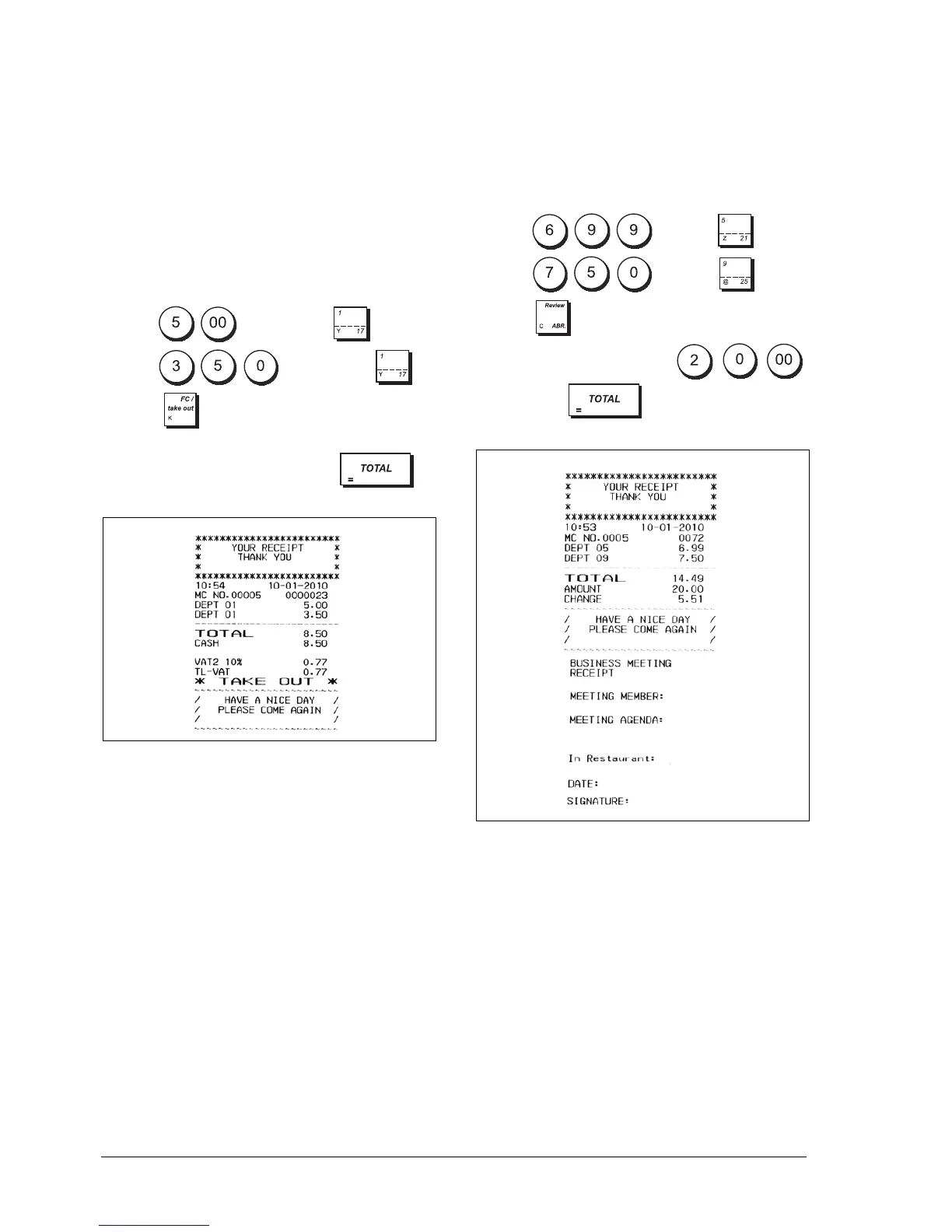
Example: Register the sale of items to Department 1,
programmed with an ordinary VAT rate of 20% and a
takeout VAT rate of 10%, then finalize the transaction
with an exact cash tender.
1. Type and then press .
2. Type and then press .
3. Press to apply the department's alternative
VAT rate.
4. Finalize the transaction by pressing .
ISSUING A BUSINESS RECEIPT MANUALLY
Example: Register a £6.99 sale to Department 5 and a
£7.50 sale to Department 9, followed by a cash
payment of £20.00. The standard receipt is issued
followed by the Business Receipt. In this example the
ABR is requested manually because Automatic ABR
printing is disabled i.e., system option 46 is set to 0.
1. Type and press .
2. Type and press .
3. Press .
4. Register the cash payment: ,
then press .















 To Next Page