24
CHANGING THE CASH REGISTER'S STANDARD SETTINGS
1. Control lock key position: PRG.
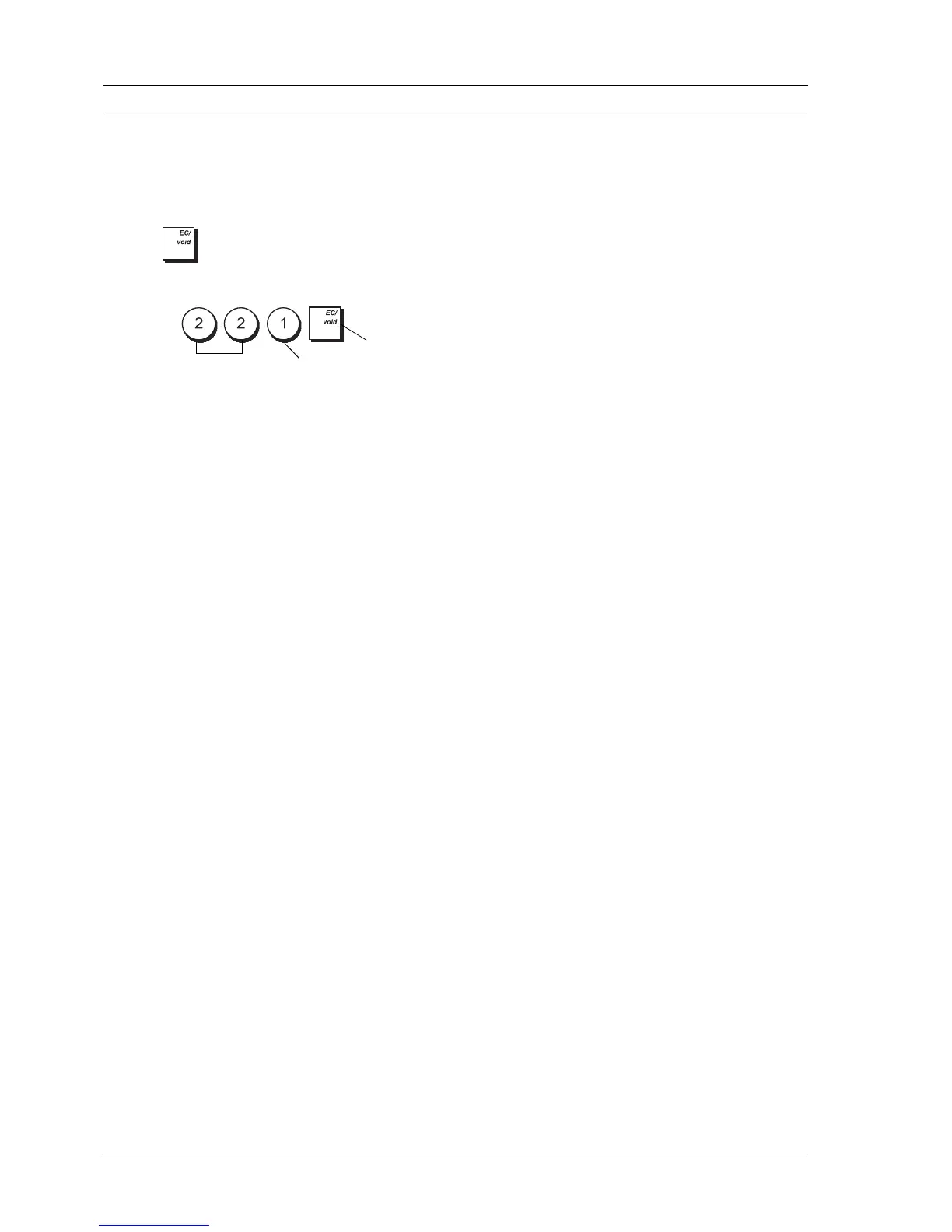
2. Type the [number] of the system option (1-96 as
indicated in the following sub-section) that you
wish to change.
3. Type the [number] of the required setting.
4. Press .
Example: Program the cash register to issue multiple
receipts.
Type/Press:
SYSTEM OPTIONS
Your cash register's system options programming
feature includes a number of options for the operation
of the cash register. Each of the functions described in
this section is already set upon delivery of the cash
register to meet the most frequent requirements.
The cash register's factory default settings, which you
can reprogram at any time, are indicated in bold print in
the table below. You can, at any time, print a report
indicating how your cash register is programmed. See
"Cash Register Programming Report" for details.
1 Set date format
0 = Month/Day/Year
1 = Day/Month/Year
2 Set time format
0 = 24 hour format
1 = 12 hour format
3 Key touch-tone
0 = Enabled
1 = Disabled
4 Electronic Journal activation
0 = Standard electronic journal
1 = Dynamic electronic journal
5 Clerk System activation
0 = Disabled
1 = Enabled
6 Compulsory clerk secret code entry
0 = Disabled
1 = Enabled
7 Compulsory clerk secret code entry at each
transaction
0 = Disabled
1 = Enabled
8 Clerk login displayed when register is idle
0 = Enabled
1 = Disabled
9 Winding motor flag (excl. REG and MGR
modes)
0 = Enabled for only EJ report
1 = Enabled for PRG, X and Z modes
10 Reset consecutive receipt number after Z1
report
0 = Enabled
1 = Disabled
11 Reset Grand Total after Z1 financial report
0 = Disabled
1 = Enabled
12 Reset Z1 and Z2 Counter after Z report
0 = Disabled
1 = Enabled
13-14 Reserved
15 Post transaction tenders
0 = Enabled
1 = Disabled
16 Zero price registrations
0 = Enabled
1 = Disabled
17 Tax calculations
0 = Reserved
1 = Add-on tax calculation
2 = VAT calculation
18 Position to print tax details
0 = Print details after tender amount
1 = Print details before total amount
19 Assign addition and subtraction
pos/neg % results to the department
0 = Enabled
1 = Disabled
20 Foreign currency exchange calculation
0 = Divide for currency calculation
1 = Multiply for currency exchange
calculation
21 Rounding
0 = No European rounding
1 = Special rounding selection - Swiss
0.01 – 0.02 = amount rounded to 0.00
0.03 – 0.07 = amount rounded to 0.05
0.08 – 0.09 = amount rounded to 0.10
2 = Special rounding selection - Danish
0.00 – 0.24 = amount rounded to 0.00
0.25 – 0.74 = amount rounded to 0.50
0.75 – 0.99 = amount rounded to 1.00
3 = Special rounding selection - Euro
0.01 – 0.03 = amount rounded to 0.00
0.04 – 0.07 = amount rounded to 0.05
0.08 – 0.09 = amount rounded to 0.10
22 Issuing multiple receipts
0 = Disabled
1 = Enabled
System option
Setting
Confirm setting















 To Next Page