ENGLISH
17
PRINTING VAT INFORMATION ON
C
USTOMER RECEIPTS
You can program the cash register to print VAT
information on the customer receipt according to your
business' or country's requirements.
Programming the Cash Register to Print
the Required VAT Information
With reference to the section "System Options", by
setting system options 70, 71, 72, 73, 74, 75 and 76
you can program the cash register to print the VAT
information that you need.
1. Control lock key position: PRG.
2. Type the [system option number] followed by
status number , then press .
3. Turn the control lock key to the OFF position.
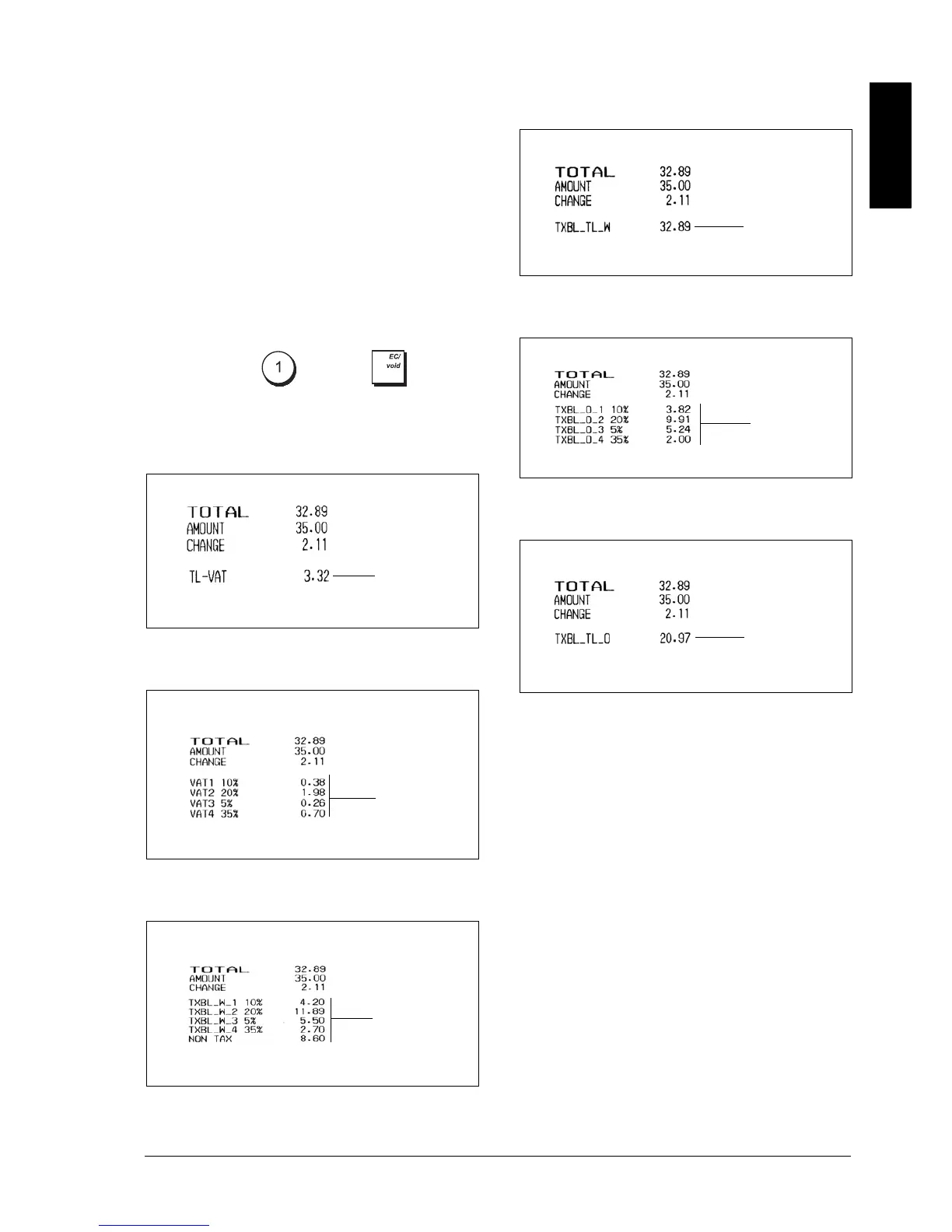
Receipt With Sum of all VAT Amounts
Calculated (TL-VAT) - System Option 71
Receipt With Taxed Sales Totals Split per
Rate - System Option 72
Receipt With Sales Totals With VAT Split per
Rate (TXBL_W) - System Option 73
Receipt with Overall Sales Total With VAT
(TXBL_TL_W) - System Option 74
Receipt With the Sales Totals without VAT
Split per Rate (TXBL_0) - System Option 75
Receipt With Sales Total Without VAT
(TXBL_TL) - System Option 76
Sum of the individual
VAT totals
VAT totals per
programmed rate
Sales totals with VAT
split per rate
Overall sales total with
VAT
Sales totals without VAT
split per rate
Sales total without VAT



 To Next Page