Field Service Ver. 1.0 Jun. 2008 7. Jam display
MB-502
Troubleshooting
7.3 Solution
7.3.1 Initial check items
• When a paper misfeed occurs, first perform the following initial check items.
7.3.2 Misfeed at manual bypass feed section
A. Detection timing
B. Action
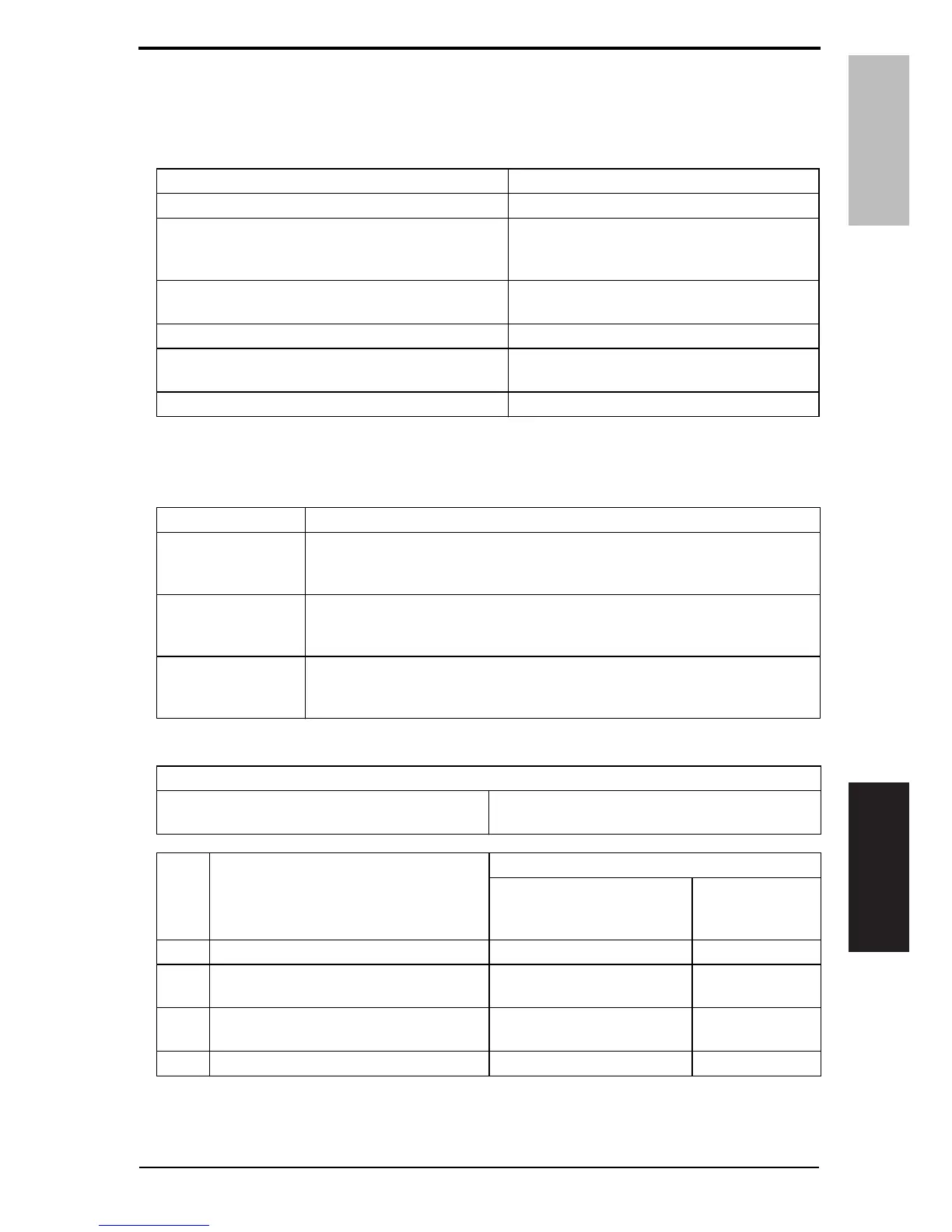
Check item Action
Does paper meet product specifications? Replace paper.
Is the paper curled, wavy, or damp?
Replace paper.
Instruct the user on the correct paper storage
procedures.
Is a foreign object present along the paper path, or is
the paper path deformed or worn?
Clean the paper path and replace if necessary.
Are rolls/rollers dirty, deformed, or worn? Clean or replace the defective roll/roller.
Are the edge guide and trailing edge stop at the cor-
rect position to accommodate the paper?
Set as necessary.
Are the actuators operating correctly? Correct or replace the defective actuator.
Type Description
Detection of misfeed
at manual bypass
feed section
• The leading edge of the paper does not block the sensor in front of tim. roller
(PC1) even after the lapse of a given period of time after the paper feed clutch
(CL5) has been energized.
Manual bypass feed
section loop registra-
tion reversing jam
• Rise timing of load for registration is earlier than the one for making the loop
at front of the registration roller at bypass feed.
Manual bypass feed
section TOD permit
waiting jam
• For paper fed from the manual bypass, TOD permit continues to be disabled
for a predetermined period of time after the timing of TOD output.
Relevant electrical parts
Sensor in front of tim. roller (PS1)
Paper feed clutch (CL5)
Printer control board (PRCB)
Step Action
WIRING DIAGRAM
Control signal
Location
(Electrical
components)
1 Initial check items — —
2 PS1 I/O check, sensor check PRCB CN1-3 (ON)
d-Color MF201
C to D-19
3 CL5 operation check PRCB CN11-2 (ON)
MB-502
D-2 to 3
4 PRCB replacement — —
Y109730-6 Service Manual 23













 To Next Page