56 EN
4 Playback functions
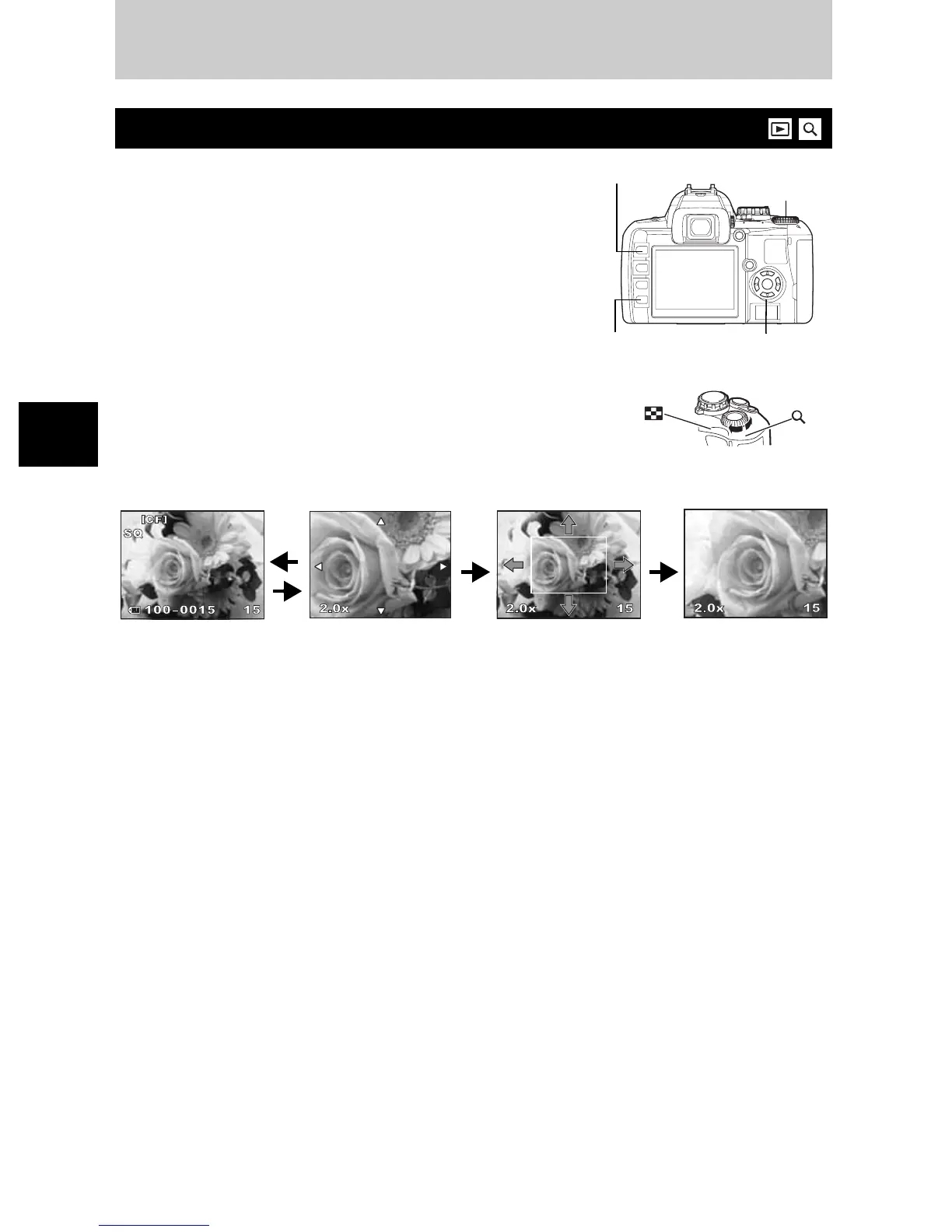
The basic procedure for viewing pictures are as shown below.
However, before using any of these functions, follow step 1
below.
1
Press the
q
(playback) button.
(Single-frame playback)
•
The last recorded image appears.
•
The LCD monitor turns off after more than 1 minute if no
operations are performed. The camera will turn off
automatically if there is no operation after 4 hours. Turn
on the camera again.
2
Use
p
to select images you want to view.
You can also turn the control dial to switch
to
U
for close-up playback.
Single-frame / Close-up playback
(Single-frame
playback) (Close-up playback)
Press
p
to change
the close-up position.
(Close-up position
playback)
Press
p
to move the
display of the close-
up position.
(Close-up playback)
Press
p
to view
frame-by-frame
close-ups.
Control dial
INFO
button
p
q
button
Press the INFO button.Press the INFO button.
a
: Displays the frame that is stored
10 frames back
c
: Displays the frame that is stored
10 frames ahead
d
: Displays the next frame
b
: Displays the previous frame
•
To exit the playback mode, press the
q
button.
•
Pressing the shutter button halfway resumes the
shooting mode.
Playback functions
4



 To Next Page