EN 3
Basic guide
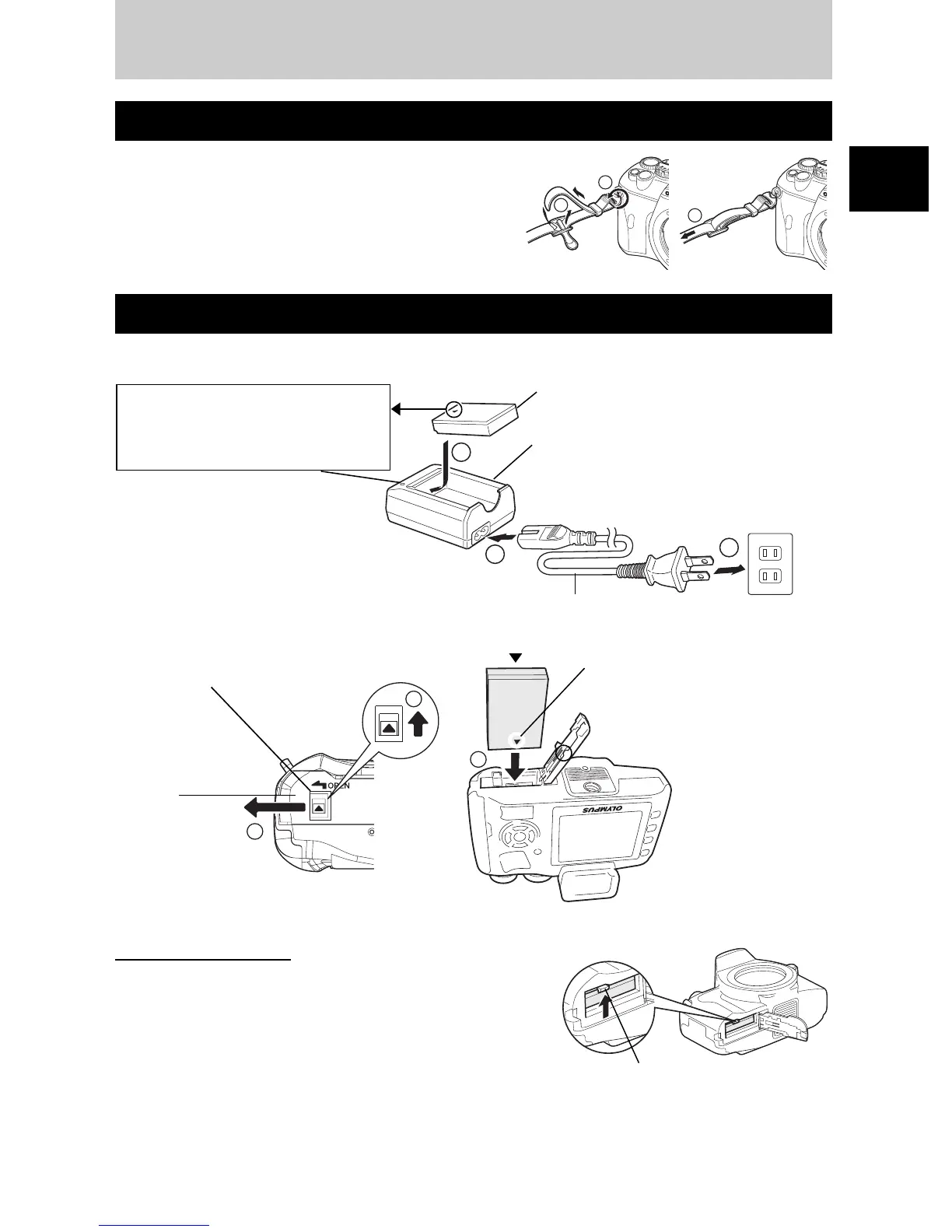
Thread the strap as indicated by the arrows (
1
,
2
).
Lastly, pull the strap tight making sure that it is
fastened securely (
3
).
1
Charging the battery.
2
Loading the battery.
•
Close the battery compartment cover until a click is heard.
Unloading the battery
Press the battery lock to unlock and remove the battery.
•
It is recommended to set aside a backup battery for
prolonged shooting in case the battery in use drains.
Attaching the strap
Preparing the battery
1
2
3
1
2
3
Lithium ion battery (BLS-1)
AC wall outlet
Lithium ion charger (BCS-1)
Charging indicator
Red light: Charging in progress
Green light: Charging completed
(Charging time: Approx. 210 minutes)
AC cable
1
2
3
Battery compartment lock
Battery
compartment cover
Direction indicating mark
Battery lock
Basic guide



 To Next Page