5
To perform shutdown processing of the devices when a power failure occurs
5-2 When using the UPS monitoring software
BU100RS
5-2-2 What is the Simple Shutdown Software
“Simple Shutdown Software” allows you to automatically shut down the PC when a power
failure occurs. It can be downloaded from our website,
http://www.omron.co.jp/ese/ups/download/category_u.htm.
For more information, refer to the manual of this soft ware.
5-2-3 How to connect
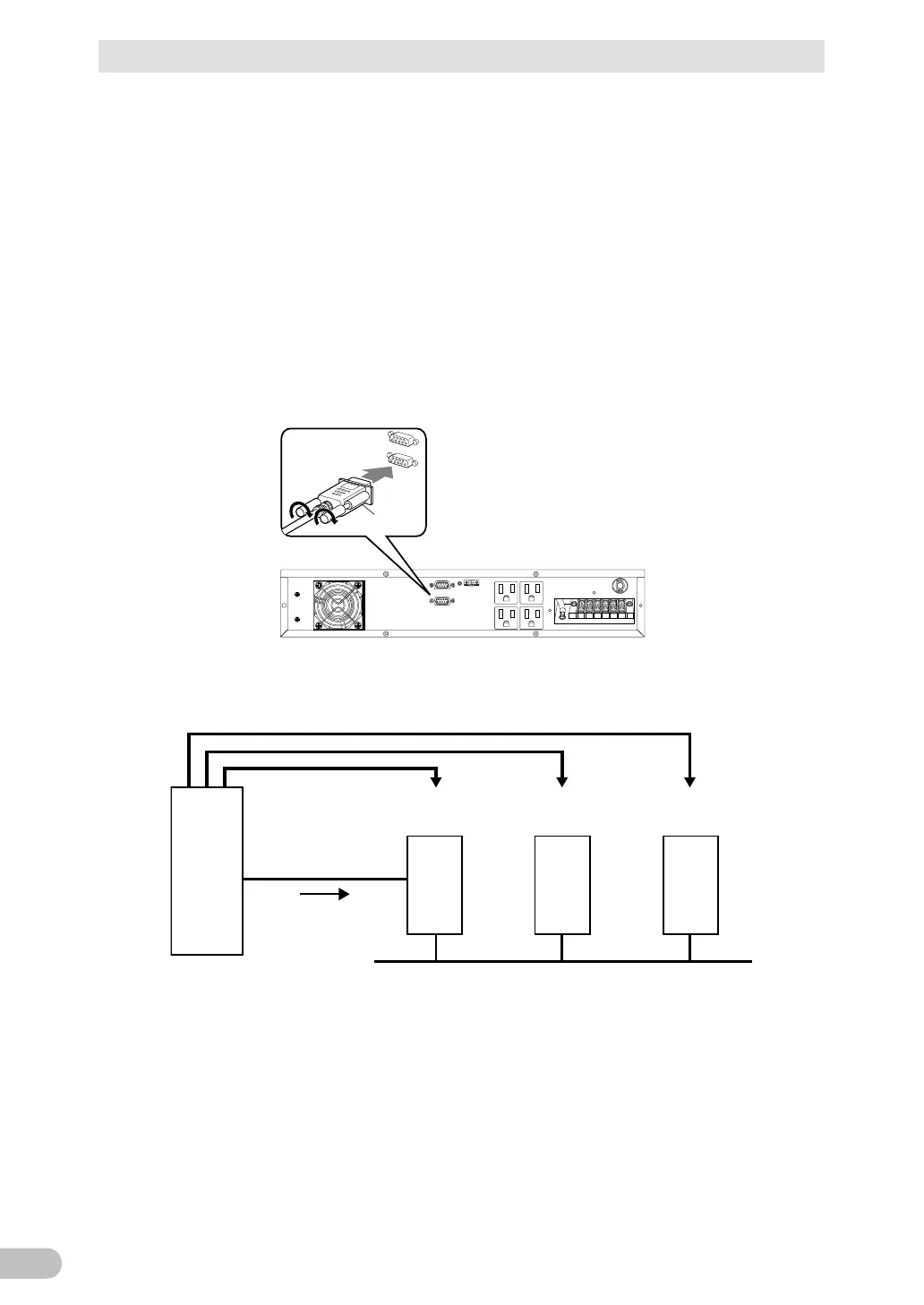
1. Connect the UPS to a computer.
Cable: Included connection cable (RS232C)
Connect to RS232C
port on UPS
Connector
* When connecting 2 or more computers to the UPS (Only when using PowerAct Pro)
PC
Master Agent
PC
Slave Agent
PC
Slave Agent
LAN
Connection cable
(RS-232C)
Shutdown
UPS
Power output
2. Install the “PowerAct Pro” or “Simple Shutdown Software” to the PC you want to shut
down.
Note: Installation method:
For “PowerAct Pro”, refer to the installation guide (for Windows) on the CD-ROM.
Refer to the manual for “Simple Shutdown Software”.



 To Next Page