EasyManua.ls Logo

Omron BU100RS - Displays and Beeps When There Is an Equipment Failure

Omron BU100RS
102 pages
Print Icon
To Next Page IconTo Next Page
To Previous Page IconTo Previous Page
Loading...
3 Check and start operation
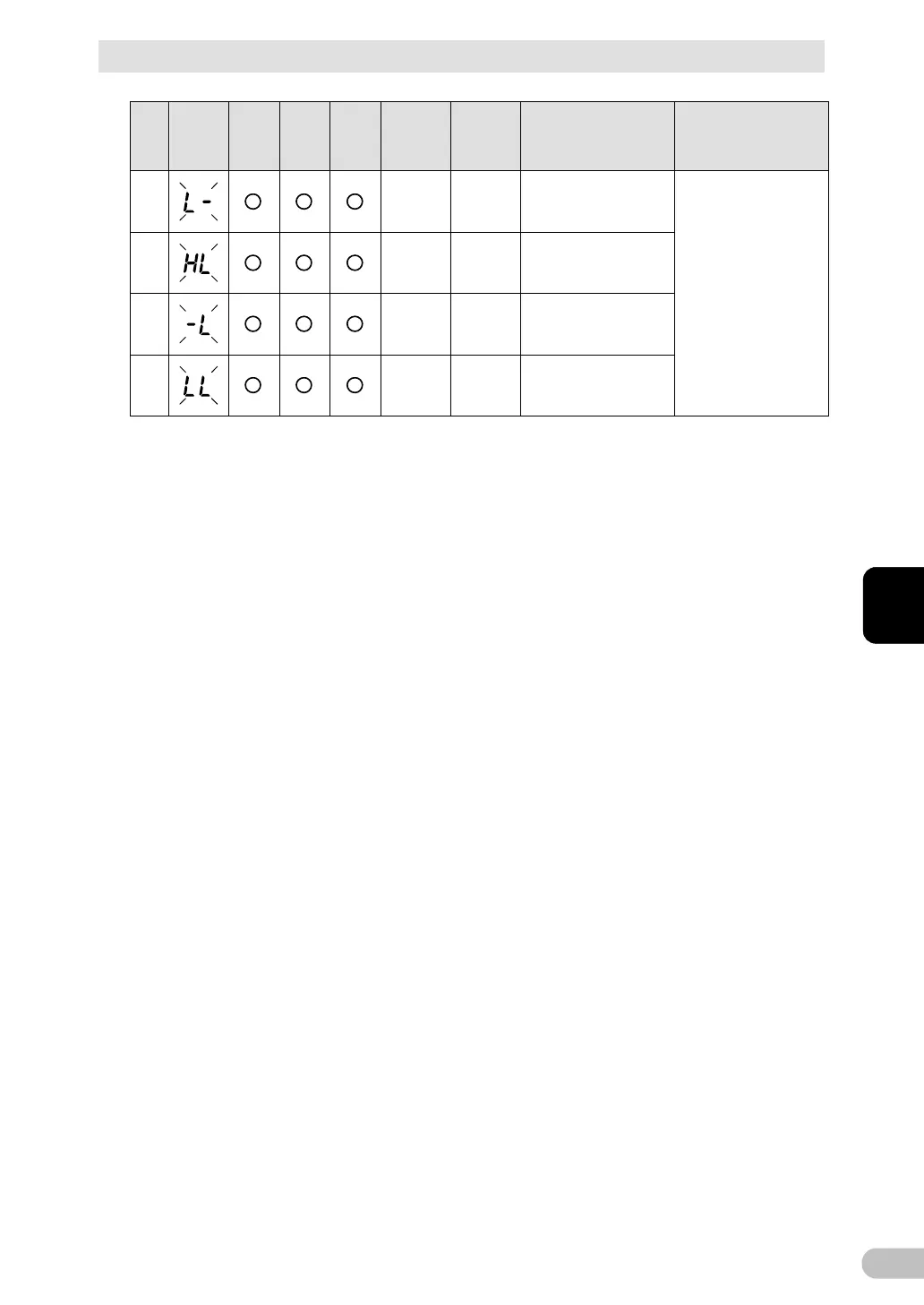
3-4 Interpreting beeps and displays
BU100RS
51
3
No.
Status
indicator
Power
supply
output
LED
Battery
mode
LED
Battery
replace
ment
LED
Beep Charging Description Solution
15
None (ON)
AC input voltage is too
low.
Use within the AC input
voltage/frequency range
described in the
specifications.
16
None (ON)
AC input voltage is too
high and AC input
frequency is too low.
17
None (ON)
AC input frequency is
too low.
18
None (ON)
AC input voltage and
AC input frequency are
both too low.
3-4-4 Displays and beeps when there is an equipment
failure
(1) When "Power" switch is "ON"

Table of Contents

Related product manuals