Appendices
A - 46
NX-series Analog I/O Units User’s Manual for Analog Input Units and Analog Output Units (W522)
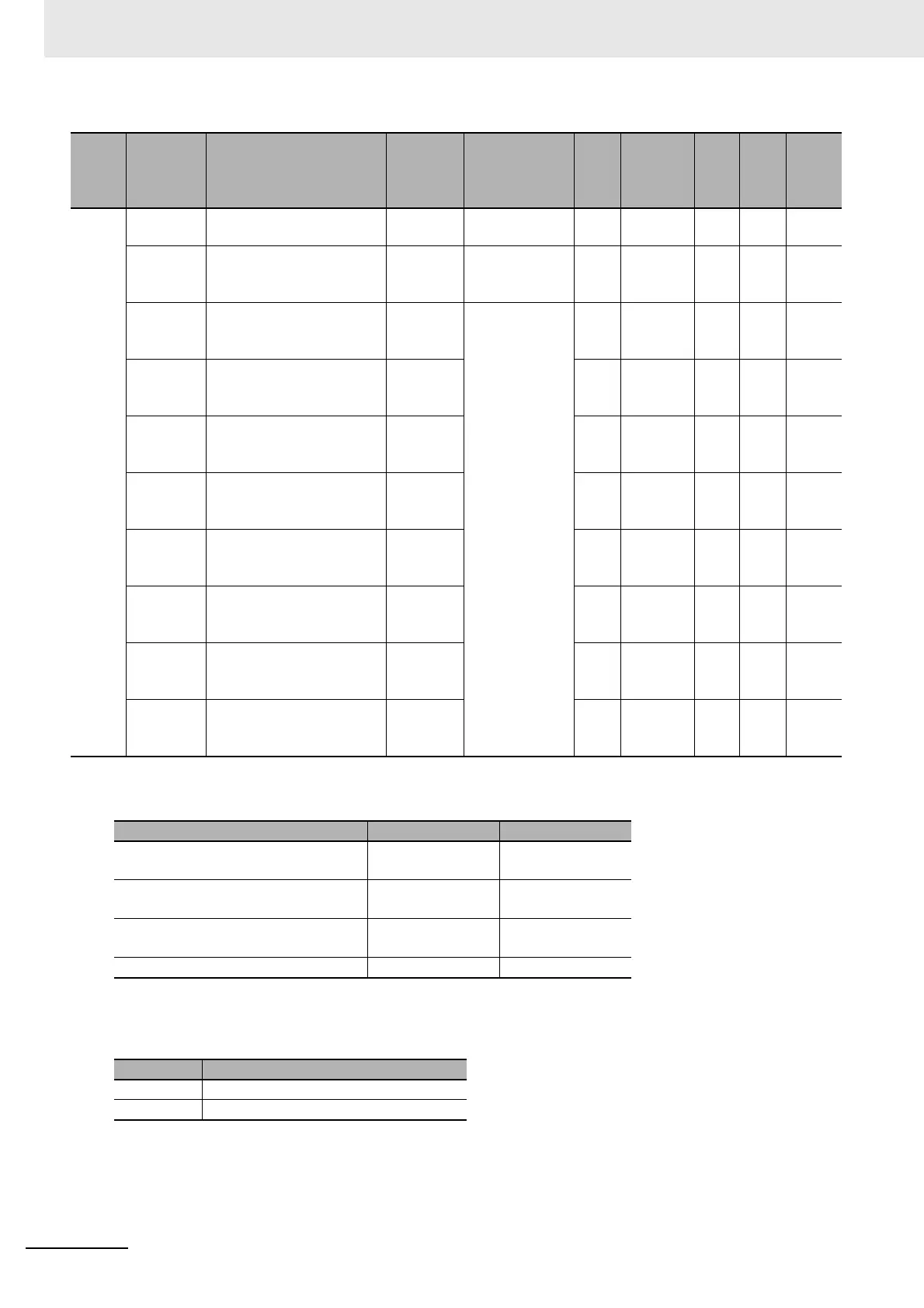
*1. The default value and data range for Number of Entries are as follows.
*2. The meanings of the set values for Ch Disconnection Detection Status are as follows.
Index
(hex)
Subindex
(hex)
Object name
Default
value
Data range Unit
Data
type
Acc
ess
I/O
allo-
cat-
ion
Data
attri-
bute
5005 --- Disconnection Detection
Status
--- --- --- --- --- --- ---
00 Number of Entries
*1 *1
--- USINT RO Not
pos-
sible
---
01 Ch1 Disconnection Detec-
tion Status
FALSE TRUE or
FALSE
*2
--- BOOL RO Not
pos-
sible
---
02 Ch2 Disconnection Detec-
tion Status
FALSE --- BOOL RO Not
pos-
sible
---
03 Ch3 Disconnection Detec-
tion Status
FALSE --- BOOL RO Not
pos-
sible
---
04 Ch4 Disconnection Detec-
tion Status
FALSE --- BOOL RO Not
pos-
sible
---
05 Ch5 Disconnection Detec-
tion Status
FALSE --- BOOL RO Not
pos-
sible
---
06 Ch6 Disconnection Detec-
tion Status
FALSE --- BOOL RO Not
pos-
sible
---
07 Ch7 Disconnection Detec-
tion Status
FALSE --- BOOL RO Not
pos-
sible
---
08 Ch8 Disconnection Detec-
tion Status
FALSE --- BOOL RO Not
pos-
sible
---
NX Units Default value Data range
NX-AD2203/AD2204/AD2208/
AD2603/AD2604/AD2608
22
NX-AD3203/AD3204/AD3208/
AD3603/AD3604/AD3608
44
NX-AD4203/AD4204/AD4208/
AD4603/AD4604/AD4608
88
Other models 0 0
Value Meaning
FALSE Disconnection Undetected
TRUE Disconnection Detected


 To Next Page
 Loading...