51
RFID System
Operation Manual
Section 3 Switch Settings
Section 3
Preparing Communications
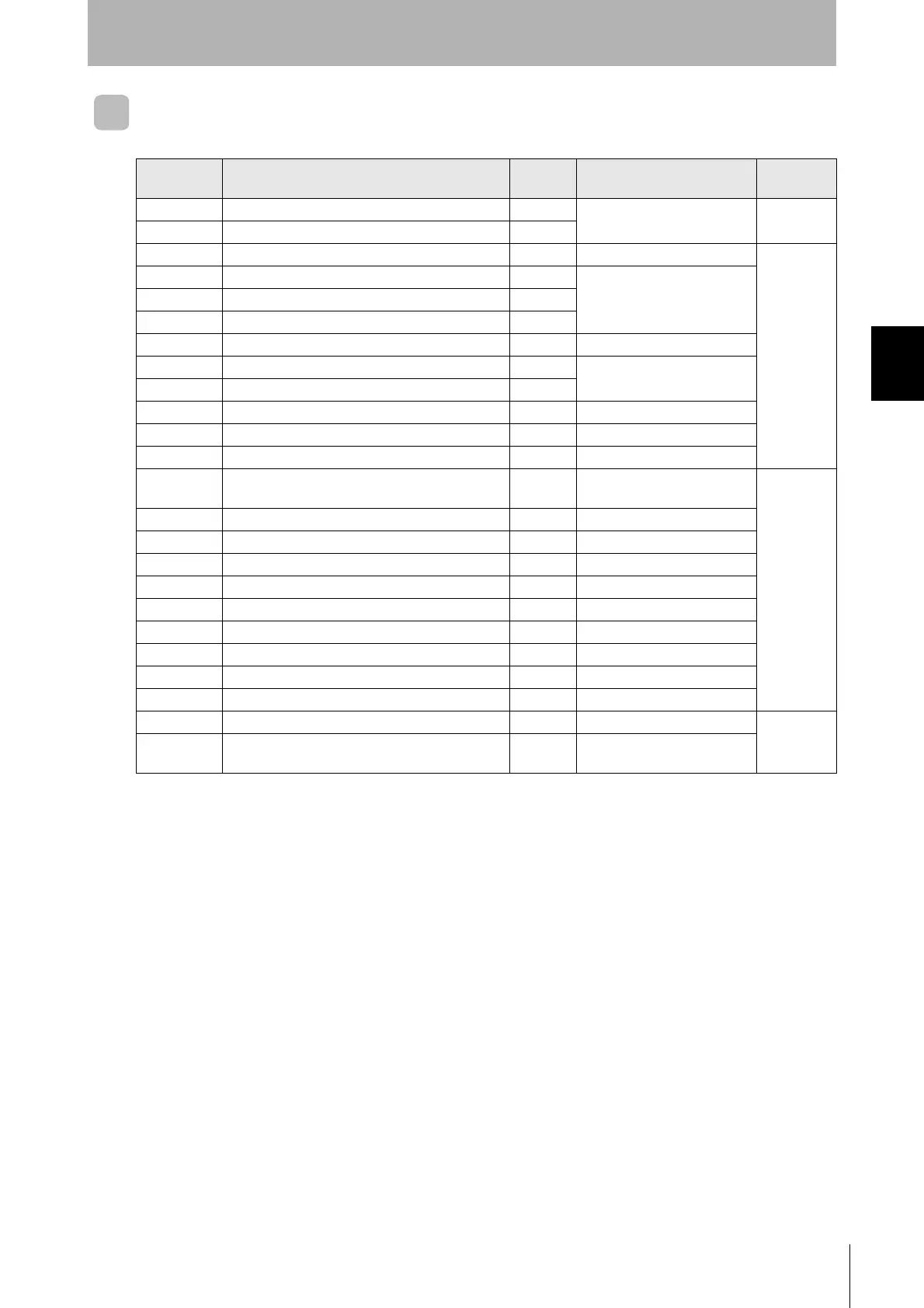
Factory Settings
Name
Factory
setting
Description
More
information
SW1 Controller Number Switch 1 (Upper digit: 0 to 9) 0 Controller number 00
p.52
SW2 Controller Number Switch 2 (Lower digit: 0 to 9) 0
SW3 pin 1 DIP switch/internal setting selector OFF DIP switches enabled
p.53
SW3 pin 2 Baud rate setting 1 OFF Baud rate: 2,400 bps
SW3 pin 3 Baud rate setting 2 OFF
SW3 pin 4 Baud rate setting 3 OFF
SW3 pin 5 Data length setting OFF Data length: 7 bits
SW3 pin 6 Parity setting 1 OFF Parity: Even
SW3 pin 7 Parity setting 2 OFF
SW3 pin 8 Stop bit setting OFF Stop bits: 2 bits
SW3 pin 9 Communications protocol setting OFF 1:1
SW3 pin 10 Reserved. OFF Not used.
SW4 pin 1
Priority mode switch
OFF
Communications distance
priority
p.54
SW4 pin 2 Verify setting OFF Verification enabled
SW4 pin 3 Display switch OFF End code display
SW4 pin 4 Lower trigger execution OFF No lower trigger
SW4 pin 5 Reserved. OFF Not used.
SW4 pin 6 Test switch OFF Test stopped
SW4 pin 7 Reserved. OFF Not used.
SW4 pin 8 TEST head specification OFF Read/Write Head 1 designated
SW4 pin 9 TEST command specification OFF Read test
SW4 pin 10 Reserved. OFF Not used.
SW5 Mode switch OFF RUN mode
p.55
SW6
Terminating resistance switch
OFF
Terminating resistance not
connected.



 To Next Page
 Loading...