3 Operational Maintenance
August 2010 AS3690 Operator Manual 3-7
Contact image sensor
1 Stop all jobs and ensure that all motors are stopped.
2 Open the Transport Door using the metal handle.
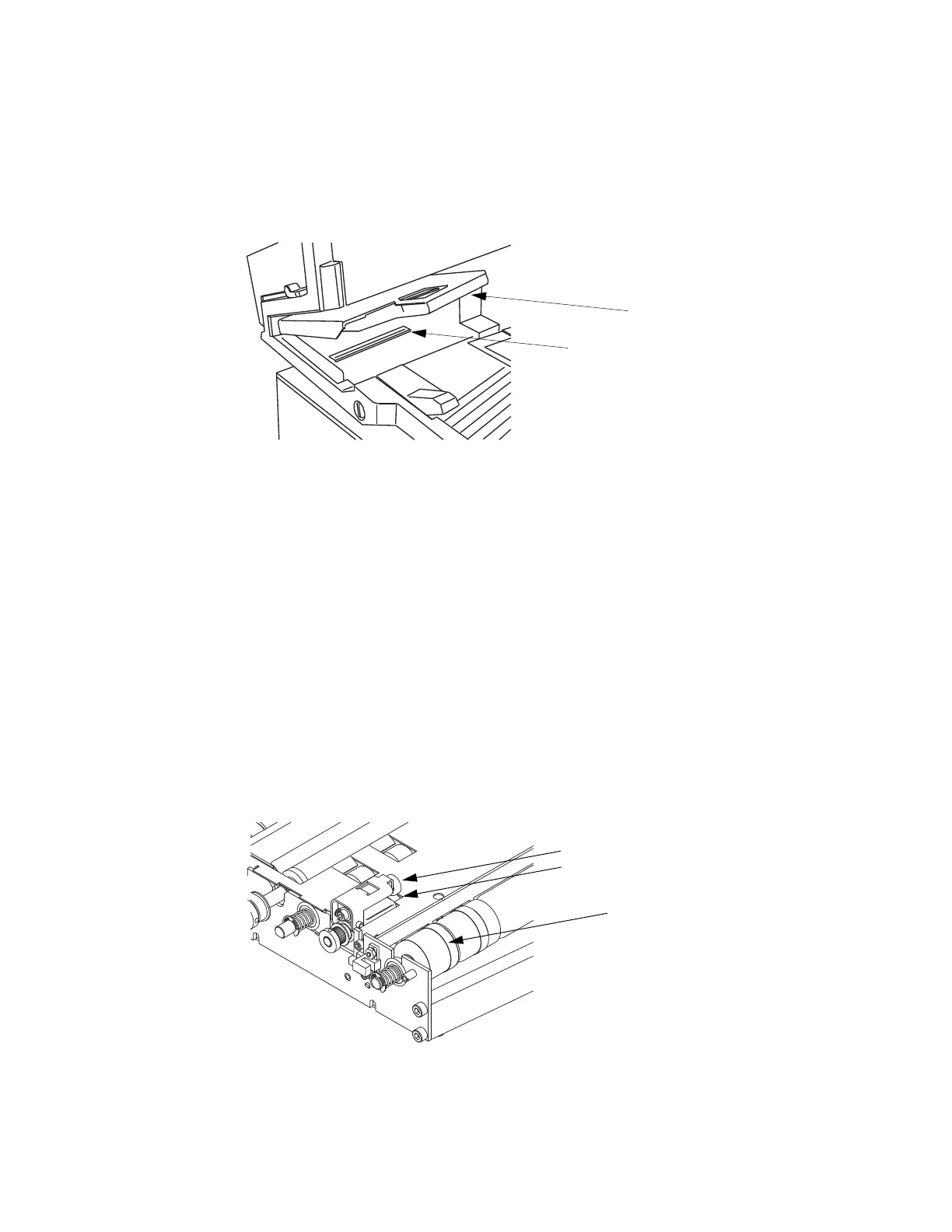
3 Using glass cleaner and a lint-free cloth, clean the upper and lower CIS glass.
FIGURE 31: Cleaning the Contact Image Sensor glass surfaces
- Windex (the recommended glass cleaner) can be applied to a lint-free rag and
wiped on the imager glass top (front camera) and bottom (back camera). The
top camera (not viewable in this picture) is on the underside of the cover
directly above the bottom camera.
The glass should be cleaned at the beginning or end of each shift, or as needed. If the
operator sees lines appearing on the image previewed on the screen, then it is likely
there is a speck (toner, white out, paper, glue, etc.) attached to the glass obstructing
the view. Wipe the glass clean and the line should not appear on the image when the
piece is scanned again. Be sure to clean the top camera glass if the line appears on
the front side of the image.
Thickness detect rollers
1 The Thickness Detect mechanism is located inside the Transport assembly. Open
the Transport Door and look to the left side.
Lower glass
Upper glass is on the
underside of the cover
Upper Thickness Detect Roller
Lower Thickness Detect Roller
Push on the rubber
band on the crush
roller to rotate it.



 To Next Page