range Pi 用户手册 深圳市迅龙软件有限公司版权所有
www.orangepi.cn
10
www.xunlong.tv
2.3. Method to burn Linux image or OpenWRT image to TF
card based on Windows PC
1) The method of burning OpenWRT image based on Windows PC is the same as the
method of burning Linux image. The following is an example of burning Linux image
2) First prepare a TF card with 8GB or larger capacity. The transmission speed of the TF
card must be above class10. It is recommended to use a TF card of SanDisk and other
brands
3) Then use a card reader to insert the TF card into the computer
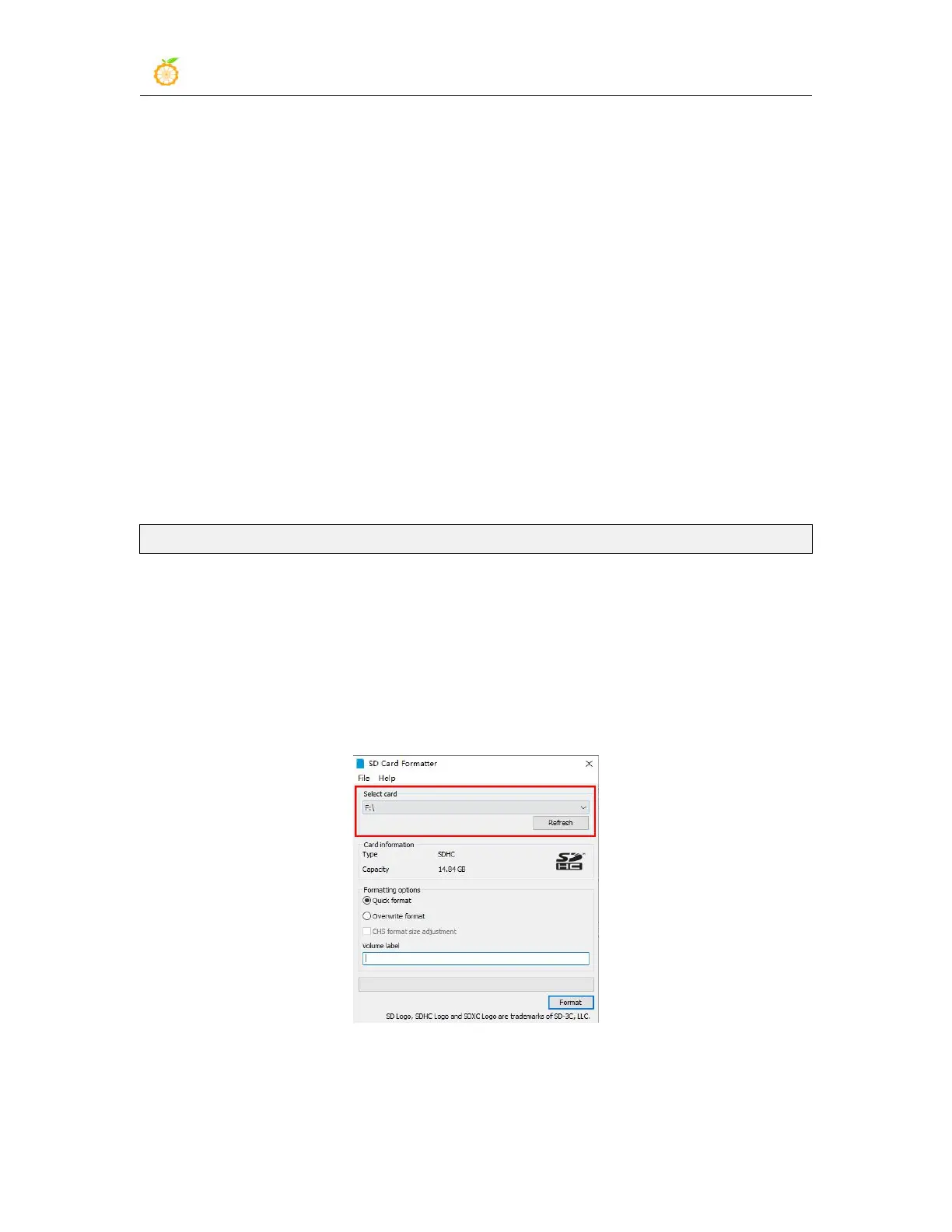
4) Then format the TF card
a. You can use SD Card Formatter to format the TF card, the download address is
https://www.sdcard.org/downloads/formatter/eula_windows/SDCardFormatterv5_WinEN.zip
b. After downloading, unzip and install directly, and then open the software
c. If the computer only has a TF card inserted, the “Select card” column will
display the drive letter of the TF card. If multiple USB storage devices are
inserted into the computer, you can select the drive letter corresponding to the
TF card through the drop-down box
d. Then click "Format", a warning box will pop up before formatting, and
formatting will start after selecting "Yes (Y)"



 To Next Page