range Pi 用户手册 深圳市迅龙软件有限公司版权所有
www.orangepi.cn
79
www.xunlong.tv
5.18.3.
13pin UART test
1) The uart controller in 13pin is closed by default in the Linux5.8 OS in dts. If you need
to use uart, you need to open the configuration of uart first. The opening method of uart
in Linux5.8 OS is as follows:
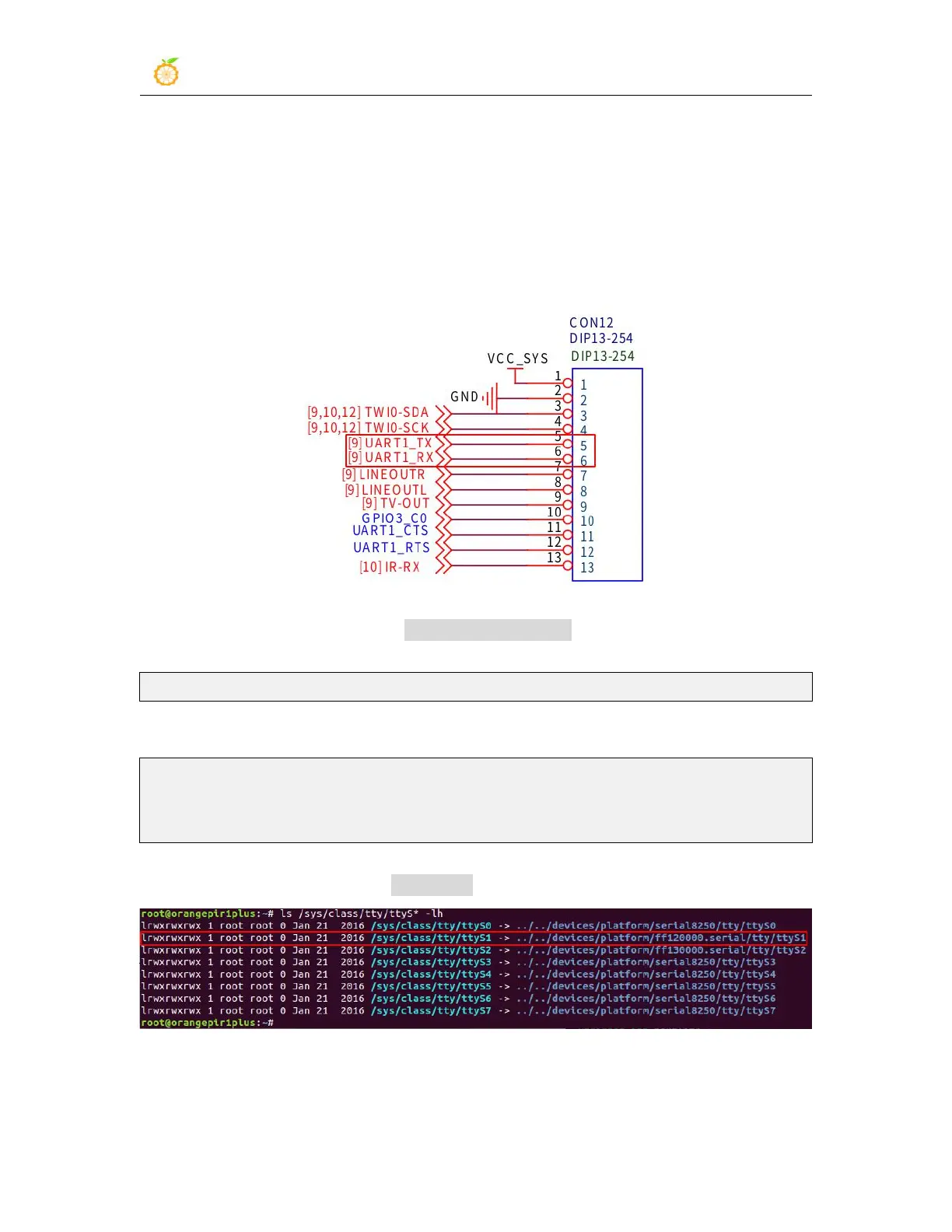
a. According to the schematic diagram of 13pin, the uart available on the
development board is uart1
b. Then set overlays=uart1 in /boot/orangepiEnv.txt to open the configuration of
uart1
overlays=uart1
c. Then restart the system. When starting, you can see the configuration output of
UART related DT overlays in the u-boot startup log
Applying kernel provided DT overlay rockchip-uart1.dtbo
2698 bytes read in 8 ms (329.1 KiB/s)
Applying kernel provided DT fixup script (rockchip-fixup.scr)
d. After the system starts, you can see the information of ttyS1 under /sys/class/tty,
uart1 in 13pin corresponds to /dev/ttyS1
2) Then start to test the uart interface, first use the Dupont line to short-circuit the rx
and tx of the uart1 interface to be tested



 To Next Page