IGS-3032GC User’s Manual
46
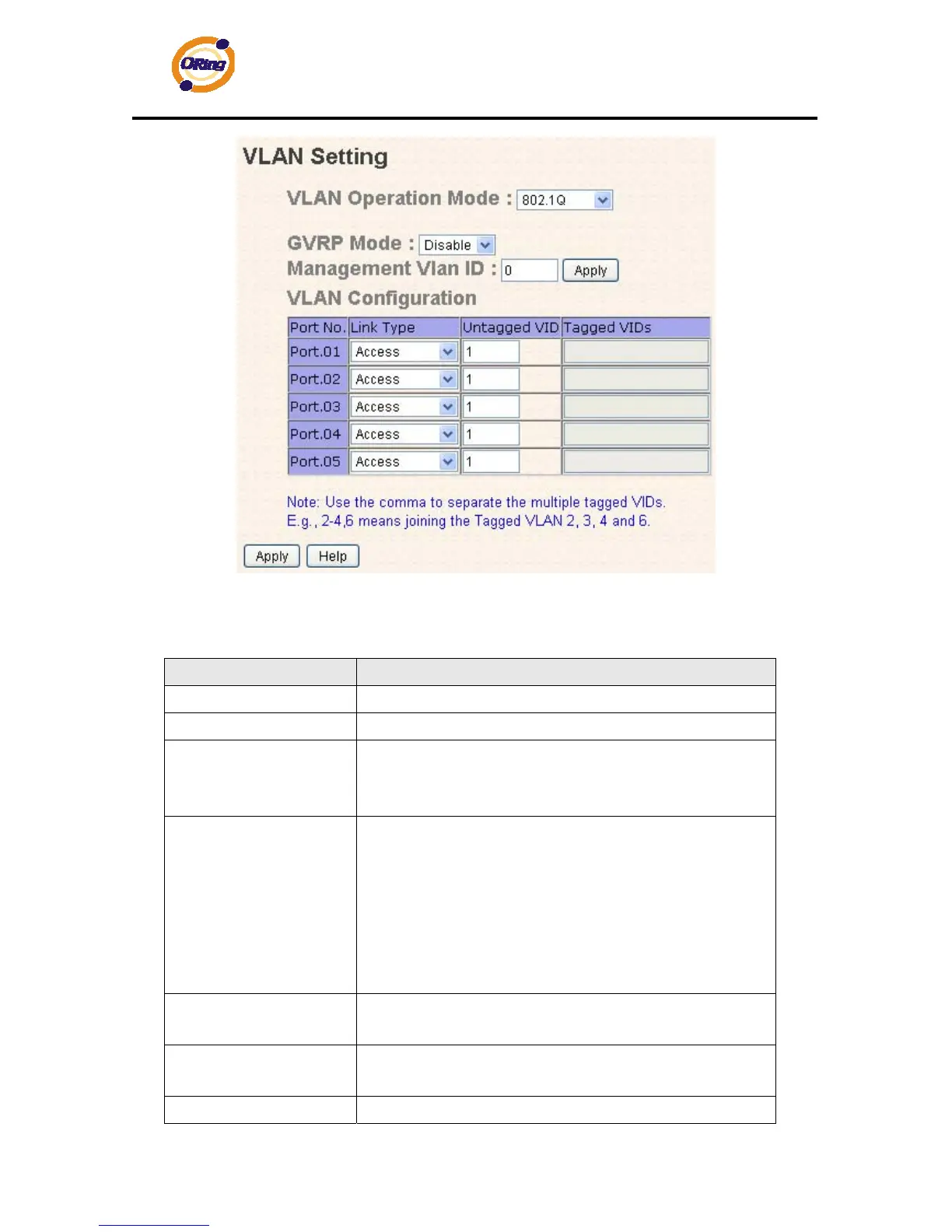
VLAN Configuration – 802.1Q interface
The following table describes the labels in this screen.
Label Description
VLAN Operation Mode
Configure VLAN Operation Mode: disable, Port Base,802.1Q
GVRP Mode
Enable/Disable GVRP function.
Management VLAN ID
Management VLAN can provide network administrator a
secure VLAN to management Switch. Only the devices in the
management VLAN can access the switch.
Link type
There are 3 types of link type:
Access Link: single switch only, allows you to group ports by
setting the same VID.
Trunk Link: extended application of Access Link, allows you
to group ports by setting the same VID with 2 or more
switches.
Hybrid Link: Both Access Link and Trunk Link are available.
Untagged VID
Set the port default VLAN ID for untagged devices that
connect to the port. The range is 1 to 4094.
Tagged VIDs
Set the tagged VIDs to carry different VLAN frames to other
switch.
Apply
Click “Apply” to set the configurations.


 To Next Page