ExpressBox 16 Basic| 27
NOTE
The power supply switch cannot be toggled quickly from ON to OFF after the expansion set is initially powered. There is a
few seconds delay to power the device down.
2.9 Power ON Computer
To effectively use your OSS chassis as part of your computer system, ensure that all the proper connections are made. Then power on your
computer. This will enable your OSS chassis to turn ON. The OSS chassis can also turn ON by itself by pressing the main switch on the front
panel and then turning on the computer.
2.10 Hardware Verification
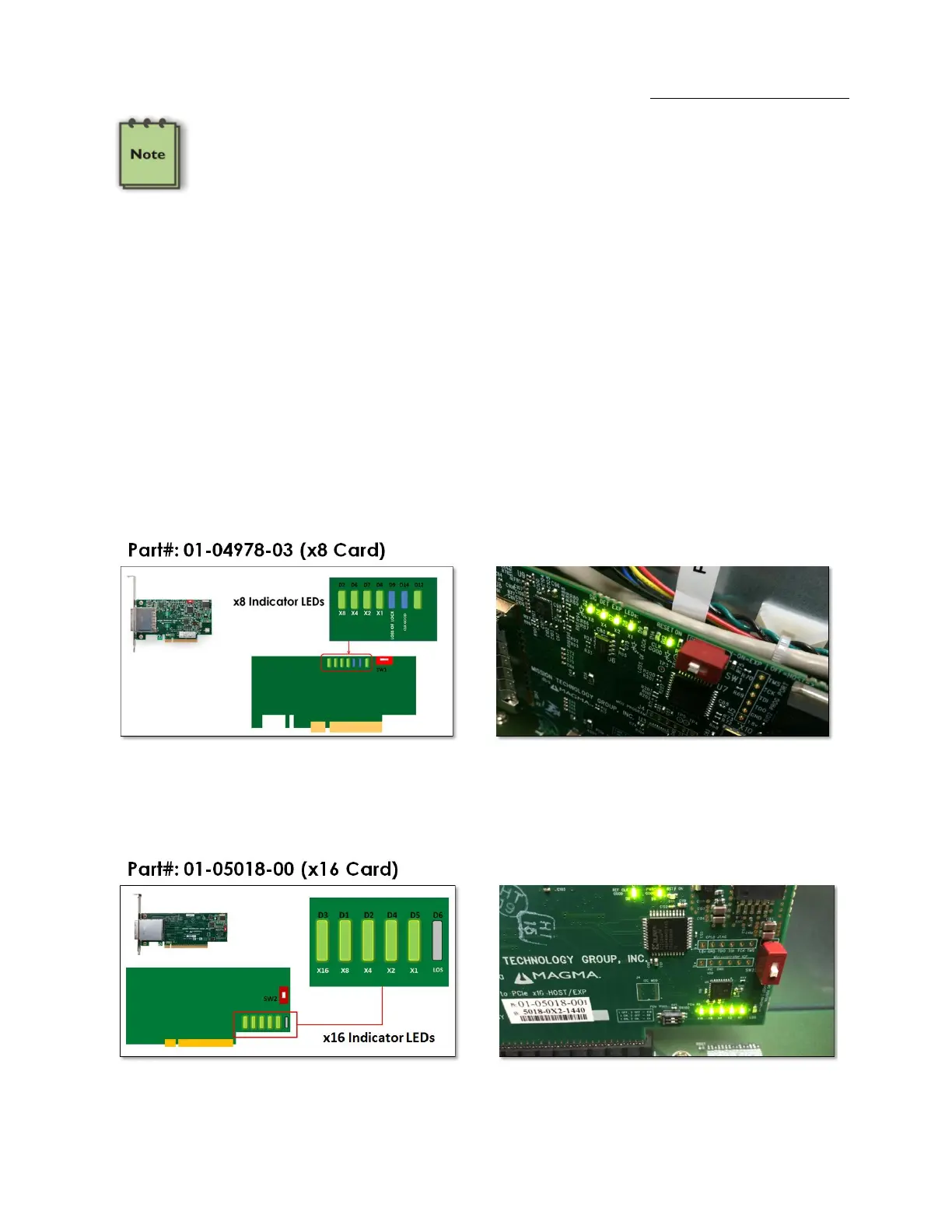
Verify the following LEDs on the Expansion and Host interface cards. A x8 Interface card (both expansion and host cards) with proper link
established should show up with FIVE solid green LEDs.
The normal LED indicator on the expansion card should display five solid green LEDs. This signifies that the expansion unit is training to x8. If
you are seeing four solid green LEDs (illuminated) and one amber solid, this is OK. This signifies that it is training to x4 or it is not utilizing its full
x8 bandwidth. A x16 Interface card (both expansion and host cards) with proper link established will illuminate FIVE solid green LEDs.


 To Next Page