Ottobock | 63B600
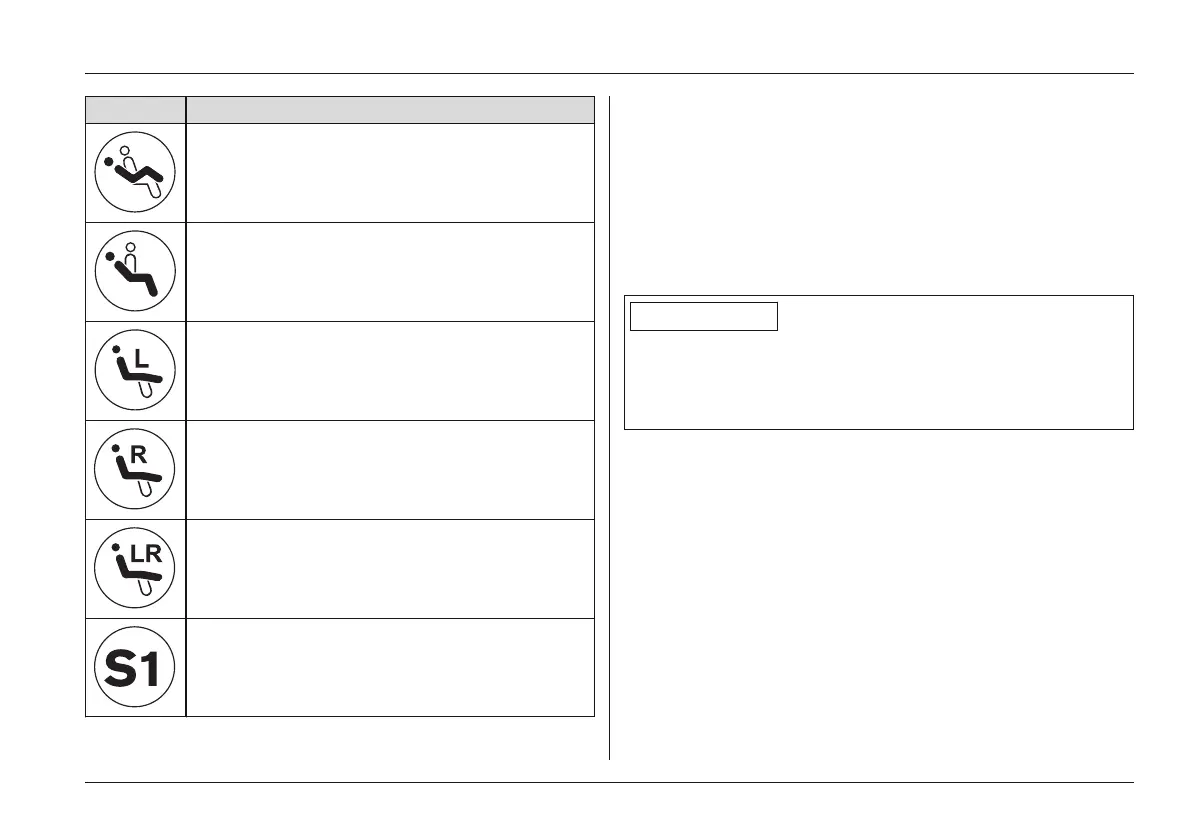
Display Information
Power seat tilt
Power back angle adjustment
Power footrest, left
Power footrest, right
Power footrests, coupled
Other special functions (combinations)
S1 – S5
Key functions
• The [Mode] button (see Fig.36, item 2) is used to
toggle among the different functions (1-2-3-4-5-1-2-…).
• The blue LED (see Fig.36, item 3) indicates the selec
ted power function.
• The respective function (function up/down) is activated
using the buttons [Selected function up] and [Selected
function down] (see Fig.36, item 4).
INFORMATION
The function of the [Selected function up/down] buttons
can be programmed according to the user's wishes (but
ton [Selected function up] = function up or function down -
depending on programming).
In addition, there are three Piko buttons that can be connec
ted to the push-button module and positioned at will (see
Page65).
The Piko buttons perform the same functions as the [Mode]
button and the [Selected function up]/[Selected function
down] buttons (see Fig.36, items 2 and 4). Symbols on the
back of the push-button module indicate the corresponding
functions.
Usage















 To Next Page