Remote Control
Outlaw Audio
10
A
For your convenience, the Model 976 comes with a
remote control.
Remote Control
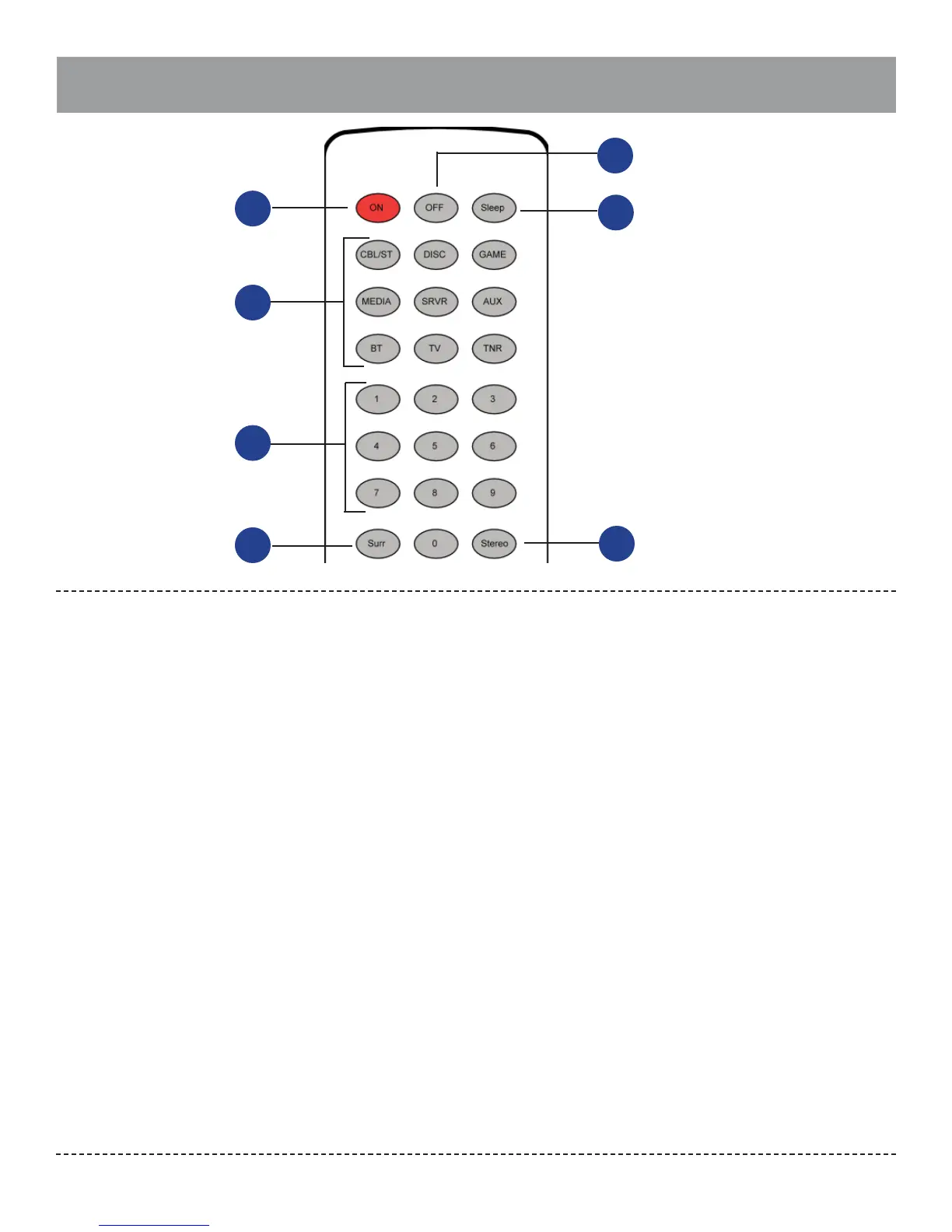
Power/Input/Numeric
Controls
Power On
(Page 33)
Press this button to bring the Model 976 out of
standby mode.
Power O
(Page 33)
Press this button to place the Model 976 in
standby mode.
Sleep
(Page 38)
Press this button to activate the sleep function,
which turns the Model 976 o after a user-select-
able amount of time.
Source/Input Selectors
(Page 33)
Press the button corresponding to the name of
the input you wish to listen to. Options include
Cable/Sat (CBL/ST), Disc, Game, Media, Server
(SRVR), Aux, Bluetooth (BT), TV, and Tuner (TNR).
Numeric Keypad (0-9)
(Page 40)
Press these buttons to enter numbers for dif-
ferent functions such as direct input of station
frequencies and direct access to preset stations
for the tuner.
Surr
(Pages 14 and 34-35)
Press this button to cycle through the available
surround processing modes. The rst press will
display the current mode.
A.
B.
C.
D.
E.
F.
Stereo
(Page 35)
Press this button to select stereo mode instead of
surround processing modes.
Menu (Pages 23)
Press this button to access the Model 976’s setup
menu.
Cursor Control
(Pages 23, 26, and 37)
These buttons control the cursor when navigat-
ing the setup menus. In addition, the Up and
Down buttons cycle through the radio preset
stations.
Sync
(Page 36)
This button provides access to the AV sync con-
trol for the active input.
Volume Up/Down
(Page 34)
Press these buttons to raise or lower the volume.
Night Mode
(Page 38)
Press this button to enable or disable Night
Mode.
EQ
(Page 38)
Press this button to engage and disengage the
EQ.
Tone
(Page 36)
Press this button to adjust the bass and treble
settings.
G.
H.
I.
J.
K.
L.
M.
N
Direct Mode
(Page 40)
This button starts the process of selecting a
broadcast station directly. Within ve seconds
of pressing the button, key in a broadcast fre-
quency using the numeric pad (E).
Exit
(Page 23)
Press this button to exit the Model 976’s setup
menu.
Enter
(Page 23)
When navigating the setup menu, pressing this
button will access sub-menus or select high-
lighted options.
Test
(Page 37)
Press this button to access audio test tones and
adjust channel levels.
Mute On/O
(Page 34)
Press this button to mute the speaker outputs.
The front panel mute button’s blue LED will be
on when Mute is engaged.
Tuner Scan Up/Down
(Page 39)
When the tuner is in use, press these buttons
to go to the next higher or lower broadcast
frequency.
O.
P.
Q.
R.
S.
T.
B
C
E
D
F
G


 To Next Page