Model 976 7.1 Channel Preamp/Processor
25
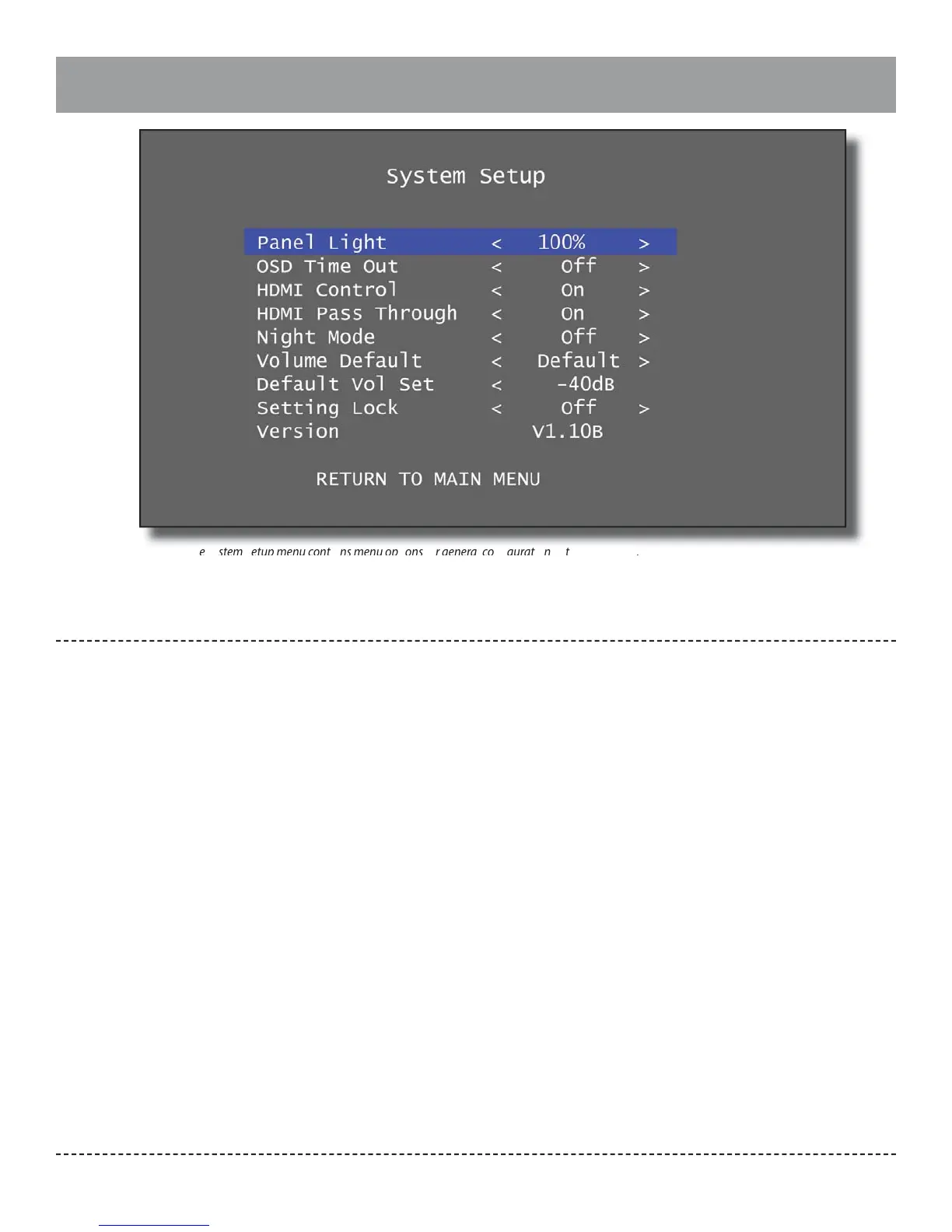
System Setup
The System Setup menu contains menu options for general con guration of the Model 976.
Panel Light:
Set this value to control brightness of the front
display panel. The default is 100% brightness. The
available choices are:
OFF → 25% → 50% → 100%
OSD Time Out:
Use this control to de ne how long the on-screen
menu is visible without user input. The default
setting of “O ” will allow the menu to stay visible
inde nitely. The available choices are:
30 seconds → 1 minute → 3 minutes →
5 minutes → O
HDMI Control:
Set to “On” (default setting) to allow Consumer
Electronics Control (CEC) of devices via HDMI connec-
tions. When enabled, commands such as power on/
o , input selection, or volume control that are sent
to one compatible device may be shared via HDMI
connection to other devices. Set to “O ” to disable
this control. The available choices are:
On → O
Note: While CEC is an industry standard, some manu-
facturers use di erent brand names for the protocol.
While many standard commands are available, each
manufacturer may choose to implement them di er-
ently.
HDMI Pass Through:
Set to “On” (default setting) to allow video signal
pass-through even when the Model 976 is in standby
mode. In this case, the last HDMI input selected will
continue to be passed to the HDMI output. Set to
“O ” to only allow HDMI output from the Model 976
when the unit is on. The available choices are:
On → O
Night Mode:
This mode a ects soundtracks produced in Dolby
Digital, Dolby Digital Plus, or Dolby TrueHD. It
employs dynamic range compression (DRC), which
quiets the loud peaks in a soundtrack while retain-
ing the same volume level for dialogue. There are
three modes. “Auto” activates DRC using instructions
encoded in the soundtrack itself; you may have more
or less DRC e ect depending on how the engineers
produced the soundtrack. “On” activates DRC for all
Dolby soundtracks. “O ” deactivates DRC entirely.
This setting can also be changed from the remote
control using the “NIGHT” button. The available
choices are:
On → O → Auto
Volume Default:
Set to “Default” to automatically start the Model 976
at a speci c volume setting or “Last” to start at the
last volume selected when the Model 976 was placed
in Standby.
Default → Last
Default Vol Set:
Select the start-up volume setting to be used with
“Default” volume setting. This setting may be any-
where from -70dB to -40dB in 1dB increments.
Setting Lock:
Set to “On” to lock all menu settings or “O ” (default)
to allow menu adjustments.
On → O
Version:
Displays rmware version installed on your Model
976.
Return to Main Menu:
Select this menu option to return to the Main Menu.


 To Next Page