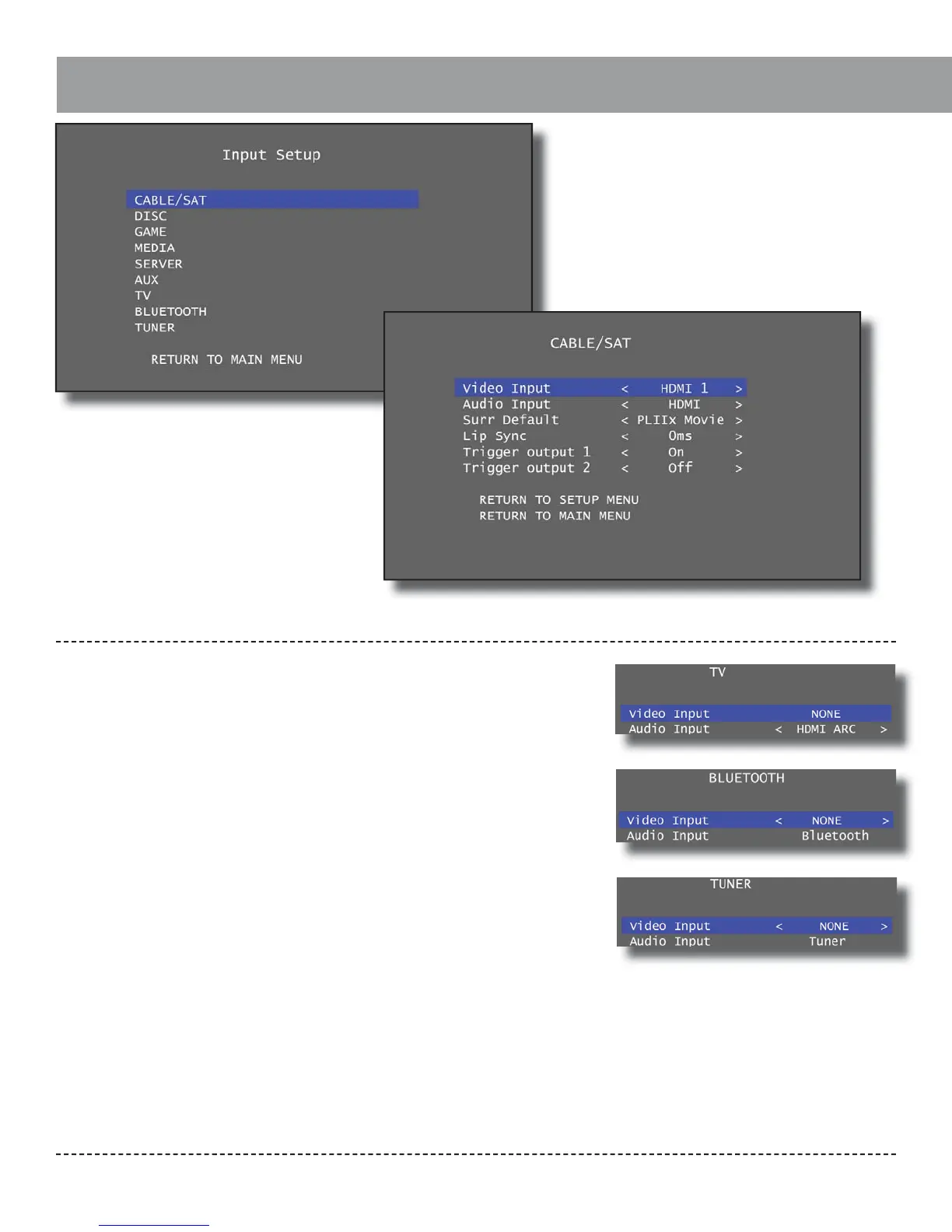
Input Setup
Outlaw Audio
26
The Input Setup menu menu allows custom
adjustments to each of the Model 976’s inputs.
Most of these inputs are “software” inputs that
can be assigned to the various digital and
analog rear panel connections used to connect
sources to the Model 976 in the “Connecting
Your Model 976” section. The inputs include
Cable/Sat, Disc, Game, Media, Server, Aux, TV,
Bluetooth, and Tuner. Refer to the Input Sum-
mary Sheet (page 46) for details on how each
source is connected to your Model 976.
All HDMI inputs can be assigned to the •
CBL/SAT, DISC, GAME, MEDIA, SERVER, and
AUX inputs.
The audio selections are xed for the •
BLUETOOTH (BT) and TUNER (TNR) inputs
to the bluetooth and tuner respectively.
For video, you may select HDMI IN 1-6.
The video selection for TV is xed to NONE. •
For audio, you may select coax, optical,
HDMI ARC, analog stereo, and 7.1 analog
inputs.
Video Input:
Select from HDMI inputs HDMI1 through HDMI6.
Note: This option is disabled for the TV input. The default
Video setting is also “NONE” for the Bluetooth and Tuner
inputs.
Audio Input:
Select HDMI (default) to get audio from the assigned
HDMI video input. Select “Coax1”, “Coax2”, “Opt1”, or
“Opt2” for a coaxial or optical digital audio input. Select
“Analog1” through “Analog 4” for a stereo analog audio
input. To use the Audio Return Channel with your TV,
select “HDMI ARC” with the TV input. This will allow the
TV input to use audio from the TV to the HDMI Out 1
output of the Model 976.
Note: This option is disabled for the Bluetooth and Tuner
inputs.
Surr Default:
This determines which surround processing mode is
used by default for the input. Options include Dolby
Pro Logic II Movie (“PLII Movie”), Pro Logic II Music (“PLII
Music”), Pro Logic II Game (“PLII Game”), DTS Neo:6 Cin-
ema (“Neo6 Cinema”), DTS Neo:6 Music (“Neo6 Music”),
All Channel Stereo (“ALL CH ST”), and Auto (“Auto”). See
the “Listening Modes” section of the manual (page 14)
for details on these processing modes.


 To Next Page