Model 976 7.1 Channel Preamp/Processor
17
Chapter 2 Overview
Connecting Audio
There are many possible ways to con-
nect a particular device. Use the diagrams
and notes on the following pages as a
guideline. The information in this section
contains some of the more common situ-
ations you might encounter in your sys-
tem. Always consult the owner’s manual
that came with the component you are
connecting for more information about
procedures, warnings, and options for the
source component’s connections.
Connecting Your
Model 976
Before you make any connections to your new
Model 976, please observe the following precau-
tions:
Do not plug the power cord into your •
Model 976 until all other connections have
been made.
Always refer to the instructions that came •
with the component that you are connecting
for speci c procedures, warnings and options.
For analog audio source device connections, •
the red input jacks (R) are used for the right
channel and white input jacks (L) are used for
the left channel.
Make sure to insert all plugs and connectors •
securely. Improper connections can result in
noise, poor performance, or damage to the
equipment.
Do not bundle audio/video connection cables •
with power cords and speaker cables. Doing
so may adversely a ect the picture and sound
quality. For example, run all the power cords
down one side of the cabinet, all the signal
cords down the other side, and the speaker
wires down the center.
Chapter 2 Contents
17 Connecting Audio
19 Connecting Video
20 Accessory and Antenna Connections
21 External Ampli er Connections
21 Power & IR Control Connections
22 Power Connection
IMPORTANT NOTE
We strongly recommend that before you connect
any loudspeakers to your ampli ers, you complete
all needed connections and setup procedures to your
Model 976 as outlined below. This will reduce the
chance that a misconnection or other error will pro-
duce audio output that might damage your speakers
or other components.
Note about HDMI Connectivity
Whenever two or more devices are connected using
HDMI cables, during the initial power on cycle there
is an initial “handshake” communication between
them. This takes place only during the rst three to
ve seconds after powering on the devices. If this
handshake is successful, you will achieve normal
Video and Audio. However, sometimes there can be
handshake issues simply due to a poor connection.
HDMI handshake issues can a ect video and audio,
as both are transmitted through these cables. Some
examples are: Flashing picture, no picture, audio
popping or crackling sound, snow on image, or no
audio. If you experience any of these, please refer to
the troubleshooting info on page 44.
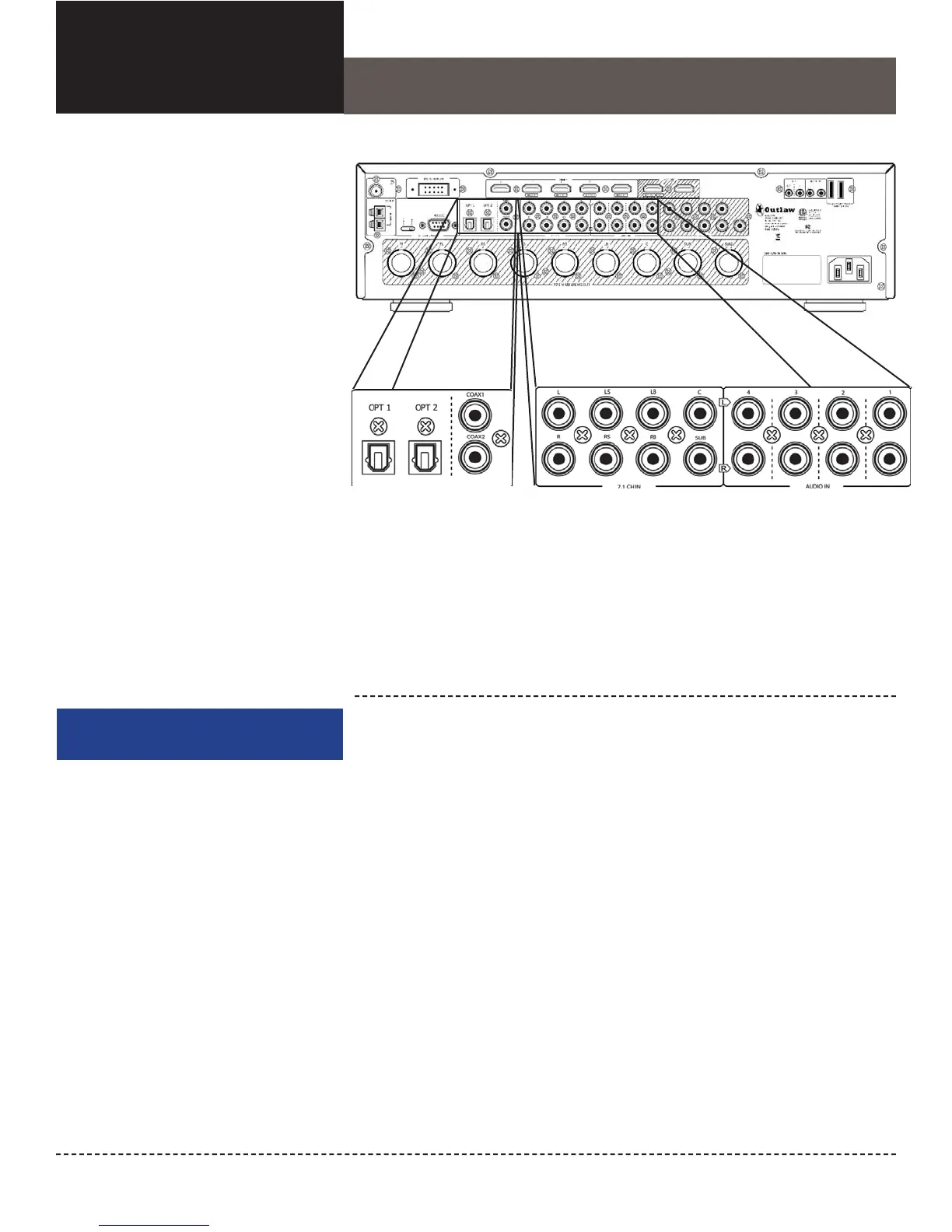
Multichannel Analog
Audio Input
The Model 976 has one set of
7.1 analog audio input jacks
Digital Audio Input Jacks
The Model 976 has two coaxial
inputs and two optical inputs for
connection of digital audio sources
Analog Audio Input Jacks
The Model 976 has four sets
of stereo analog input jacks
for connecting the outputs of
analog audio devices


 To Next Page