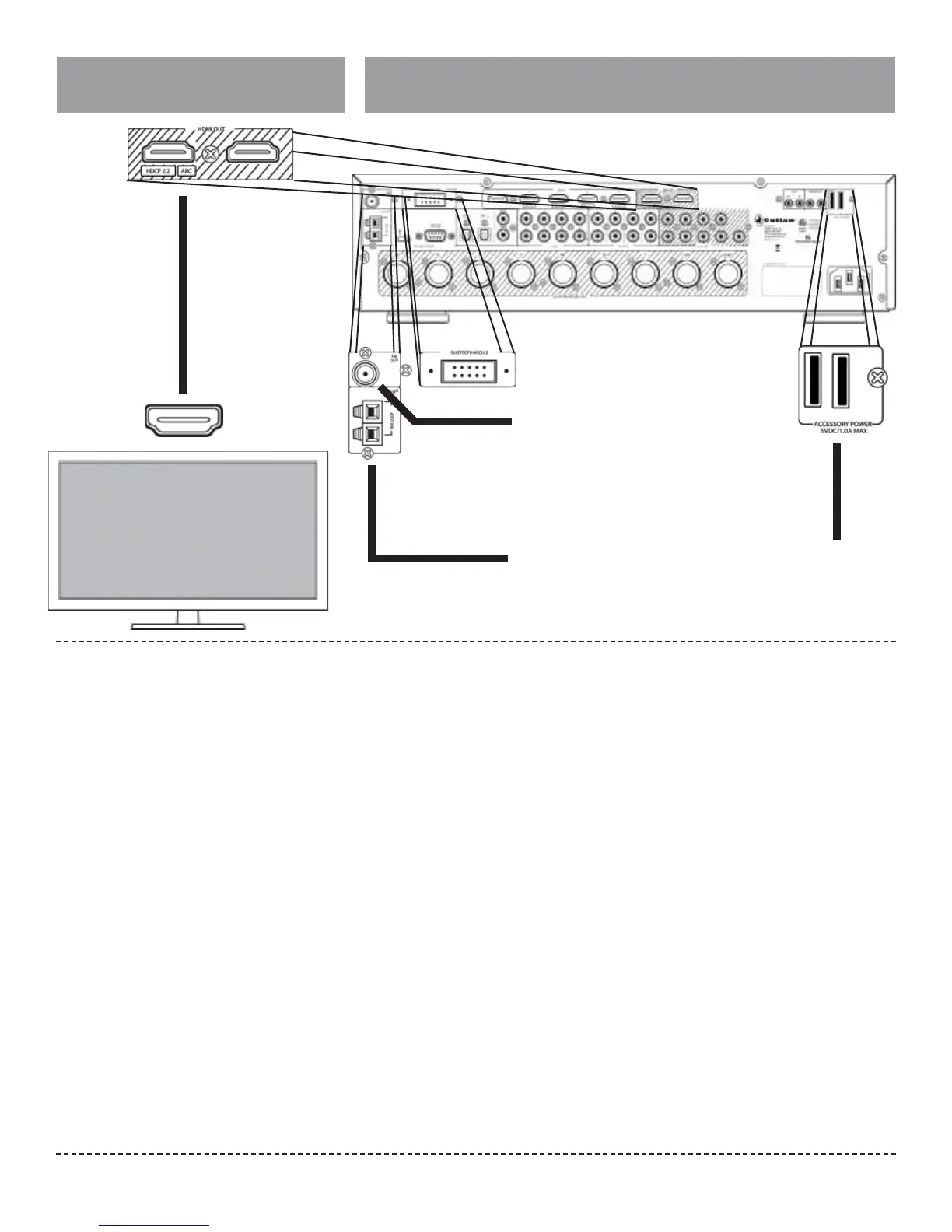
Video Display
Accessory and Antenna Connections
Outlaw Audio
20
position to obtain the strongest signal. You can
attach it to a wall or other surface using push pins or
similar apparatus.
If FM reception is poor with the supplied indoor
antenna, the use of an ampli ed indoor or outdoor
antenna is recommended.
NOTE: You can only connect a 75Ω type FM antenna to
the Model 976. If you choose to use an antenna other
than the one supplied, be sure to verify that it has the
correct type of connector or that you obtain an ap-
propriate adaptor.
If you use the same antenna for FM and TV signals,
be sure to install a splitter to separate the two
signals.
AM Antenna
Connect the AM antenna to the terminals labeled
AM 300Ω on the rear panel of the Model 976. Press
the spring-loaded levers to open the terminals,
insert a wire into each terminal, then release the
terminals. Give the antenna cables a very light pull
to make sure they’re connected.
If you experience reception problems, try turning
the loop antenna in a di erent direction.
Accessory Power
Some devices in your system may be powered
from a USB wall adapter. Examples include
Google’s Chromecast and Amazon.com’s FireStick.
If you have any of these devices, you may connect
their USB power cord to one of the two Accessory
Power USB ports found above the AC power cord
on the rear panel of the Model 976.
Bluetooth
The Model 976 integrates with a compatible
Bluetooth receiver, which may be connected to
the Bluetooth Module input on the rear panel
of the Model 976. Install this optional adapter to
allow streaming of audio from a smartphone or
tablet to the Model 976.
Note: Only connect or remove the Bluetooth receiver
when the Model 976 is turned o .
FM Antenna
Connect the supplied FM antenna to the terminal
labeled FM 75Ω. The Model 976’s coaxial antenna
terminal is designed for push-on type antenna
cable connectors.
The supplied FM antenna is for indoor use only.
For best signal reception you must fully extend
the antenna. Experiment with the antenna’s
A video display device such as a at-panel TV or a
video projector can be connected to the
Model 976 using the following methods.
Using two displays simultaneously will limit HDMI
output 1 to 1080p
HDMI (UHD, ARC)
Connect the Model 976’s HDMI Out 1 output to
one of the video display’s HDMI inputs. If you are
using the ARC function, which feeds audio from
the TV back into the Model 976, be sure to con-
nect to the jack on the TV labeled HDMI/ARC. If
you are connecting any UHD sources to the Model
976, be sure that the input in the TV is rated for
HDMI 2.0 and HDCP 2.2.
HDMI
If you want to connect a second display to the
Model 976, the HDMI Out 2 output can be con-
nected to an HDMI input. The on-screen menu
and UHD sources will not be available, but any
other sources will be passed through to this
display.
Analog Connectors
If your component uses ana-
log audio, it will have either
stereo RCA jacks as shown
above or a mini stereo jack
(small headphone jack).
Bluetooth Adapter
Connect the compatible Model 976 Bluetooth adapter
(optional) to the Model 976 here.
FM Antenna
Connect the supplied FM antenna or a di erent 75Ω
type FM antenna.
AM Antenna
Connect the supplied AM antenna or a di erent AM
antenna here.
Accessory Power
The Model 976 o ers two
USB jacks that can provide
5VDC power to accessories.


 To Next Page