Model 976 7.1 Channel Preamp/Processor
35
To activate one of the Model 976’s surround
modes:
The Model 976 lets you deactivate surround
sound and switch to stereo at the push of a but-
ton. If you have a subwoofer in your system, the
subwoofer can function in stereo mode.
1.
2.
3.
Press the SURR MODE button on the
remote or the front panel.
The front panel display will read out the
currently selected surround mode or, if
no surround mode has been selected, the
format of the incoming signal.
If a digital 5.1 or 7.1 soundtrack is playing,
you will see a readout of the format of that
material and its channel content, such as
DOLBY DIGITAL [3/2].1. The rst number
in the parentheses is the number of front
channels, while the second number is the
number of surround channels. The “.1” after
the parentheses indicates the presence of a
low-frequency e ects (LFE) channel.
Press the SURR MODE button again to
change the surround mode.
The front panel display will show which
mode is selected.
Press the SURR MODE button repeatedly
until the mode you want is selected.
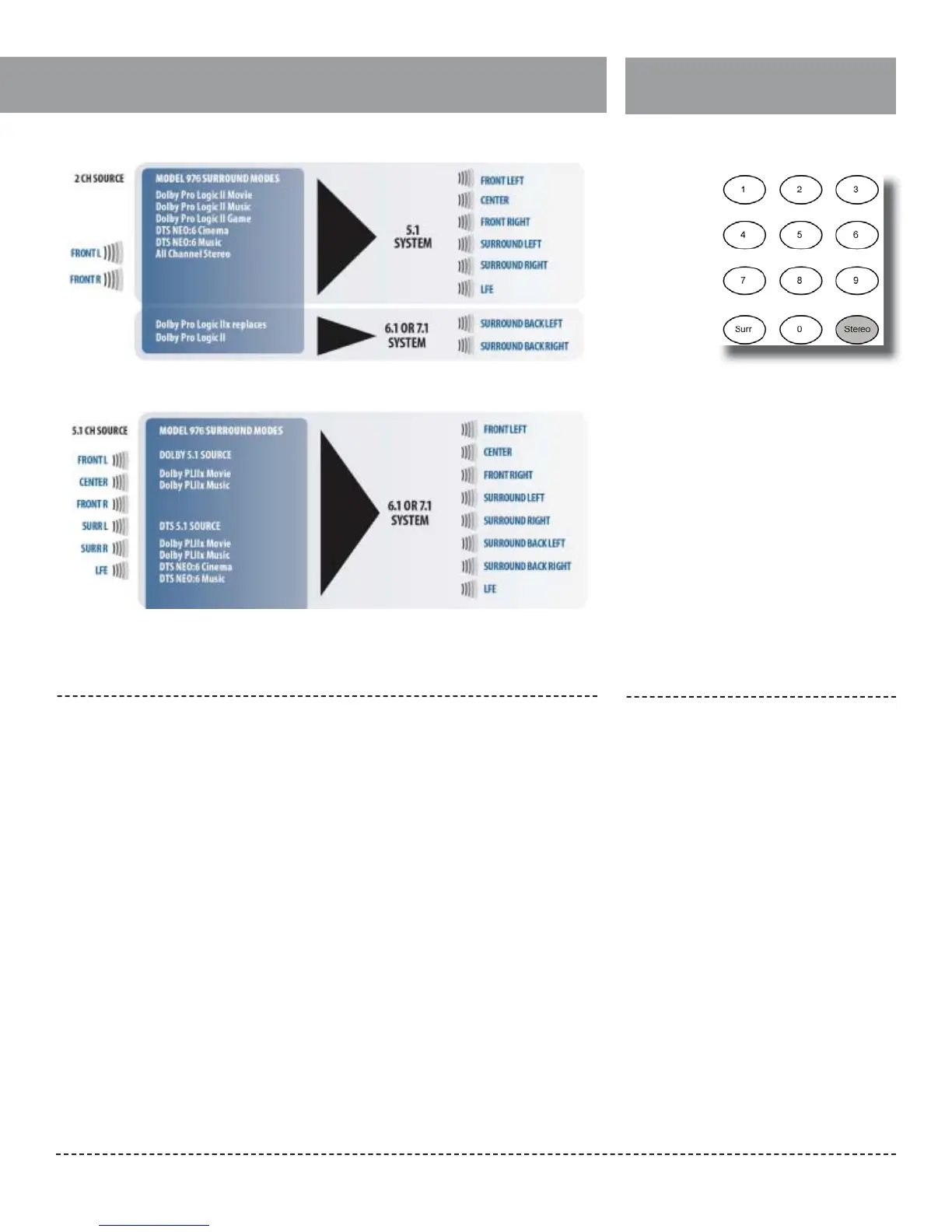
If the Model 976 is receiving a 5.1 signal and
you have a speaker system using back surround
speakers (7.1), pressing the SURR MODE button
when 5.1 material is playing will let you expand
the two surround channels into four surround
channels. With Dolby 5.1 material, you can access
three surround modes:
Dolby PLIIx Movie → Dolby PLIIx Music → Dolby
PLIIx Game
When DTS 5.1 or multichannel PCM material is
playing, you can access these surround modes:
Dolby PLIIx Movie → Dolby PLIIx Music → Dolby
PLIIx Game → DTS NEO:6 Cinema → DTS NEO:6
Music
If the Model 976 is receiving a 6.1 or 7.1 signal and
you have a speaker system using back surround
speakers (7.1), there will be no available surround
sound modes.
Switching to Stereo
Matrix surround modes with 5.1 source
Matrix surround modes with stereo (2-channel) source
To switch the Model 976 to stereo mode:
1.
2.
Press the STEREO button on the remote
control.
Any surround sound mode currently in use
will be deactivated, and the front panel dis-
play will read either STEREO or STEREO+SW
(stereo plus subwoofer), depending on
your speaker con guration settings.
To go back into surround sound, press
the SURR MODE on the remote or the
front panel.
To deactivate surround mode and
switch to stereo


 To Next Page