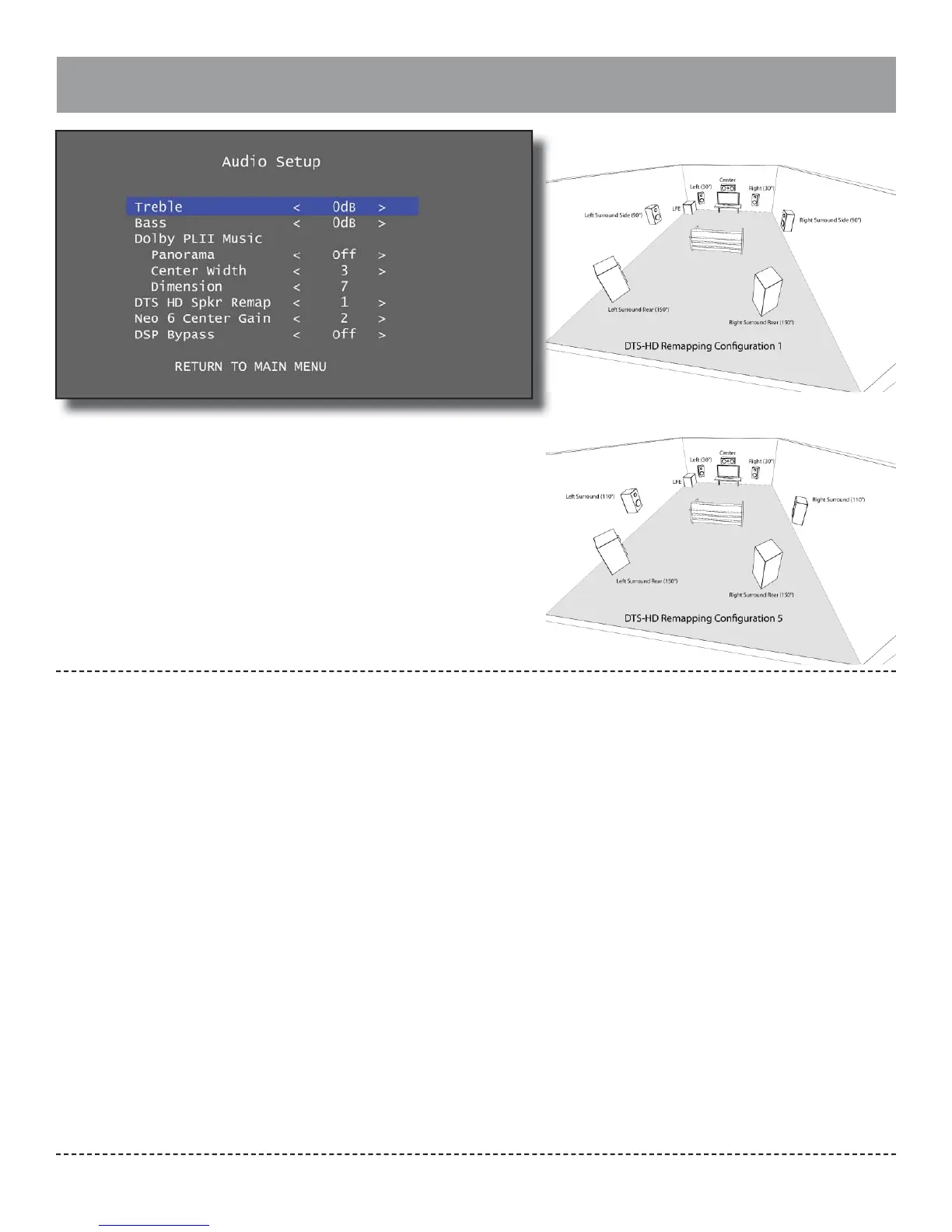
Audio Setup
Outlaw Audio
32
Options for Audio Setup include treble, bass, Dolby
Pro Logic II, DTS, and DSP bypass.
Treble / Bass: Adjust the treble and bass settings
from -10dB to +10dB. The default for each is 0dB.
These settings may also be adjusted directly from
the remote using the Tone button. The available
choices are:
-10dB → -8dB → -6dB → -4dB → -2dB → 0dB →
+2db → +4dB → +6dB → +8db → +10dB
Dolby Pro Logic II o ers three settings that can be
adjusted in this menu to control how the Pro Logic
II Music mode behaves. Note that these settings do
not apply to Pro Logic II Movie or Game.
Panorama: When set to “On”, Pro Logic II Music will
extend the front soundstage into the surrounds.
This may also be set to “O ” (default) to focus the
audio in the front soundstage.
Center Width: Set from 0 to 7 (default of 3) to con-
trol how much the center channel data is spread
across the left and right channels. A center width
of 7 will redirect all center channel data to the left
and right channels. The available choices are:
0 → 1 → 2 → 3 → 4 → 5 → 6→ 7
Dimension: Set from 0 to 7 (default of 7) to control
how much the soundstage is shifted into the sur-
rounds when Panorama is on. A setting of zero will
cause Pro Logic II to steer more information in the
surrounds. A setting of more than zero will pull the
soundstage toward the fronts, reducing surround
activity. The available choices are:
0 → 1 → 2 → 3 → 4 → 5 → 6→ 7
DTS-HD Speaker Remap: This is a setting devel-
oped by DTS to address the lack of a single standard
speaker layout for channel mapping when surround
sound is mastered. DTS de ned seven possible
speaker con gurations that may be used in the
mixing stage. By specifying the con guration that
most closely matches your speaker layout, DTS will
attempt to re-map audio channels that are agged as
belonging in one of the other layouts. The DTS stan-
dard includes seven speaker con gurations that are
available for surround sound mastering. Of these, two
con gurations are supported by the Model 976’s 7.1
channel output. (Other mapping plans include such
speaker arrangements as height speakers, ceiling
center height, and mono rear surround speakers.) The
default setting is con guration 1, but con guration
5 is also available. Both possible con gurations are
pictured above.
We recommend con guration 5 if your surround
speakers are located behind the primary listening
position rather than directly to the sides. The avail-
able choices are:
1 → 5
DTS NEO:6 Center Gain: This setting is similar to Pro
Logic II’s Center Width setting, but is applied before
the center channel signal is derived from the stereo
source. When Center Gain is set to 0 (the minimum
setting), both left and right channels are attenuated
by half in order to create the center channel signal. A
Center Width setting of 5 applies no attenuation to
the left and right channels, preserving the original
stereo signal. The default is 2. The available choices
are:
0 → 1 → 2 → 3 → 4 → 5
DSP Bypass: This is set to “O ” by default and allows
the Model 976 to apply surround processing, but
can be turned “On” to defeat any surround process-
ing modes. The available choices are:
On → O


 To Next Page