316
Air suspension
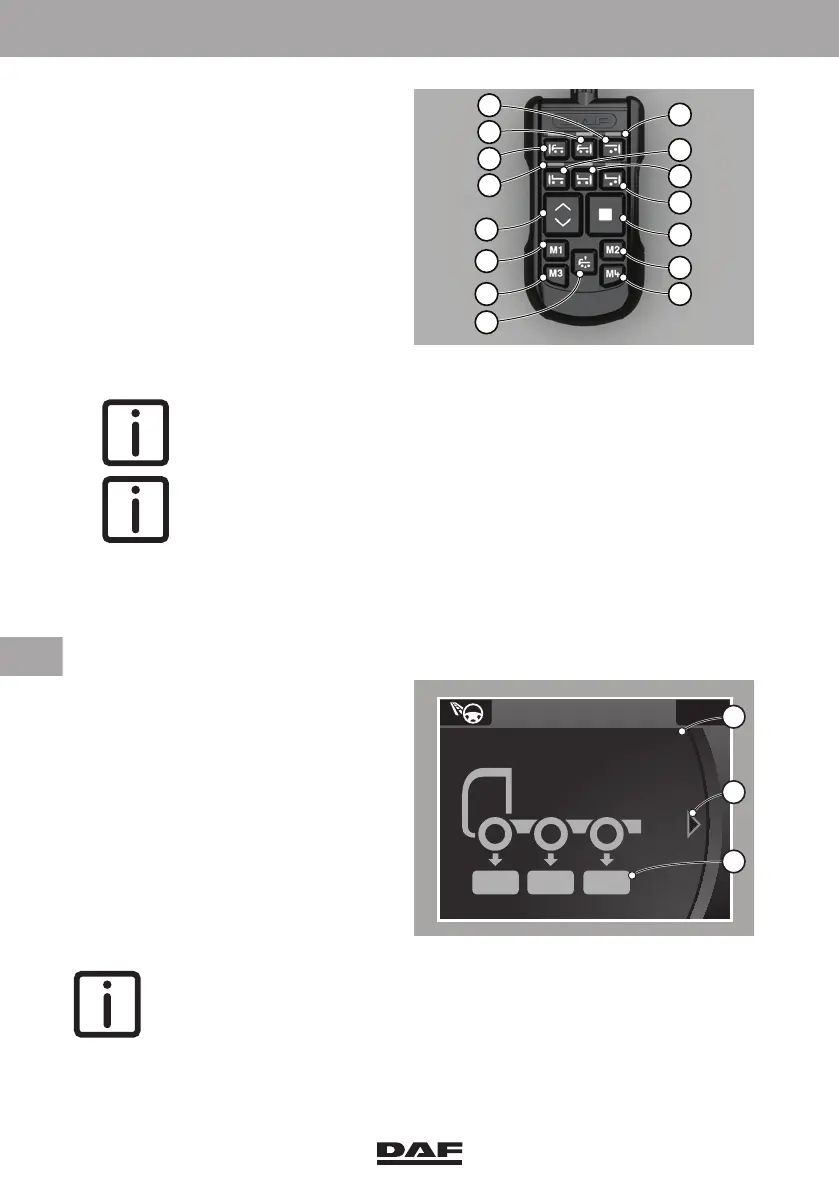
– To enter the calibration mode, press
the lift trailing axle key (3) once.
– The LED (4) above key (3) starts
blinking.
– Press the 'STOP' key (8) and hold it
down for at least five seconds.
– The LED's (4), above the different
keys, will go on one after another
(running lights) to indicate that the
calibration mode is active.
– Select the axle for calibration. The LED above the selected key lights continously.
NOTE: If the LED's continu to go on one after another, there is no valid
weight message for this axle. The axle can not be selected and
calibrated.
NOTE: Axles must be calibrated from the front to the rear. A maximum
of four axles per truck can be calibrated.
–The 1
st
axle is key 1 (symbol for lifting/lowering the front axle of the truck).
–The 2
nd
axle is key 2 (symbol for lifting/lowering the driven axle of the truck).
–The 3
rd
axle is key 3 (symbol for lifting/lowering the lift axle of the truck).
–The 4
th
axle is key 5 (symbol for lifting/lowering the front axle of the trailer).
– Use the arrow keys (14) to increase
or decrease the value (C) on the
master display.
– Store the value by pressing the
'STOP' (8) and 'M1' (13) keys
simultaneously.
– Then select the next axle that needs
calibrating.
– To stop calibrating, hold down the
'STOP' key (8) for at least five
seconds.
NOTE: During calibration, the remote control is automatically switched off if
it is not operated for 20 seconds and the calibration mode is ended.
D005113-2
5
6
7
8
4
9
1012
11
13
14
3
2
1
4
D001735
Axle load info
7.5 6.1 5.0
x 1000 kg
Total 45.7
A
B
C
DW63246305.book Page 316 Friday, March 22, 2019 4:54 PM






 To Next Page