107
Instruments and controls
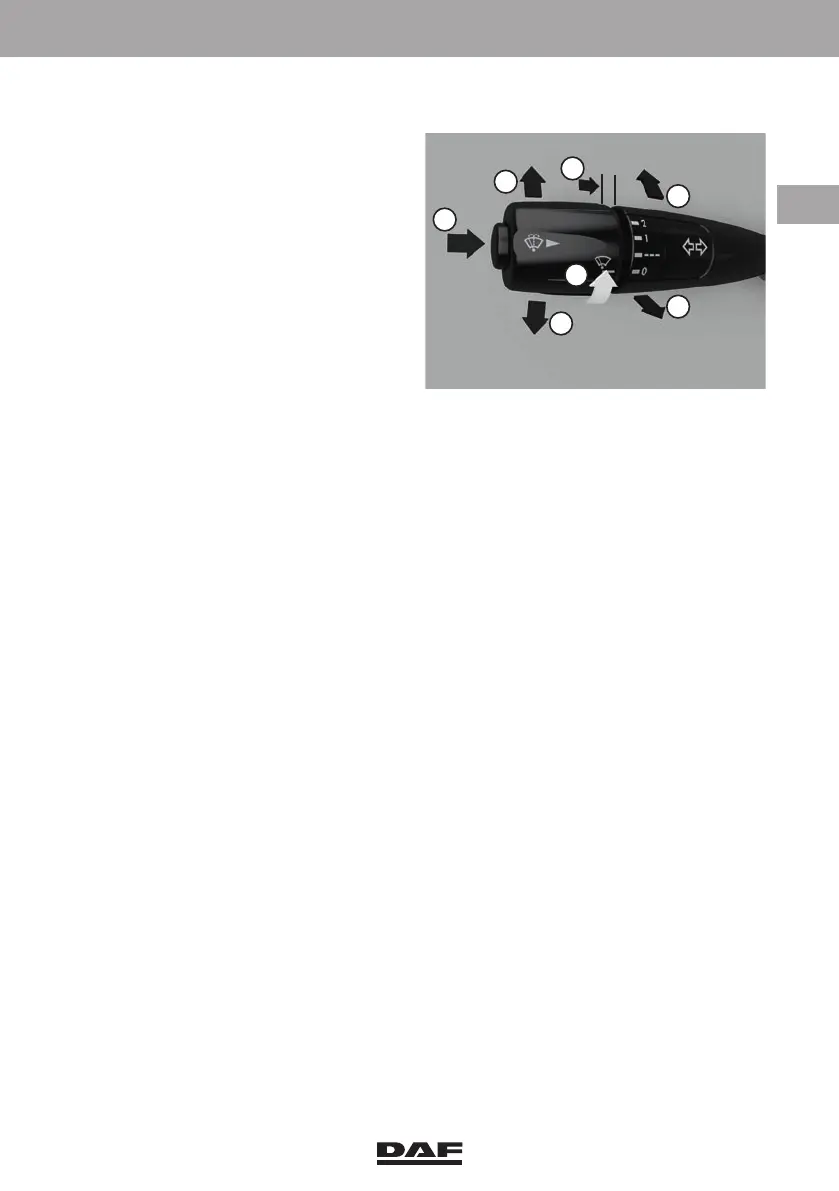
3.3.8 Left-hand steering column switch
Centre position (dipped beam,
with headlights on)
1 Horn switch
2 Direction indicators, right
3 Direction indicators, left
4 Windscreen washers switch
5 Windscreen wiper switch
0 Wipers off
- - - Intermittent wipe
1 Wipers on, low speed
2 Wipers on, high speed
6 Main beam
7 Headlight flash
Horn switch
Press switch (1) to operate the horn.
Direction indicators
The direction indicators (2 and 3) only work when the ignition is switched on.
To operate the direction indicators briefly when changing lanes, pull the steering
column switch back slightly against the perceptible spring pressure. It springs back
when released.
Windscreen washers
The windscreen washers are activated by pressing the spring-operated windscreen
washer switch (4). The windscreen washers stop when the switch is released. The
windscreen washer is engaged together with the windscreen wipers.
Headlight washers
If the vehicle is equipped with headlight washers, these washers are only activated
when the headlights are switched on.
The headlight washers are activated when the windscreen washer switch (4) is
activated for more than 5 seconds. The headlight washers are also activated once
every three times that the windscreen washers switch is activated. The switch must be
activated for less than 5 seconds.
Windscreen wipers
The windscreen wipers only work when the ignition is switched on.
The windscreen wipers make one wiper movement when switch (4) is briefly pressed.
Interval for intermittent wipe
The standard interval is 5 seconds.
The interval can be adjusted between one and 20 seconds using the windscreen wiper
switch (5).
D001580
1
2
3
4
6
7
5
DW63246305.book Page 107 Friday, March 22, 2019 4:54 PM






 To Next Page