310
Air suspension
NOTE: Via optional settings on vehicles with air suspension it is possible
that operating the PTO switch;
– lowers the air suspension on to its bump stop.
With the vehicle on its bump stop the remote control is switched off.
– freezes the current position of the air suspension and the remote control
is switched off.
In this situation the air suspension will not react if for example the
hydraulic legs of a crane are used.
Either one ore both of these settings (bump or freeze) can be active
depending on the vehicle specification.
If the PTO is switched off the remote control becomes active again. The
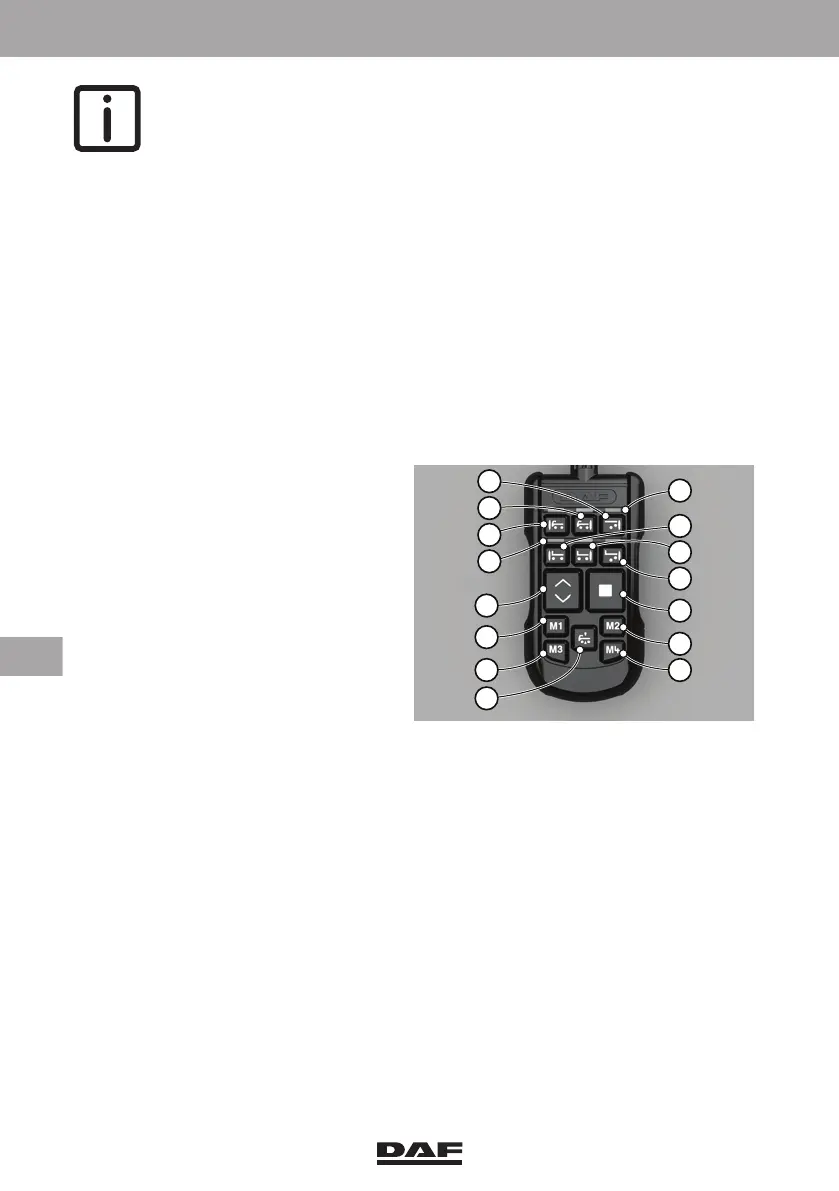
vehicle can be brought back on driving height by pushing the normal level
button (11).
12.3 ENGAGING AIR SUSPENSION
– Press the 'Vehicle rear' key; the
relevant indicator light on the
remote control comes on.
– If the front axle is also equipped with
air suspension, press the key for
'Vehicle front' or 'Vehicle rear'; the
relevant indicator light lights up. It is
also possible to select both the front
and rear ends of the vehicle. In this
case, both indicator lights come on.
– If the drawn vehicle has air
suspension as well, press the key
for the relevant axle.
The choice can be cancelled by pressing the same key once again.
If the air suspension continues adjusting during loading or unloading, press the 'Stop'
button. The vehicle stops readjusting.
Pressing any of the other keys reactivates the air suspension. Unless stated otherwise,
the keys need only be pressed once briefly.
12.4 STOP KEY
When the 'Stop' key, on the remote control unit, is pressed, the system responds as
follows, irrespective of the vehicle speed:
– While changing the chassis height, the electropneumatic valves are cut-out
immediately. The chassis remains at the chassis height at that moment.
D005113-2
5
6
7
8
4
9
1012
11
13
14
3
2
1
4
DW63246305.book Page 310 Friday, March 22, 2019 4:54 PM






 To Next Page