39
Be sure to disconnect the power cable of the main block (POS Workstation) and
confirm the power is “OFF” before the operation below.
■ When fixing parts that use VESA mounts are installed
1
Follow step 1 in “Display Unit (Including Main Block)
Replacement /
■
When fixing parts that use VESA
mounts are installed” to remove the cable cover.
(
page 33)
2
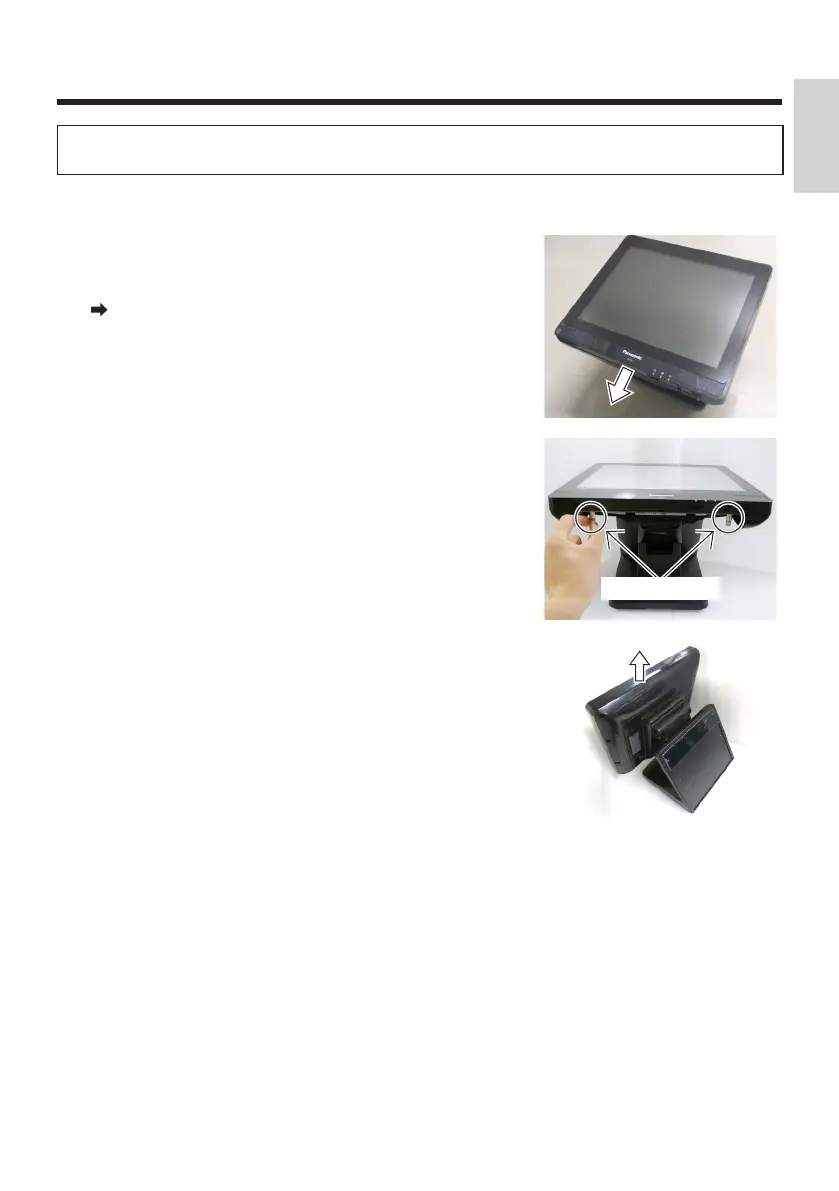
Loosen the 2 thumbscrews securing the operator’s
display.
●
Loosen the thumbscrews until they are extended
by their springs.
●
If you continue to loosen the thumbscrews further
after they are extended, they could become
detached. Make sure not to detach them.
Thumbscrews
3
Hold both sides of the display unit and slowly
separate the main block from the operator’s display.
English


 To Next Page
 Loading...