Playing Back Recordings
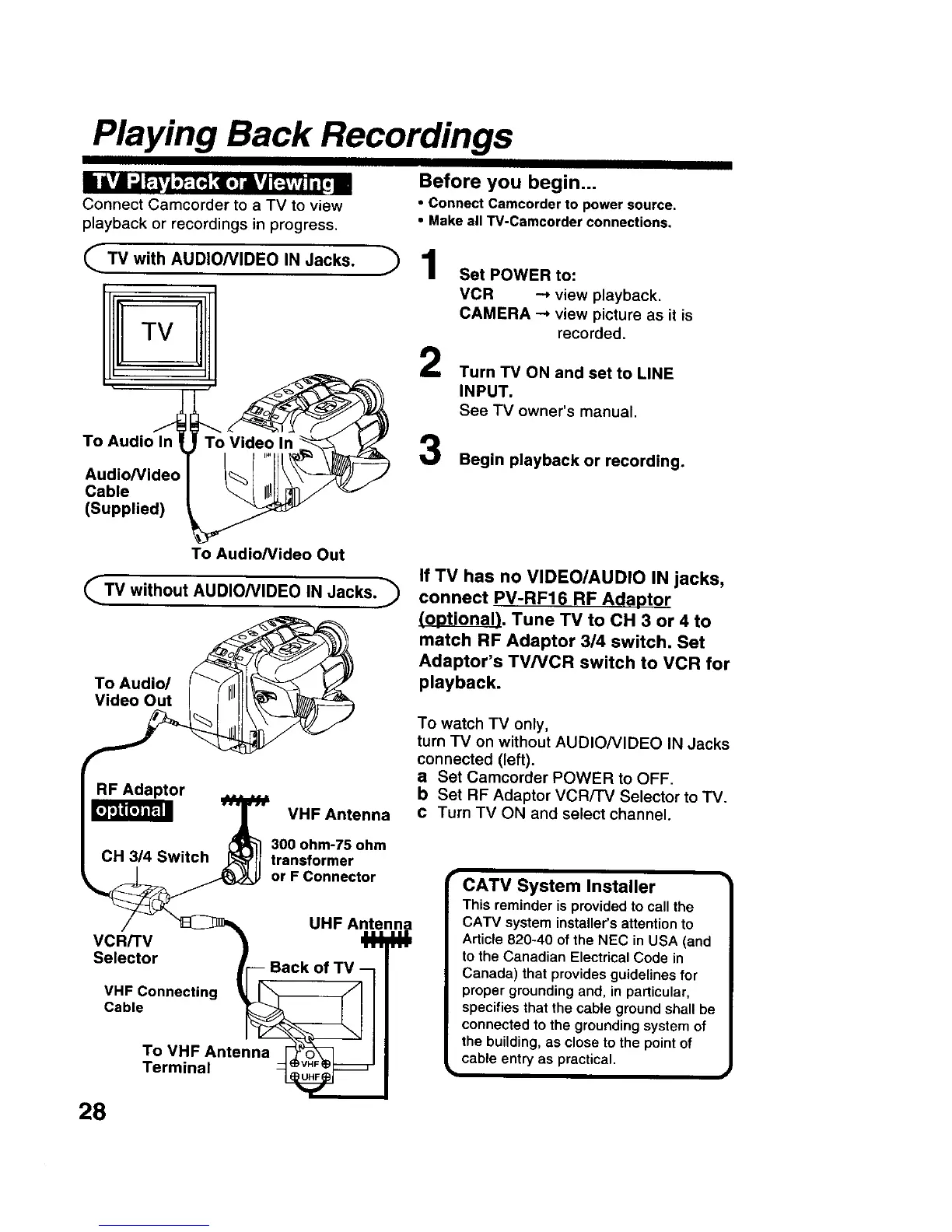
Connect Camcorder to a TV to view
playback or recordings in progress.
(_TV with AUDIO/VIDEO IN Jacks.
I!ITV
Before you begin...
• Connect Camcorder to power source.
• Make all TV-Camcorder connections.
71
2
Set POWER to:
VCR -_ view playback.
CAMERA --* view picture as it is
recorded.
Turn TV ON and set to LINE
INPUT.
See TV owner's manual.
To Audio
Audio/Video
Cable
(Supplied)
Begin playback or recording.
To Audio/video Out
_TV without AUDIO/VIDEO IN Jacks.
To Audio/
Video Out
RF Adaptor
CH 314 Switch
VHF Antenna
300 ohm-75 ohm
transformer
or F Connector
VCR/TV
Selector
VHF Connecting
Cable
UHF Antenna
To VHF Antenna
Terminal
If TV has no VIDEO/AUDIO IN jacks,
connect PV-RF16 RF Adaptor
(optional). Tune TV to CH 3 or 4 to
match RF Adaptor 3/4 switch. Set
Adaptor's TV/VCR switch to VCR for
playback.
To watch TV only,
turn TV on without AUDIO/VIDEO IN Jacks
connected (left).
a Set Camcorder POWER to OFF.
b Set RF Adaptor VCRiTV Selector to TV.
c Turn TV ON and select channel.
CATV System Installer
This reminder is provided to call the
CATV system installer's attention to
Article 820-40 of the NEC in USA (and
to the Canadian Electrical Code in
Canada) that provides guidelines for
proper grounding and, in particular,
specifies that the cable ground shall be
connected to the grounding system of
the building, as close to the point of
cable entry as practical.
i
28











 To Next Page