SETTING
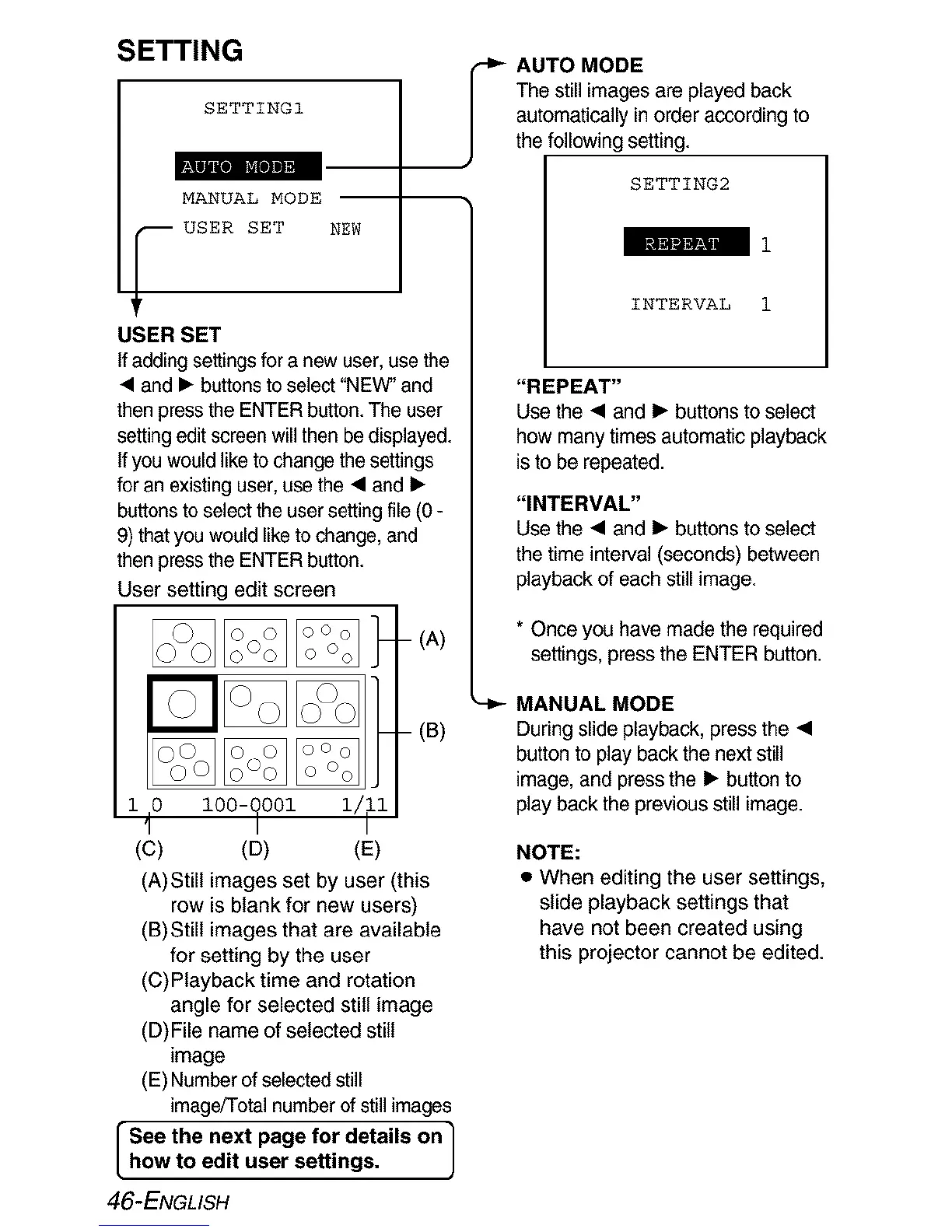
SETTING1
MANUAL MODE
USER SET NEW
USER SET
If adding settings for a new user, use the
• and • buttons toselect "NEW" and
then press the ENTER button.The user
setting editscreen will then be displayed.
If you would liketo change thesettings
for an existing user, use the • and I_
buttonsto select the usersetting file(0 -
9) that you would liketo change, and
then press the ENTER button.
User setting edit screen
1 0 I00-_001
(C) (D)
(B)
(E)
(A)Still images set by user (this
row is blank for new users)
(B)Still images that are available
for setting by the user
(C)Playback time and rotation
angle for selected still image
(D)File name of selected still
image
(E) Number of selectedstill
image/Total numberof still images
See the next page for details on ]
how to edit user settings.
]
,_ AUTO MODE
The still images are played back
automatically in order according to
the following setting.
SETTING2
INTERVAL 1
"REPEAT"
Use the • and • buttons to select
how many times automatic playback
isto be repeated.
"INTERVAL"
Use the • and • buttons to select
the time interval (seconds) between
playback of each still image.
* Once you have made the required
settings, press the ENTER button.
MANUAL MODE
During slide playback, press the •
button to play back the next still
image, and press the • button to
play back the previous still image.
NOTE:
• When editing the user settings,
slide playback settings that
have not been created using
this projector cannot be edited.
[
46-ENGLISH













 To Next Page