28 - ENGLISH
Setting up
Installation mode
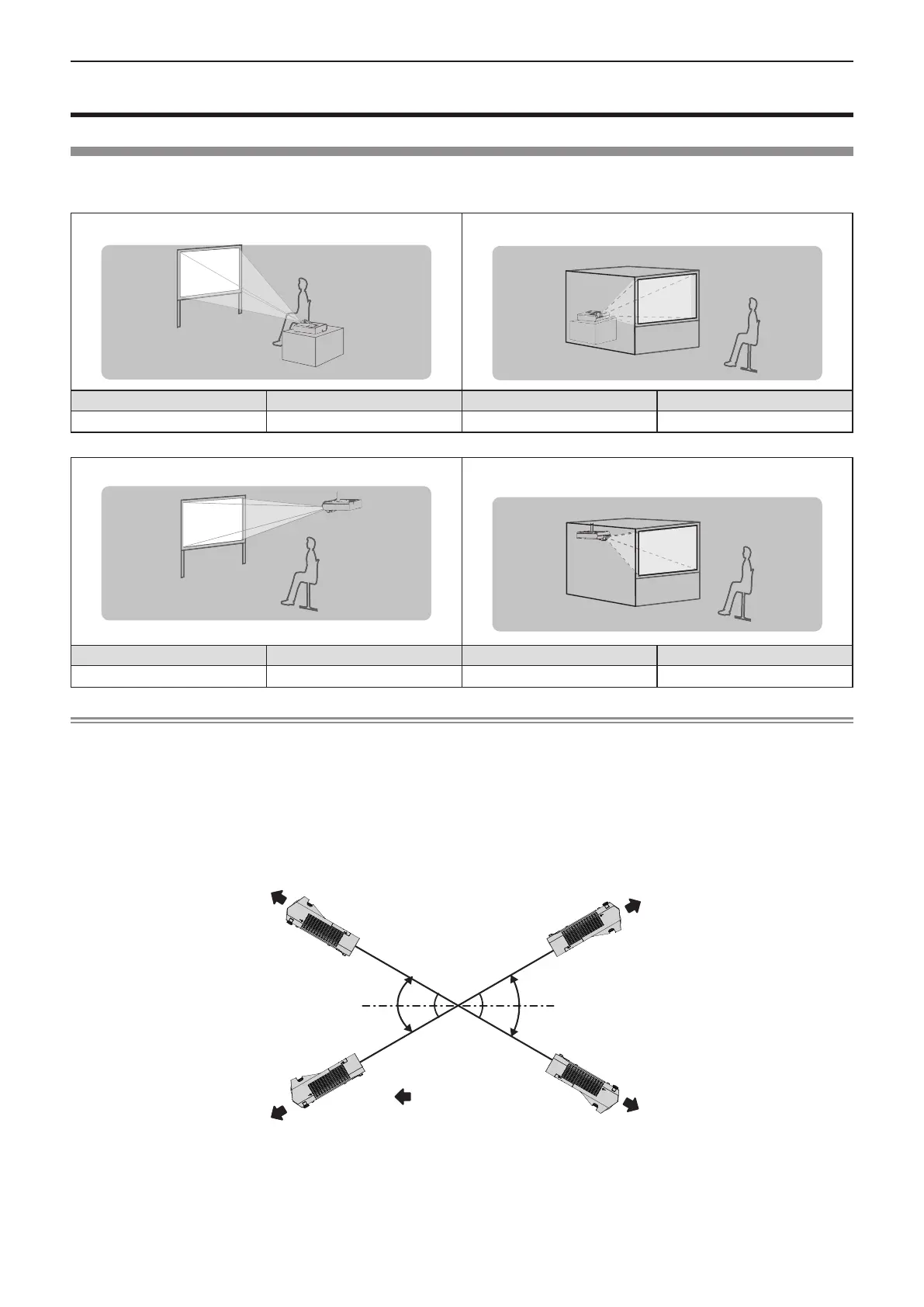
There are four ways to set up the projector. Set the [PROJECTOR SETUP] menu → [PROJECTION METHOD]
(x page 72) depending on the installation location.
Setting on a desk/ oor and projecting forward Setting on a desk/ oor and projecting from rear
(Using the translucent screen)
Menu item Method Menu item Method
[PROJECTION METHOD] [AUTO] or [FRONT/DESK] [PROJECTION METHOD] [REAR/DESK]
Mounting on the ceiling and projecting forward Mounting on the ceiling and projecting from rear
(Using the translucent screen)
Menu item Method Menu item Method
[PROJECTION METHOD] [AUTO] or [FRONT/CEILING] [PROJECTION METHOD] [REAR/CEILING]
Note
f The projector has a built-in angle sensor. The attitude of the projector is automatically detected by setting the [PROJECTOR SETUP] menu
→ [PROJECTION METHOD] to [AUTO]. For rear projection, set the [PROJECTION METHOD] to [REAR/DESK] or [REAR/CEILING].
r Angle sensor
The range of installation posture detected by the projector’s built-in angle sensor is as follows.
In case of [AUTO], when the projector is placed with the top side upward within ±30° from the horizontal plane, it
will switch to [FRONT/DESK] automatically; when the projector is placed with the top side downward within ±30°
from the horizontal plane, it will switch to [FRONT/CEILING] automatically.
30°
30°
30°
30°
:
Projection direction
[FRONT/CEILING]
[FRONT/DESK]
In the case of [AUTO], it will be detected as [FRONT/DESK] even when the projector tilts over ±30° with the top
side upward or over ±30° with the top side downward. To use the projector that tilts over ±30° with the top side
downward, set the [PROJECTOR SETUP] menu → [PROJECTION METHOD] to [FRONT/CEILING] or [REAR/
CEILING] instead of [AUTO].
However, do not use the projector when it exceeds ±30° with respect to the horizontal plane. Doing so may
shorten the life of the parts.
Chapter 2 Getting Started - Setting up












 To Next Page