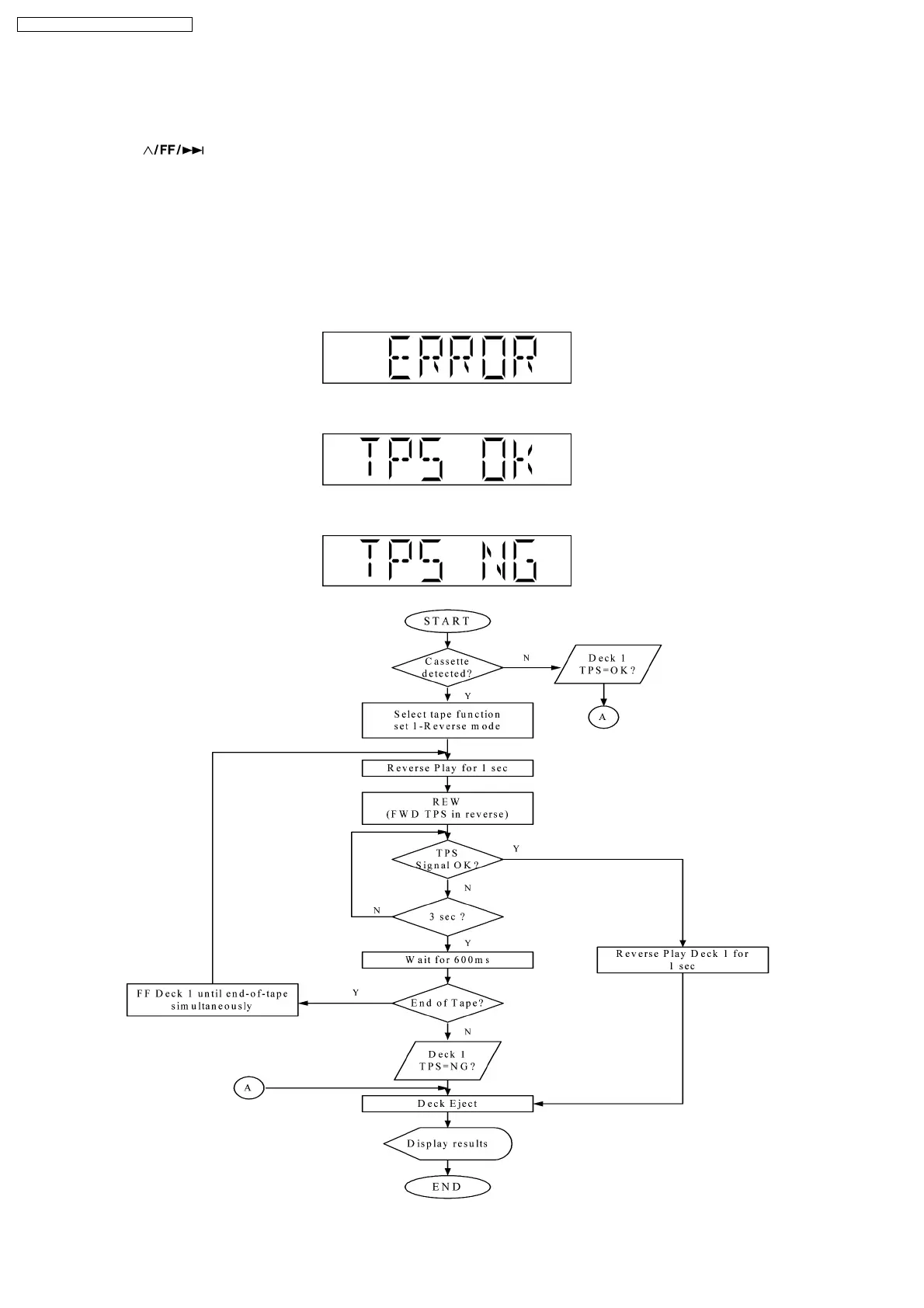
REV TPS for the Deck and ends by displaying the result and ejecting the Deck.
Below is the procedures for this mode:-
Step 1: Enter into Doctor mode (For more information refer to section 8.2 on key operation to enter into this mode).
Step 2 : Press [
] button on remote control. (It enters into TPS Test mode).
The following process is carry out in this test mode.
Micro-processor will start checking for the existence of cassette in deck mechanism unit, -
·
If it does not contain any cassette, it shall end the test and displays [ERROR].
·
If the cassette is detected, test shall start by playing the DECK in reverse direction for 1 sec and perform REV TPS.
·
If TPS signal is OK, the Deck shall be ejected. Below is information on the TPS under 3 examples.
1. If ERROR Flag is set "ERROR" shall be displayed. TPS check result shall not be shown in this case.
2. If Deck TPS check = OK
3. If Deck TPS check = NG
18
SA-PM45E / SA-PM45EG / SA-PM45EE








 To Next Page