EasyManua.ls Logo

Panasonic SC-CH7 - Consecutive and Advanced Tape Playback

Panasonic SC-CH7
61 pages
Print Icon
To Next Page IconTo Next Page
To Previous Page IconTo Previous Page
Loading...
3
2
4
ftUMB
ooM«ic
&mim
ocor
DECK1
DECK
2
7iS&.
OuRo
aiXMii
•«*(
tici
ql-O
i5
tVNCNAOSTMT
O
Q
p
i-TAH
tOlt
J
^
I
g.
I*
t>
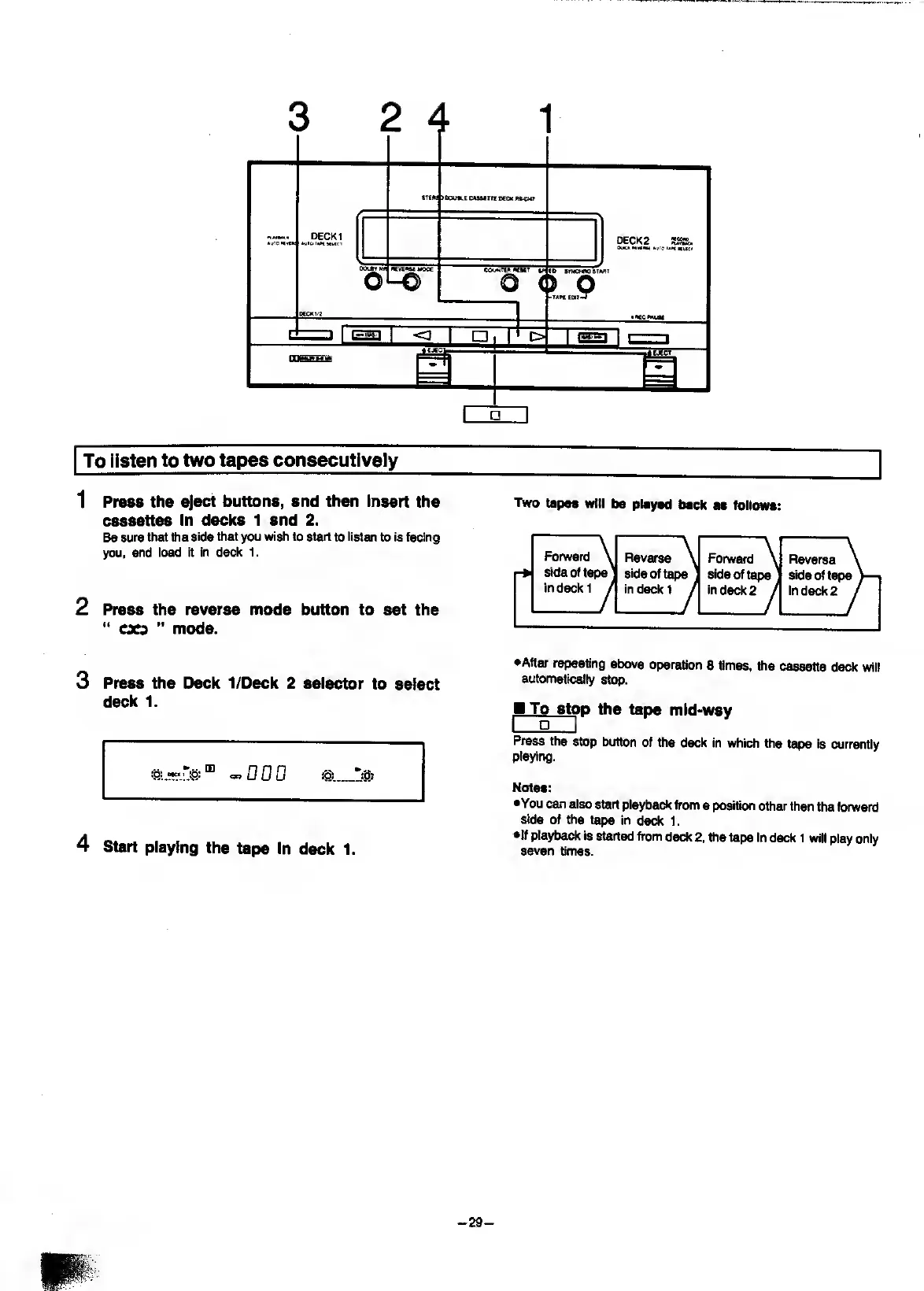
To
listen
to
two
tapes
consecutively
1
P
ress
the
eject
buttons,
and
then
Insert
the
cassettes
in
decks
1
and
2.
Be
sure
that
the
side
that
you
wish
to
start
to
listen
to
is
facing
you,
and
ioad
it
in
deck
1.
2
P
ress
the
reverse
mode
button
to
set
the
cxp
mode.
Two
tapes
will
be
played
back
aa
follows:
Forward
\
Reverse
\
Fonvard
\
|-b
side
of
tape'
side
of
tape
side
of
tape
in
deck
1
/
in
deck
1
j
in
deck
2
j
Reverse
side
of
tape
in
deck
2
3
P
ress
the
Deck
1/Deck
2
selector
to
select
deck
1.
4
S
tart
playing
the
tape
in
deck
1.
•After
repeating
above
operation
8
times,
the
cassette
deck
wii!
automatically
stop.
M
To
sto
p
the
tape
mid-way
I
g
I
Press
the
stop
button
of
the
deck
in
which
the
tape
is
currentiy
piaying.
Notes:
•You
can
also
start
playback
from
a
position
other
than
the
forward
side
of
the
tape
in
deck
1.
•If
playback
is
started
from
deck
2.
the
tape
in
deck
1
will
play
only
seven
times.
-
29
-

Related product manuals