EasyManua.ls Logo

Panasonic SC-CH7 - Tape to Tape Recording

Panasonic SC-CH7
61 pages
Print Icon
To Next Page IconTo Next Page
To Previous Page IconTo Previous Page
Loading...
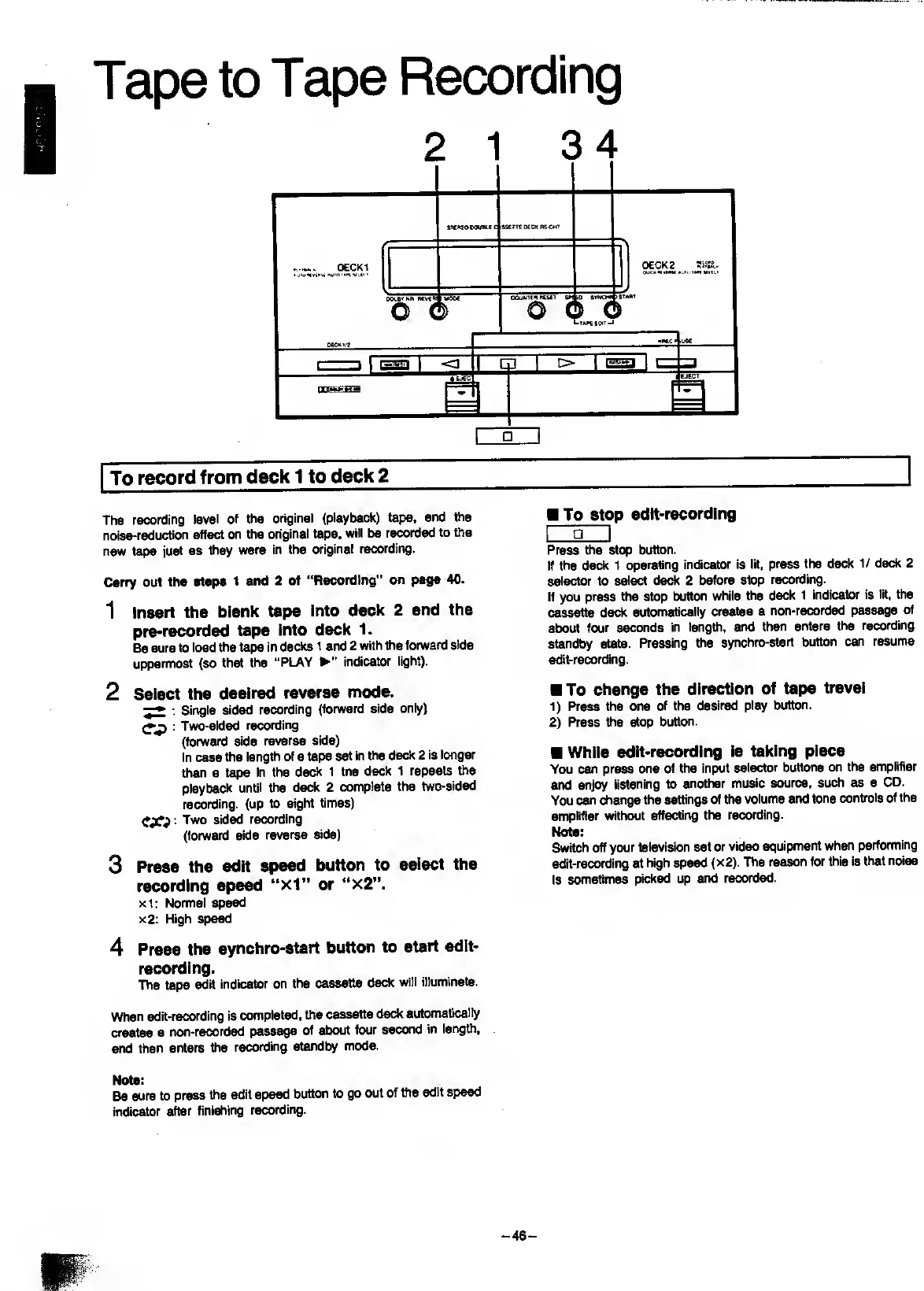
Tape
to
Tape
Recording
i
J
To
record
from
deck
1
to
deck
2
The
recording
level
of
the
original
(playback)
tape,
and
the
noise-reduction
effect
on
the
original
tape,
will
be
recorded
to
the
new
tape
just
as
they
were
in
the
original
recording.
Carry
out
the
steps
1
and
2
of
“Recording”
on
page
40,
1
Insert
the
blank
tape
Into
deck
2
and
the
pre-recorded
tape
into
deck
1.
Be
sure
to
load
the
tape
in
decks
1
and
2
with
the
forward
side
uppermost
(so
that
the
“PLAY
"
indicator
light).
2
Select
the
desired
reverse
mode.
:
Single
sided
recording
(forward
side
only)
:
Two-sided
recording
(forward
side
reverse
side)
In
case
the
length
of
a
tape
set
in
the
deck
2
is
longer
than
a
tape
in
the
deck
1
tne
deck
1
repeats
the
playback
until
the
deck
2
complete
the
two-sided
recording,
(up
to
eight
times)
Tvw)
sided
recording
(forward
side
reverse
side)
3
Press
the
edit
speed
button
to
select
the
recording
speed
“xl”
or
“x2”.
xl:
Normal
speed
x2:
High
spe^
4
Press
the
synchro-start
button
to
start
edlt-
recording.
The
tape
edit
indicator
on
the
cassette
deck
will
illuminate.
When
edit-recording
is
completed,
the
cassette
deck
automatically
creates
a
non-recorded
passage
of
about
four
second
in
length,
and
then
enters
the
recording
standby
mode.
Note:
Be
sure
to
press
the
edit
speed
button
to
go
out
of
the
edit
speed
indicator
after
finishing
recording.
To
stop
edIt-recordIng
I
g
I
Press
the
stop
button.
If
the
ded(
1
operating
indicator
is
lit,
press
the
deck
1/
ded(
2
selector
to
select
deck
2
before
stop
recording.
If
you
press
the
stop
button
while
the
deck
1
indicator
is
lit,
the
cassette
deck
automatically
creates
a
non-recorded
passage
of
about
four
seconds
in
length,
and
then
enters
the
recording
standby
state.
Pressing
the
synchro-start
button
can
resume
edit-recording.
To
change
the
direction
of
tape
travel
1)
Press
the
one
of
the
desired
play
button.
2)
Press
the
stop
button.
While
edIt-recordIng
Is
taking
place
You
can
press
one
of
the
input
selector
buttons
on
the
amplifier
and
enjoy
listening
to
another
music
source,
such
as
a
CD.
You
can
chcmge
the
settings
of
the
volume
and
tone
controls
of
the
amplifier
vnthout
affecting
the
recording.
Note:
Switch
off
your
television
set
or
video
equipment
when
performing
edit-recording
at
high
speed
(x2).
The
reason
for
this
is
that
noise
Is
sometimes
picked
up
and
recorded.
-46-

Related product manuals