EasyManua.ls Logo

Panasonic SC-CH7 - Front Panel Controls and Functions; CD Player Controls and Display

Panasonic SC-CH7
61 pages
Print Icon
To Next Page IconTo Next Page
To Previous Page IconTo Previous Page
Loading...
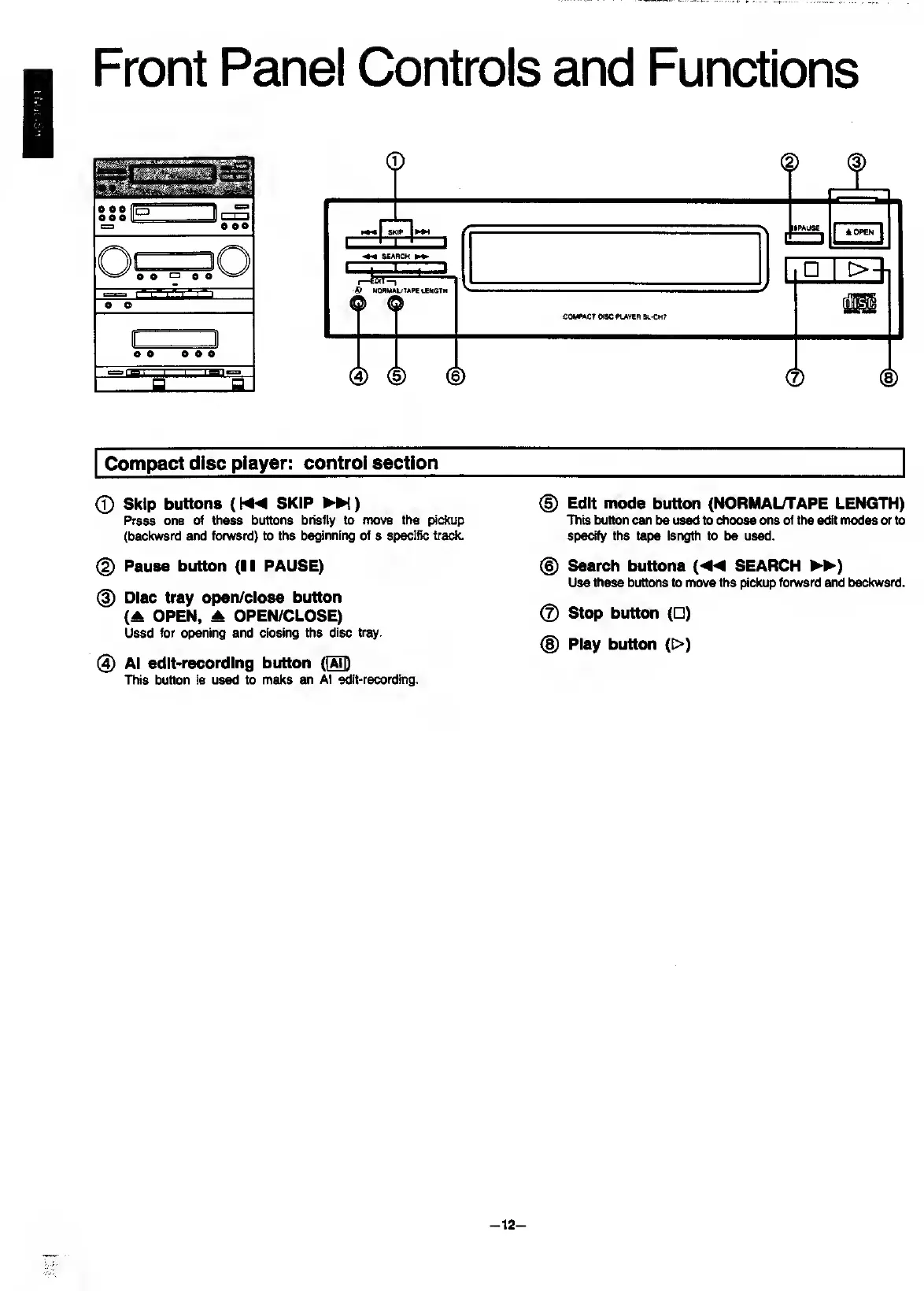
Front
Panel
Controls
and
Functions
Compact
disc
player:
control
section
©
Skip
buttons
(SKIP
)
Press
one
of
these
buttons
briefly
to
move
the
pickup
(backward
and
forward)
to
the
beginning
of
a
specific
track.
@
Pause
button
(II
PAUSE)
@
Disc
tray
open/close
button
(A
OPEN,
OPEN/CLOSE)
Used
for
opening
and
closing
the
disc
tray.
@
Al
edit-recordIng
button
This
button
is
used
to
make
an
Al
edit-recording.
®
Edit
mode
button
(NORMAUTAPE
LENGTH)
This
button
can
be
used
to
choose
one
of
the
edit
modes
or
to
specify
the
tape
length
to
be
used.
@
Search
buttons
SEARCH
►►
)
Use
these
buttons
to
move
the
pickup
forward
and
backward.
©
Stop
button
(
)
(§)
Play
button
(>)
-
12
-

Related product manuals